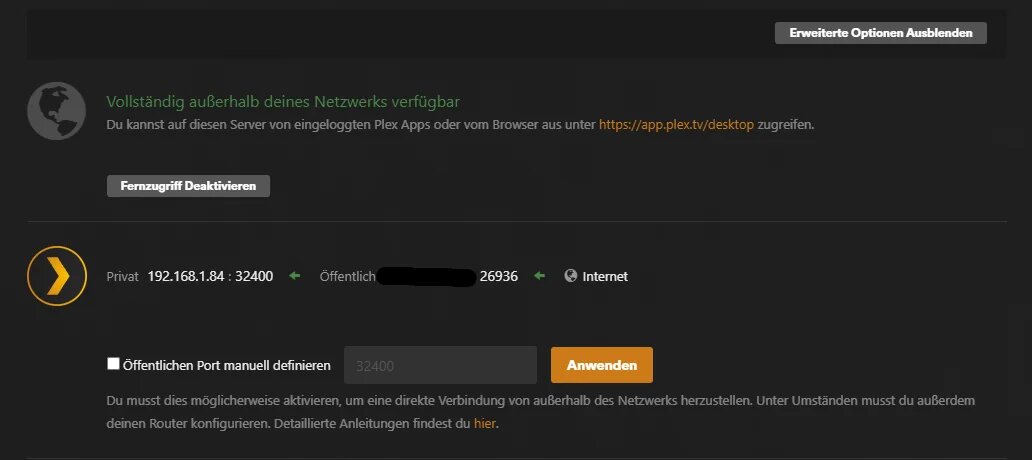
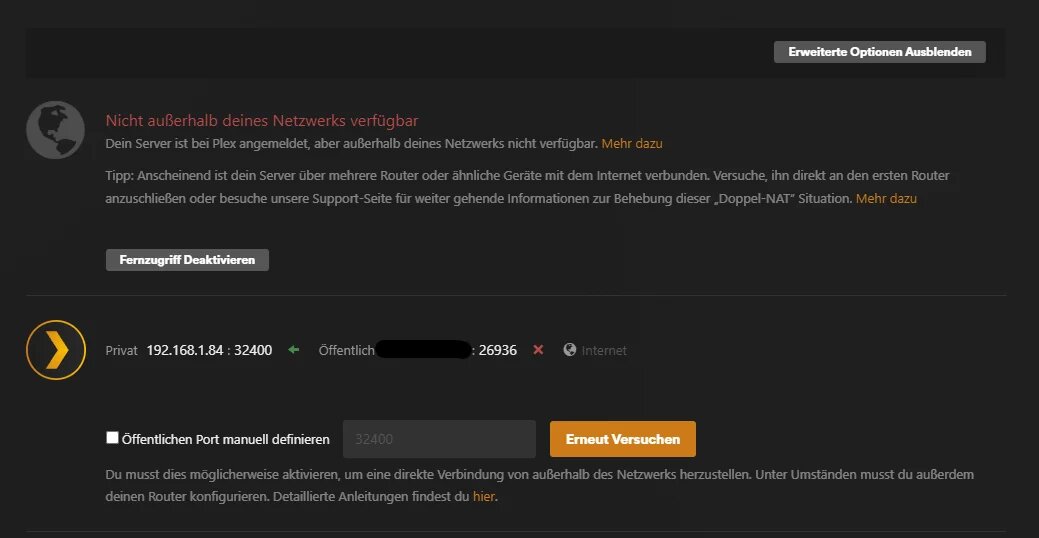
Hope someone has an idea or does know if there is currently an issue on the Plex side.
My Server is keeping disconnecting the Remote access connection. When I manually reconnect it goes all green but after a few seconds up to a few minutes, it switches to disconnected.
Nothing in my network setup has changed over the last few weeks and this was always working for years now. I share my server with a bunch of people but made sure direct connection is possible and no relay is in place. It just started to do that this morning.
I also manually added the port forwarding to my router although that was never needed before, but no luck.
Yep I have checked that article already. As stated above, it worked just fine until about 4 hours ago. Then I saw no traffic externally anymore So I assume it stopped working within these last 4 hours while I was sleeping. Definitely not a change on my end.
Since PLEX has some kind of DDNS server I wonder if there is an issue on that end?
Alright, I added the port manually, the restarted both my Modem router and my Home Network Router. It seems to work now again. Hope it stays that way. Will monitor and report in a few hours.
Current state is, that I moved my Server to entirely new hardware a while ago. It was all fine for some time but still randomly happens. Sometimes all is fine for 1-2 weeks and then suddenly, no external connection possible. But as a workaround now I can just switch between manual port or automatic port in the “Remote Access” Settings. If the port changes, it will work again for quite some time.
So I basically switch between the default 32400 port and the automatically generated port forth and back. Port forwarding makes no difference.
have the same problem here. Tryed UPNP off and on. reboot firmware updates software updates, new ports on router / change to switch. manual port assignment. still no improment. i have static ip on lan and wan
same troubleshooting steps for you then…
to what actual output did you perform those steps?
have you been able to verify your manual port forward is working (e.g. using a service like canyouseeme.org)?
So for some weeks it was kind of stable for me by manually setting the external port to 32400 (with additional Port Forwarding although it works without as well)
Today just for testing I disabled manual port setting and let it decide automatically again and it set itself to 21034. I also set the port forwarding accordingly.
It worked for about an hour no problem and then suddenly showed the same error again.
Back to 32400 for external port and now it works fine again for a few hours.
I am not feeling well to use that widely known port externally as well but so far its the only way to have it somewhat reliable without disconnects.
Before that issue started in November, I had the automatic external port active for 1.5 years with no issue.
You don’t need both. Use UPnP (automatic ports) or a manual port forward. Personally, I prefer a manual forward as it’s easier to troubleshoot and less chances of interferences.
You can specify a public port of your liking (usually something in the range from 20000 to 50000). There’s no need to set the public port to 32400.
If I use another port than 32400 then it won’t be stable anymore. UPnP is enabled. When I select automatic port it will work for a short time and then disconnect. Even with manual forwarding. Only when manually setting to 32400 it is somewhat stable for longer time.
And as others report here in the chat who recently ran into the same issue, it must be something on the plex server side. Otherwise it makes no sense.