Plex remote access not working (CG-NAT) - Used to work until recently

Server Version#: 1.21.2.3943
Player Version#: web (plex.tv) and android App, both from outside home WiFi

Home server appears offline. Media libraries not available. Android app: "[servername] is Currently Unavailable; Please verify that the server is running etc.; button RETRY CONNECTION. Web app: Unable to connect to [servername] securely. This appears also with enabling unsecured connections.

My IPS has CG-NAT, so there was no earlier port/whatever configuration that I used.

Remote access has been working all the time up until recently. I don’t know when, since due to covid home-working I rarely leave my WiFi area, so I noticed it only today. Able to reproduce from remote locations and from home when turning off WiFi on phone and using Data.

1 Like

Is there any official announcement about this?

Any idea what to do on my side? I literally changed nothing in my configuration, tried rebooting Nas, Plex on Portainer, the router. Everything works fine from devices/apps connected to home WiFi, the server appears online and accessing from remote location option is enabled, but from remote location, the server is marked as offline.

I didn’t even have any special configuration: my IPS uses CG-NAT, so I have no port/firewall/router configuration for direct access. The last time I can confirm it worked was some 2-3 weeks ago.

1 Like

started having same problem that local my server is running but all access from outside local network

The official status on this has always been:

  1. CG-NAT is Double NAT (Internet → ISP’s NAT → Your Modem/Router → Your LAN
  2. CG-NAT does not provide a stable Internet-facing IP address.
  3. Without a stable Internet-facing IP address it is not possible to know where (IP address) your server is.
  4. Remote access does not work without this.

The recommendation has always been to contact the ISP and investigate a public-facing IP address.

Most do make them available for a nominal additional cost.

1 Like

Hi. problem i am having is it have run flawlessly for 4 months and after updating DSM on my synology and updating plex it all went bad and cant get access from remote.

@ChuckPa The recommendation might as well be to found my own ISP and program my own media server. :slightly_smiling_face:

I didn’t want to overburden the topic with unnecessary background. Getting a static IP just for the sake of direct access to my home NAS is not an option. I have to repeat and emphasize - Plex DOES work without static Internet-facing IP, and has been working for almost a year now, but with a limited speed. In a point in time in the recent past, it stopped. My guess is that recent Plex server update and/or some change on the Plex global side might have caused it to stop working, because there were no changes in my configuration, nor with my ISP. But I am not 100% sure, as I see no official disclaimer about this.

That is the reason why I’m interested why this specific feature stopped working, and not into workarounds. Plex is a paid software, and my yearly pass is expiring in three weeks - I think this is a valid question and request. I wanted to contact the support for this, but I was pointed to forums as the only solution. Now, although I am somewhat tech-literate, I am not a sysadmin nor a server guru, but more of a newbie that can do something. I need help understanding if there actually was something on my side that I could do to fix this, or this is a Plex issue.

(With CG-NAT I had remote access to my server with a very limited speed, but that was fine as my ISP’s upload speed is poor in the first place. But even with that “limited access” I got 720p, which is more than enough for my needs.)

Latest update on this: this seems to be a Plex-side issue. “Plex Relay” (one of the top important Plex features, used for indirect remote connections without static IP) seems to be out-of-order 99% of the time.

Remote access seems to currently be in a random on/off state. Half an hour ago I was able to remotely connect, and the connection lasted a couple of minutes, when it broke again. A minute ago, I managed to remotely connect again, after clicking “Retry” for a couple dozen times.

I was watching the logs at the time, and I could spot the [PlexRelay] messages about successful authentication and the relay starting.

If anyone else had the same issue: watch the logs under Settings → Manage (last section) → Console; have a mobile app, disconnect from WiFi and use cellular data, and keep refreshing/retrying relentlessly until your library appears, and the log messages about relay functioning and responding to your tapping start popping up.

1 Like

If anyone else is annoyed by this issue not being announced on the website, we should appeal to the staff for this.

It’s not the end of the world if a Plex feature is out-of-order for a couple of days. But to let your users bang their heads against the wall trying to fix something that’s not even broken on their side, contact their ISP’s, messing with their servers and router configuration for hours, that’s literally outrageous.

2 Likes

Server Version#: Latest
Player Version#: All of them

Plex Relay - ‘One of the most important features of Plex - the ability to let you access your content whenever you want from wherever you are, without direct IP connection.’

Plex Relay has not been working for days. It’s currently in a random on/off state.

Is there a page where Plex users are informed about such malfunctions? I spent almost an entire weekend trying to figure out why remote connection didn’t work, went through router and server configuration, downgrading of apps, restoring backups, contacting ISP. OK, I finally learned how Plex remote connection works, learned about the term ‘Plex Relay’ and in the end figured out that there’s nothing on my side that could have gone wrong, but that was not my idea of a weekend. I was on the verge of throwing my server through the window over something that turned out to be a Plex-provider service being out of order.

There isn’t a support line, chat or email, but all support ends up directing to forums, where no one of the staff seems to be participating. Okay, it’s weekend and that’s understandable. But is there a visible place where malfunctions like this are announced in flashing lights that I missed? If there isn’t one, shouldn’t there be?

1 Like

https://status.plex.tv/

There doesn’t currently seem to be any known or widespread spread issue with relay, it’s entirely possible your isp (or any number of interconnected isps) have made some kind of changes that have affected you.

I understand your frustration, but unfortunately I don’t have any suggestions on how to troubleshoot your particular problems, but I would suggest that if you can provide exact details of your network, and some clean client/server logs that can capture what the client/server are seeing, then maybe some one who can help, might?

I moved the 2 post above to this topic.

Details about my network: my ISP is using CG-NAT, and has been doing so since before I started using Plex.

Log Details: I have these intermittent logs regardless of my activity:

Feb 23, 2021 12:00:14.338 [0xb12fe430] Debug — Auth: authenticated user 1 as <MY_USERNAME>
Feb 23, 2021 12:00:14.338 [0xa90f6430] Debug — Request: [<MY_LOCAL_IP:PORT> (Allowed Network (Subnet))] GET /player/proxy/poll?deviceClass=pc&protocolVersion=3&protocolCapabilities=timeline%2Cplayback%2Cnavigation%2Cmirror%2Cplayqueues&timeout=1 (5 live) TLS GZIP Signed-in Token (<MY_USERNAME>)
Feb 23, 2021 12:00:14.339 [0xa90f6430] Debug — Content-Length is -1 (of total: -1).
Feb 23, 2021 12:00:17.432 [0xab0fa430] Debug — NetworkServiceBrowser: Parsing SSDP schema for http://<MY_LOCAL_IP:PORT>/450cd864-1dd2-11b2-b949-6686b1fb64f4
Feb 23, 2021 12:00:17.432 [0xab0fa430] Debug — HTTP requesting GET http://<MY_LOCAL_IP:PORT>/450cd864-1dd2-11b2-b949-6686b1fb64f4
Feb 23, 2021 12:00:17.435 [0xab0fa430] Error — Error issuing curl_easy_perform(handle): 7
Feb 23, 2021 12:00:17.435 [0xab0fa430] Warning — HTTP error requesting GET http://<MY_LOCAL_IP:PORT>/450cd864-1dd2-11b2-b949-6686b1fb64f4 (7, Couldn't connect to server) (Failed to connect to 192.168.0.10 port 2468: Connection refused)
Feb 23, 2021 12:00:17.436 [0xab0fa430] Error — SSDP: Error parsing device schema for http://<MY_LOCAL_IP:PORT>/450cd864-1dd2-11b2-b949-6686b1fb64f4

Log details when I’m trying to access the server: When I’m trying to access my libraries on Plex outside my network, there is literally nothing in the logs, as if Plex isn’t pinging my server at all. My server status appears ONLINE on devices within my home network, and OFFLINE outside of it. I get " is Currently Unavailable" message in the client, and nothing in the logs.

How it has been “fixing” itself past month: I was able to connect to my server outside my network after hitting Retry several dozen times, as described above. After that happens, the console is populated by successful authentication logs. This issue has displayed erratic and inconsistent behavior: sometimes I was able to connect to Plex instantly, sometimes after 20-30 retries, sometimes never. At this moment, I am unable to access my server from remote network.

My guesses: My yearly subscription is running out. During past year, I had absolutely no issues with remotely accessing my server, and I changed nothing in my network, behavior, or the way I am using Plex. The only thing that’s changed is the updates with new versions of Plex server and new versions of Plex client. Unless I have been doing something terribly wrong and have been totally unaware of it, my guesses are that either 1. Plex Relay might have issues, or 2. that Plex stopped supporting connections with CG-NAT networks. But if that’s the issue, I would expect some kind of answer from the staff confirming that, so it’s probably not it.

My resolution: Dropping this feature is a deal-breaker for me, and I don’t intend to renew my subscription. If I am limited to accessing my libraries only within my home network, without proper support about broken features, I don’t see why I would continue using paid software that advertises this as its feature, instead of free alternatives.

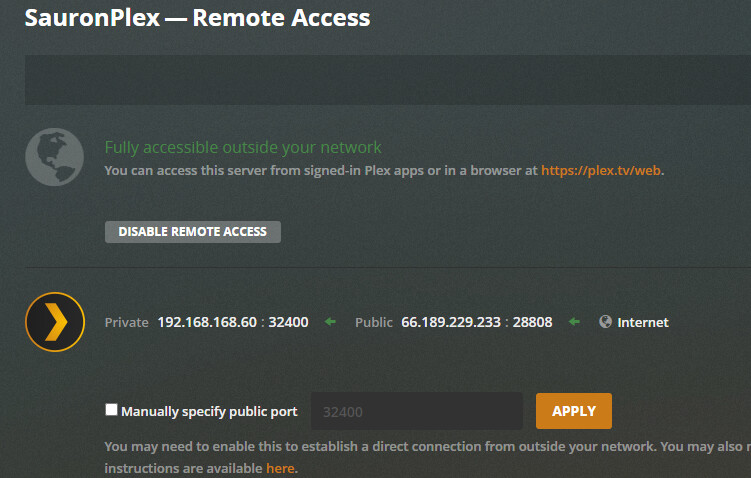
From within my network. Note that Plex is confirming that it can see my server and that it is accessible outside my network.

Meanwhile, outside my network:

please provide the full un-edited debug (NOT verbose) logs, you can download from your server via settings > troubleshooting > download logs.

drag/drop or attach the zip file to a reply.

there is no need to hide or change your username (which is being displayed as part of your posts) or your ips.

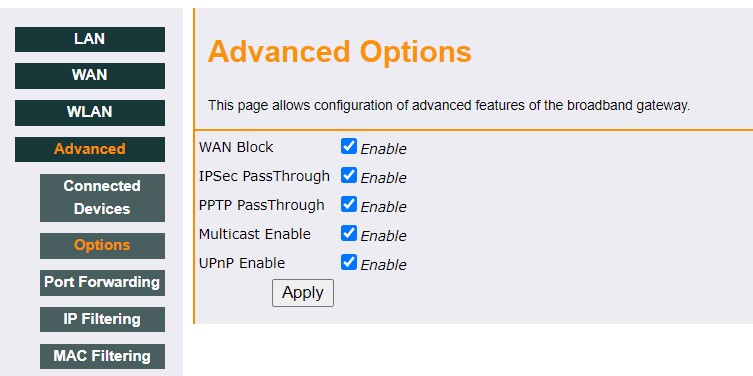
ssdp is UPNP, but I can’t tell whether that is your router/gateway or your server.

either way, it appears that UPNP is not working, which is likely why your remote access is not working.

if your isp sent a router update or change that disabled upnp, you may simply be out of luck.

also, provide your specific ISP and your router model, or search the forums to see if anyone else has had a similar problem and found a solution

also, the image that shows accessible, also does NOT show your local ips, which is very strange.

the remote access page should look like the below, with both your local ip:port and your public ip:port information displayed.

there is no need to hide or change your username (which is being displayed as part of your posts) or your ips.

Sorry about that, no idea why I did that in the first place.

Anyway, I tried now, and remote access started working after the first Retry, and has been working since. A couple of hours ago, it just wouldn’t. Here are the logs (I will attach the full log file shortly):

Feb 23, 2021 18:07:53.475 [0xb1aff430] Debug — Auth: authenticated user 1 as vnovak06
Feb 23, 2021 18:07:53.476 [0xaecff430] Debug — Request: [127.0.0.1:36636 (WAN)] GET /hubs/sections/1?count=20&excludeElements=Actor%2CCollection%2CCountry%2CDirector%2CGenre%2CLabel%2CMood%2CPart%2CProducer%2CRole%2CSimilar%2CWriter%2CPhoto%2CVast%2CTopic&excludeFields=summary%2Ctagline%2Cfile&includeEmpty=1&includeExternalMetadata=1&includeLibraryPlaylists=1&includeMeta=1&includeRecentChannels=1&includeStations=1&includeTrailers=1&includeTypeFirst=1&libraryHubsOnly=1 (8 live) TLS GZIP Signed-in Token (vnovak06)
Feb 23, 2021 18:07:53.478 [0xaecff430] Debug — HubCache: Retrieving '1/movie.inprogress.1/1/hubs/sections/1/en-usexternal-media,indirect-media/count=20&excludeElements=Actor%2CCollection%2CCountry%2CDirector%2CGenre%2CLabel%2CMood%2CPart%2CProducer%2CRole%2CSimilar%2CWriter%2CPhoto%2CVast%2CTopic&excludeFields=summary%2Ctagline%2Cfile&includeEmpty=1&includeExternalMetadata=1&includeLibraryPlaylists=1&includeMeta=1&includeRecentChannels=1&includeStations=1&includeTrailers=1&includeTypeFirst=1&libraryHubsOnly=1' from the cache.
Feb 23, 2021 18:07:53.478 [0xaecff430] Debug — HubCache: Retrieving '1/movie.recentlyreleased.1/1/hubs/sections/1/en-usexternal-media,indirect-media/count=20&excludeElements=Actor%2CCollection%2CCountry%2CDirector%2CGenre%2CLabel%2CMood%2CPart%2CProducer%2CRole%2CSimilar%2CWriter%2CPhoto%2CVast%2CTopic&excludeFields=summary%2Ctagline%2Cfile&includeEmpty=1&includeExternalMetadata=1&includeLibraryPlaylists=1&includeMeta=1&includeRecentChannels=1&includeStations=1&includeTrailers=1&includeTypeFirst=1&libraryHubsOnly=1' from the cache.
Feb 23, 2021 18:07:53.479 [0xaecff430] Debug — HubCache: Retrieving '1/movie.recentlyadded.1/1/hubs/sections/1/en-usexternal-media,indirect-media/count=20&excludeElements=Actor%2CCollection%2CCountry%2CDirector%2CGenre%2CLabel%2CMood%2CPart%2CProducer%2CRole%2CSimilar%2CWriter%2CPhoto%2CVast%2CTopic&excludeFields=summary%2Ctagline%2Cfile&includeEmpty=1&includeExternalMetadata=1&includeLibraryPlaylists=1&includeMeta=1&includeRecentChannels=1&includeStations=1&includeTrailers=1&includeTypeFirst=1&libraryHubsOnly=1' from the cache.
Feb 23, 2021 18:07:53.480 [0xaecff430] Debug — HubCache: Retrieving '1/recent.library.playlists.1/1/hubs/sections/1/en-usexternal-media,indirect-media/count=20&excludeElements=Actor%2CCollection%2CCountry%2CDirector%2CGenre%2CLabel%2CMood%2CPart%2CProducer%2CRole%2CSimilar%2CWriter%2CPhoto%2CVast%2CTopic&excludeFields=summary%2Ctagline%2Cfile&includeEmpty=1&includeExternalMetadata=1&includeLibraryPlaylists=1&includeMeta=1&includeRecentChannels=1&includeStations=1&includeTrailers=1&includeTypeFirst=1&libraryHubsOnly=1' from the cache.
Feb 23, 2021 18:07:53.480 [0xaecff430] Debug — HubCache: Retrieving '1/movie.genre.1/1/hubs/sections/1/en-usexternal-media,indirect-media/count=20&excludeElements=Actor%2CCollection%2CCountry%2CDirector%2CGenre%2CLabel%2CMood%2CPart%2CProducer%2CRole%2CSimilar%2CWriter%2CPhoto%2CVast%2CTopic&excludeFields=summary%2Ctagline%2Cfile&includeEmpty=1&includeExternalMetadata=1&includeLibraryPlaylists=1&includeMeta=1&includeRecentChannels=1&includeStations=1&includeTrailers=1&includeTypeFirst=1&libraryHubsOnly=1' from the cache.
Feb 23, 2021 18:07:53.481 [0xaecff430] Debug — HubCache: Retrieving '1/movie.by.actor.or.director.1/1/hubs/sections/1/en-usexternal-media,indirect-media/count=20&excludeElements=Actor%2CCollection%2CCountry%2CDirector%2CGenre%2CLabel%2CMood%2CPart%2CProducer%2CRole%2CSimilar%2CWriter%2CPhoto%2CVast%2CTopic&excludeFields=summary%2Ctagline%2Cfile&includeEmpty=1&includeExternalMetadata=1&includeLibraryPlaylists=1&includeMeta=1&includeRecentChannels=1&includeStations=1&includeTrailers=1&includeTypeFirst=1&libraryHubsOnly=1' from the cache.
Feb 23, 2021 18:07:53.481 [0xaecff430] Debug — HubCache: Retrieving '1/movie.topunwatched.1/1/hubs/sections/1/en-usexternal-media,indirect-media/count=20&excludeElements=Actor%2CCollection%2CCountry%2CDirector%2CGenre%2CLabel%2CMood%2CPart%2CProducer%2CRole%2CSimilar%2CWriter%2CPhoto%2CVast%2CTopic&excludeFields=summary%2Ctagline%2Cfile&includeEmpty=1&includeExternalMetadata=1&includeLibraryPlaylists=1&includeMeta=1&includeRecentChannels=1&includeStations=1&includeTrailers=1&includeTypeFirst=1&libraryHubsOnly=1' from the cache.
Feb 23, 2021 18:07:53.483 [0xaecff430] Debug — HubCache: Retrieving '1/movie.curated.1/1/hubs/sections/1/en-usexternal-media,indirect-media/count=20&excludeElements=Actor%2CCollection%2CCountry%2CDirector%2CGenre%2CLabel%2CMood%2CPart%2CProducer%2CRole%2CSimilar%2CWriter%2CPhoto%2CVast%2CTopic&excludeFields=summary%2Ctagline%2Cfile&includeEmpty=1&includeExternalMetadata=1&includeLibraryPlaylists=1&includeMeta=1&includeRecentChannels=1&includeStations=1&includeTrailers=1&includeTypeFirst=1&libraryHubsOnly=1' from the cache.
Feb 23, 2021 18:07:53.483 [0xaecff430] Debug — HubCache: Retrieving '1/movie.recentlyviewed.1/1/hubs/sections/1/en-usexternal-media,indirect-media/count=20&excludeElements=Actor%2CCollection%2CCountry%2CDirector%2CGenre%2CLabel%2CMood%2CPart%2CProducer%2CRole%2CSimilar%2CWriter%2CPhoto%2CVast%2CTopic&excludeFields=summary%2Ctagline%2Cfile&includeEmpty=1&includeExternalMetadata=1&includeLibraryPlaylists=1&includeMeta=1&includeRecentChannels=1&includeStations=1&includeTrailers=1&includeTypeFirst=1&libraryHubsOnly=1' from the cache.
Feb 23, 2021 18:07:53.531 [0xb12fe430] Debug — Completed: [127.0.0.1:36636] 200 GET /hubs/sections/1?count=20&excludeElements=Actor%2CCollection%2CCountry%2CDirector%2CGenre%2CLabel%2CMood%2CPart%2CProducer%2CRole%2CSimilar%2CWriter%2CPhoto%2CVast%2CTopic&excludeFields=summary%2Ctagline%2Cfile&includeEmpty=1&includeExternalMetadata=1&includeLibraryPlaylists=1&includeMeta=1&includeRecentChannels=1&includeStations=1&includeTrailers=1&includeTypeFirst=1&libraryHubsOnly=1 (8 live) TLS GZIP 55ms 8447 bytes (pipelined: 6)

My ISP: Serbia Broadband (SBB)

My Router: Ubee EVW32C-0N, firmware version 2.4.1014-SIP

UPNP seems to be ticked in the router settings (not sure about the actual meaning of all network options tho):

Allegedly, there were no firmware updates triggered by the ISP in the last year. But if that ends up remaining as the only option, I will try to press them, but I will need the info as to what specific feature/option was supposedly on, and is now off.

What troubles me is that this issue is intermittent: as of this moment, I am able to access the server remotely from one phone using Data, while from the other phone instead of my server appearing offline, I get this:

I am testing remote access from home by using Data on my phones, and try several ways. e.g. opening from app, from browser in phone, using phone as hotspot and opening on PC etc.

Thanks a lot for the willingness to help. I will attach the logs shortly.

The logs (attached).Plex Media Server Logs_2021-02-23_18-31-52.zip (2.0 MB)

Yes, using Data internet on one phone, the first that I mentioned, that didn’t work on a few hours ago, the server can now be accessed remotely:

I am currently not changing anything in the settings, just refreshing the app on remote connection.

Updates from today: Remote connection work flawlessly (Plex relay and CG-NAT on my side). Now I can’t get it to not-work:

This is from plex.tv web app, that didn’t work yesterday and past few days (see screenshot from yesterday’s post). Remote connection works, I only get the warning that the connection is indirect, which is expected and this is how it’s always been, since I’m communicating through CG-NAT.

What can cause this randomness? It’s not possible that my ISP has been constantly changing their configuration and my router configuration / connection settings on daily or even hourly bases.

To me, this seems like a Plex Relay issue with servers that are communicating through CG-NAT.

But my suggestions in this direction have been refuted almost a month ago. :confused:

Are there any suggestions what could have gone wrong on my side, for remote connection to work flawlessly for 10 month during my yearly subscription, and to suddenly stop somewhen in December/January? Since then I have this erratic behavior, when remote connection works 20% of the time, while in the other 80% it doesn’t, with the “offline” state lasting for days

Recap: Remote access with CG-NAT definitely started behaving erratically, and it used to work flawlessly. This erratic behavior includes, but isn’t limited to:

  1. falsely displaying that the server is offline and cannot be reached;
  2. falsely displaying that the library is empty (after 10+ refreshes usually changes to 1 or 3.);
  3. intermittently starting/stopping working;
  4. on random occasions - working flawlessly for hours with seemingly no way to reproduce the non-working state.

This is confirmed and reproduced on several devices and clients, so I dismiss that it’s a client issue.

According to ISP, there were no changes in network configuration nor were there any router firmware updates. Repeating again: remote connection still works on occasion, but most of the time it doesn’t.

I have done my best to describe my problem and provided the logs.

Conclusion: Sorry, but this is definitely a deal-breaker for me condisdering Plex Pass renewal. :-1: In the company that I work in, smaller issues end up as incidents for the dev team. To me, this suspiciously looks like a broken Plex feature, and the lack of proper support about this is simply disappointing.