Server Version#: 1.24.3.5033
Player Version#:5.25.3
I have recently added a number of 4K TV shows to my library, on the server Subtitles are set to manual.
On my Samsung TV - when playing the shows, it automatically enables the subtitles (PGS) so has to transcode in order to “burn” the subtitles. This kills my server having to transcode a 18Gb file
The only option I see to disable them, is to select “more …” on each episode and switch the subtitles off. There are over 20 episodes and more downloading.
Is there a way in the Plex App to set them off by default?
The “server” preferences are not used, unless the server is not signed into a plex account.
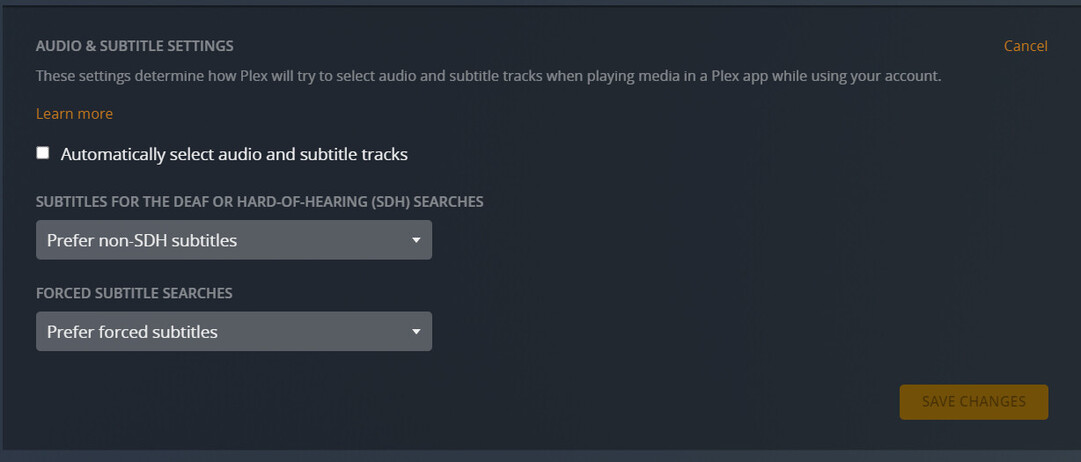
If you are signed into a plex.tv user account (i.e. the “normal” case), the settings in your account are used instead. (for each user separately) https://app.plex.tv/desktop/#!/settings/account
Thanks @OttoKerner I have checked the settings on the Tizen TV plex app. I have a dedicated user “TV”, under its settings > Subtitles > Burn Subtitles is set to “Only Image formats” the only other option are “Automatic” or “Always” there are no other options I can see that are subtitle related.
When I play new episode it automatically displays the subtitles, so I go have to go to the episode subtitle menu and change it from “English (SRT)” to none, which I have had to do on each unplayed episode.
I don’t remember having to do this previously on the Tizen app until a few months ago.
Other apps (Windows, iOS etc.) I dont experience the issue.
I have checked the files all are MKV containers, checking the tracks on VLC I can see that subtitles have been embedded in the MKV files.
Does the Tizen app, if it detects embedded subtitle track, automatically “play” them by default, whereas other app dont?
I have adjusted the settings via the web browser for the TV user account - set the burn subtitles to “image formats only” it does work on the web player when playing an unwatched episode, it does not automatically show the subtitles.
However back on the Tizen app it still automatically shows the subtitles on a new episode.
I have tried with my main user account also which is set the same, the Tizen app still shows the subtitles.
Are there any other options that could disable the subtitles showing automatically on the Tizen app, or is it a bug in the app?
You are not editing the settings that @OttoKerner is referring to.
The setting that you keep referring to (Burn Subtitles) only refers to whether the subtitles will be direct played or if the server needs to transcode the video to burn them into the video so that they can be displayed. For most situations, this should be set to automatic, and it has absolutely no impact on whether or not subtitles are automatically selected when watch something.
If you are still having please provide the XML of one of the files where the subtitle is being auto selected and paste it here (make sure to use the preformatted text option which is can be added clicking the icon that looks like </> when typing your reply,
)
Edit: Forgot to add, if you need to get the XML info for the media, click on the 3 dots (ellipses) then click on Get Info. From the Get Info Modal, click on View XML in the bottom left corner and then copy all the text on the new page that opens and paste it here (see screenshots below for the steps).
So I played a new episode on the Tizen app, which still automatically played the subtitles also
I have grabbed the XML as you suggested via the web app:
<MediaContainer size="1" allowSync="1" identifier="com.plexapp.plugins.library" librarySectionID="3" librarySectionTitle="TV" librarySectionUUID="1fac33f6-dcf0-4f5b-bd95-f84e46d3d93d" mediaTagPrefix="/system/bundle/media/flags/" mediaTagVersion="1634922197">
<Video ratingKey="16174" key="/library/metadata/16174" parentRatingKey="16170" grandparentRatingKey="16147" guid="plex://episode/5d9c10f3705e7a001e74c5c7" parentGuid="plex://season/602e649e66dfdb002c09c0e5" grandparentGuid="plex://show/5d9c08514eefaa001f5da49e" type="episode" title="The Spy Who Killed Me" titleSort="Spy Who Killed Me" grandparentKey="/library/metadata/16147" parentKey="/library/metadata/16170" librarySectionTitle="TV" librarySectionID="3" librarySectionKey="/library/sections/3" grandparentTitle="Homicide Hunter: Lt. Joe Kenda" parentTitle="Season 2" contentRating="TV-14" summary="Lt. Kenda's investigation into the arson-related death of a housewife takes a bizarre turn when the woman's son shows up at a police station in another town." index="4" parentIndex="2" viewCount="1" lastViewedAt="1640225983" thumb="/library/metadata/16174/thumb/1638807695" art="/library/metadata/16147/art/1637182745" grandparentThumb="/library/metadata/16147/thumb/1637182745" grandparentArt="/library/metadata/16147/art/1637182745" grandparentTheme="/library/metadata/16147/theme/1637182745" duration="2614044" originallyAvailableAt="2012-10-30" addedAt="1637212801" updatedAt="1638807695">
<Media id="37293" duration="2614044" bitrate="5134" width="1920" height="1080" aspectRatio="1.78" audioChannels="2" audioCodec="aac" videoCodec="h264" videoResolution="1080" container="mkv" videoFrameRate="NTSC" audioProfile="he-aac" videoProfile="high">
<Part accessible="1" exists="1" id="37294" key="/library/parts/37294/1637212386/file.mkv" duration="2614044" file="/media/TV/Homicide Hunter Lt. Joe Kenda/Season 2/Homicide Hunter Lt. Joe Kenda - S02E04 - The Spy Who Killed Me.mkv" size="1677513421" audioProfile="he-aac" container="mkv" deepAnalysisVersion="6" indexes="sd" requiredBandwidths="5126,5126,5126,5126,5126,5126,5126,5126" videoProfile="high">
<Stream id="82115" streamType="1" default="1" codec="h264" index="0" bitrate="5134" language="English" languageTag="en" languageCode="eng" bitDepth="8" chromaLocation="center" chromaSubsampling="4:2:0" codedHeight="1088" codedWidth="1920" colorPrimaries="bt709" colorRange="tv" colorSpace="bt709" colorTrc="bt709" frameRate="29.970" hasScalingMatrix="0" height="1080" level="40" profile="high" refFrames="2" requiredBandwidths="4999,4999,4999,4999,4999,4999,4999,4999" scanType="progressive" title="AVC" width="1920" displayTitle="1080p (H.264)" extendedDisplayTitle="AVC (1080p)"> </Stream>
<Stream id="82116" streamType="2" selected="1" default="1" codec="aac" index="1" channels="2" language="English" languageTag="en" languageCode="eng" audioChannelLayout="stereo" profile="he-aac" requiredBandwidths="127,127,127,127,127,127,127,127" samplingRate="48000" title="AAC" displayTitle="English (HE-AAC Stereo)" extendedDisplayTitle="AAC (English Stereo)"> </Stream>
<Stream id="82117" streamType="3" codec="srt" index="2" language="English" languageTag="en" languageCode="eng" requiredBandwidths="1,1,1,1,1,1,1,1" title="English" displayTitle="English (SRT)" extendedDisplayTitle="English (SRT)"> </Stream>
</Part>
</Media>
<Guid id="imdb://tt2233224"/>
<Guid id="tmdb://1046614"/>
<Guid id="tvdb://4486100"/>
<Marker id="47390" type="intro" startTimeOffset="55710" endTimeOffset="83036">
<Attributes id="47390"/>
</Marker>
<Extras size="0"> </Extras>
<Related> </Related>
</Video>
</MediaContainer>
The subtitles only automatically show on the Tizen app, the web app and iOS app are ok and dont automatically show the subtitles.
I got the wrong impression that you were instead at Settings - Server - Languages.
It is set to “manual”, which is correct.
Now, if the user has switched the subtitle tracks before (by hand), then this selection is stored.
If this is a new item (and the user couldn’t have possibly selected a subtitles manually), then it might be interesting to know if what you are seeing are indeed the embedded SRT subtitles or whether this video stream does contain another type of subtitles, called “closed captions”.
Could you use this 3rd-party software to export a mediainfo as text file please? download mediainfo here
(pay attention during installation, it comes with a ‘piggybacked’ installer which asks to install additional crapware. Make sure to set/clear the right checkboxes!)
Once it is installed, analyse the file, then go to:
File - Export - Text (Advanced mode)
@OttoKerner Sorry for the delay, been a bit busy recently.
I have downloaded the MediaInfo app and run it on a couple of files that when first played show the subtitles, which I’ve attached below.: FG mediainfo.txt (4.0 KB) HH mediainfo.txt (4.0 KB)
On first look it doesn’t appear to show any embedded subtitles (unless i’m reading it wrong). So its strange as to why its only the Tizen app that automatically shows subtitles on the first play.
Both files have one SRT subtitle stream.
Is this the one that’s automatically activated?
If you are game for an experiment, download MKVtoolnixGUI and install it.
Make a backup copy of one of the affected MKV files and store it somewhere safe.
Drag the file into MKVtoolnix
disable the subtitle stream
and press “Start Multiplexing”
Now replace the file in your Plex media storage with the remuxed version.
Press “analyze” on it, to let Plex update its own mediainfo.
Play this file on the TV.
Are the subtitles still shown?
@OttoKerner Thought I was reading it wrong. Is it the “TEXT” section of the output that refers to the subtitles?
I have disabled the subtitle stream on a few episodes, the two that I had attached the mediainfo for and couple of other un-played episodes and ran the Multiplexer on them after unchecking the subtitle stream.
When playing on the TV app - they play without any automatic subtitles
That does seem suggest the TV app is automatically playing embedded subtitles, despite being disabled in the app?
Is it a bug in the app itself?
Possible, but could also be a bug in the demuxer of the TV.
Plex is only using what’s already in there. It doesn’t deliver its own playback engine.
Precisely.
This is a typical SRT subtitle:
Text
ID                                       : 3
Format                                   : UTF-8
Codec ID                                 : S_TEXT/UTF8
Codec ID/Info                            : UTF-8 Plain Text
Duration                                 : 43 min 24 s
Bit rate                                 : 111 b/s
Count of elements                        : 909
Stream size                              : 35.3 KiB (0%)
Title                                    : English
Language                                 : English
Default                                  : No
Forced                                   : No
You can see the text encoding (UTF-8 should be the standard which all subtitles on your server adhere to)
and the number of “phrases” (909 in this case, which implies that this is either a “full” or, considering the playtime of just 43 min., even an “SDH” subtitle).
Please provide both the Logging for Smart TV App | Plex Support
and the server logs.
Please activate “debug” logging before testing the issue, (do NOT activate “verbose” logging)
restart the server
provoke the issue
wait 1 minute
fetch logs immediately
@OttoKerner - I have enabled the debug logging on the app and the server, rebooted as you suggested and played an episode which caused the subtitles to autoplay,
Ive grabbed the logs and attached them here





 Thought I was reading it wrong. Is it the “TEXT” section of the output that refers to the subtitles?