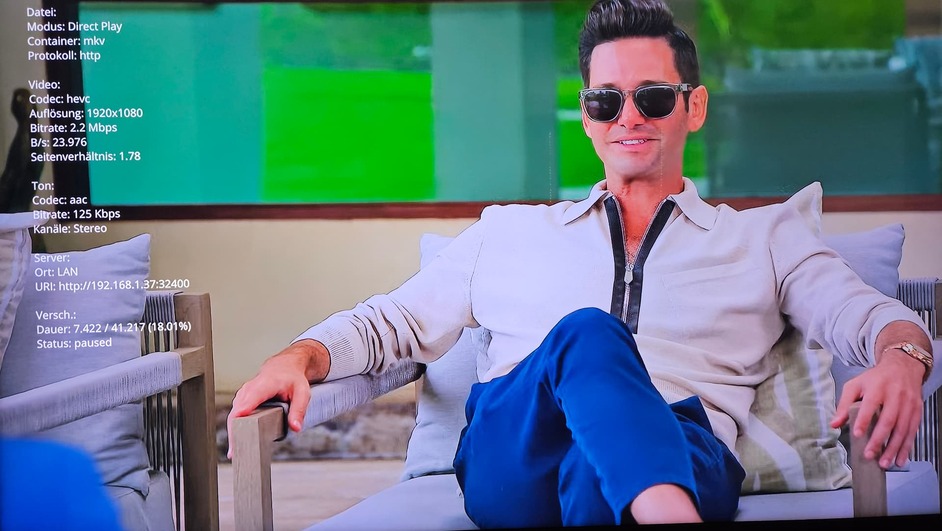
Server Version#: Version 1.40.2.8395
Player Version#: V 5.86.5
Platform Version#: 6.5
Hello, I have noticed on my Samsung TV when I specifically turn off subtitles they still will show. I have tried the same thing on a TCL / Roku client and when they are turned off, they stay off.
I have checked into the language setting on Plex and made sure its set for ENG and its off when playing.
Any other suggestions?
Thanks
Hi,
I have the same problem. It seems to be related to MKV-files specifically? When I enable subtitles in Plex, there are 2 subtitles on top of each other. The font and look of these subtitles (that cannot be disabled) look totally different from the normal Plex ones. White text and think black borders. This happens only on the Samsung TV, not on the iPhone, or in the web browser.
I am fairly sure this issue came at the same time (about a month ago) when suddenly subtitles are turned on by default in other TV streaming apps also.
Agreed, I have tried it on a Roku TV and on my iphone and ipad and the subs don’t display
Could you provide the model of Samsung TV you have? Maybe a bit more info as well what subtitle format do the files have you are seeing this on? And the same file on a different device does not have the subtitles enabled? I just want to confirm the file does not have hardcoded subs. Are the subtitles labelled “forced” by any chance?
I have not been able to reproduce it on my Samsung, the subtitles remain off by default unless I watch a title not in English or if they have forced subtitles.
It is 77" S93C OLED (same as S90C I believe). The subtitles are included in the mkv-files. E.g. in VLC I can see it as Subtitle - Sub Track - “English - [English]”.
I have noticed this only on mkv-files (and only on recent files maybe?). They are not hardcoded. When I pause a video, these subtitles are even shown on top of the Plex menu in the bottom (and almost looks like old teletext).
When I enable subtitles in Plex, there are 2 subtitles shown at different places on the screen. The source for the subtitles must be the same (from the mkv) as the text and timing are identical.
It seems the Plex player has no control of these at all? They are just added at some “layer”?
Plex server (UNRAID docker): Version 1.40.4.8679
Plex for Samsung:
- Client version 5.86.5
- Platform version 7
Absolutely
Model: QN65S95BAFXZA
Software (TV): T-PTMAKUC-1640.9,BT - S
Plex for Samsung
Client V: 5.86.5
Platform Version: 6.5
Media info of the file
General
Unique ID                                : 171678921803293449329418173371640272125 (0x8128285A93EB9D2DDF4B52561A4954FD)
Complete name                            : .mkv
Format                                   : Matroska
Format version                           : Version 4
File size                                : 673 MiB
Duration                                 : 1 h 4 min
Overall bit rate                         : 1 449 kb/s
Frame rate                               : 29.970 FPS
Movie name                               :
Writing application                      : Lavf60.16.100
Writing library                          : Lavf60.16.100
Comment                                  : RUBiK-Tue-16-Jul-2024,05:14:22,480p,22,fast,N,7814000,1920,1080,1.78
ErrorDetectionType                       : Per level 1

Video
ID                                       : 1
Format                                   : AVC
Format/Info                              : Advanced Video Codec
Format profile                           : High@L3.1
Format settings                          : CABAC / 4 Ref Frames
Format settings, CABAC                   : Yes
Format settings, Reference frames        : 4 frames
Codec ID                                 : V_MPEG4/ISO/AVC
Duration                                 : 1 h 4 min
Bit rate                                 : 1 228 kb/s
Width                                    : 854 pixels
Height                                   : 480 pixels
Display aspect ratio                     : 16:9
Frame rate mode                          : Constant
Frame rate                               : 29.970 (30000/1001) FPS
Color space                              : YUV
Chroma subsampling                       : 4:2:0
Bit depth                                : 8 bits
Scan type                                : Progressive
Bits/(Pixel*Frame)                       : 0.100
Stream size                              : 570 MiB (85%)
Writing library                          : x264 core 164
Encoding settings                        : cabac=1 / ref=2 / deblock=1:0:0 / analyse=0x3:0x113 / me=hex / subme=6 / psy=1 / psy_rd=1.00:0.00 / mixed_ref=1 / me_range=16 / chroma_me=1 / trellis=1 / 8x8dct=1 / cqm=0 / deadzone=21,11 / fast_pskip=1 / chroma_qp_offset=-2 / threads=15 / lookahead_threads=2 / sliced_threads=0 / nr=0 / decimate=1 / interlaced=0 / bluray_compat=0 / constrained_intra=0 / bframes=3 / b_pyramid=2 / b_adapt=1 / b_bias=0 / direct=1 / weightb=1 / open_gop=0 / weightp=1 / keyint=250 / keyint_min=25 / scenecut=40 / intra_refresh=0 / rc_lookahead=30 / rc=crf / mbtree=1 / crf=22.0 / qcomp=0.60 / qpmin=0 / qpmax=69 / qpstep=4 / ip_ratio=1.40 / aq=1:1.00
Default                                  : Yes
Forced                                   : No
Color range                              : Limited
Color primaries                          : BT.709
Transfer characteristics                 : BT.709
Matrix coefficients                      : BT.709

Audio
ID                                       : 2
Format                                   : AC-3
Format/Info                              : Audio Coding 3
Commercial name                          : Dolby Digital
Codec ID                                 : A_AC3
Duration                                 : 1 h 4 min
Bit rate mode                            : Constant
Bit rate                                 : 192 kb/s
Channel(s)                               : 2 channels
Channel layout                           : L R
Sampling rate                            : 48.0 kHz
Frame rate                               : 31.250 FPS (1536 SPF)
Bit depth                                : 32 bits
Compression mode                         : Lossy
Stream size                              : 89.1 MiB (13%)
Writing library                          : Lavc60.31.102 ac3
Language                                 : English
Service kind                             : Complete Main
Default                                  : Yes
Forced                                   : No

Text
ID                                       : 3
Format                                   : UTF-8
Codec ID                                 : S_TEXT/UTF8
Codec ID/Info                            : UTF-8 Plain Text
Duration                                 : 1 h 4 min
Language                                 : English
Default                                  : No
Forced                                   : No
Example of show playing on iphone and TV at the same time
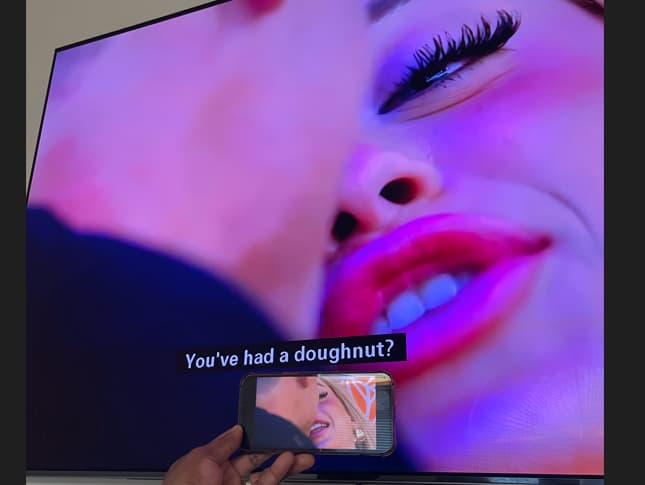
We have been unable to reproduce the issue on a Tizen 7 device which @Slartibartman has. Could you please provide a sample file?
I just downloaded the file and tried it on my Samsung TV. I can both show and hide the subtitles. A single subtitle in the clip is hardcoded, which of course cannot be hidden.
My TV is a GQ75Q60RGTXZG
Plex for Samsung 5.87.1 Plattform Version 5
The server is Nvidia Shield TV Pro 2019 version 1.40.4.8679
The example file is on a connected USB hard drive
I am also seeing the same experience. @Slartibartman from your screenshot you have a black background behind the subtitles, this is not how Plex shows subtitles on the Samsung app its possible your TV could be displaying subtitles. Can you go into your TV’s accessibility settings and see if subtitles are enabled?
@mwoods98 could you do the same as above? As stated Plex does not insert a black background onto subtitles.
If I enable subtitles in Plex, there are 2 subtitles:
Plex-subtitles looks as they are configured in the Plex player. Note: when I press pause, the black subtitles are show over the Plex menu. They also disappear after about 10 seconds (when video is paused).
And yes, I have tested enabling/disabling subtitles in the TVs accessibility settings (a number of times), but no effect. I do believe it has something to do with that.
Yes, those subtitles without the black background are definitely Plex subtitles but the other ones are not. I am not sure what else to try as if it is related to the accessibility subtitles we have no control over that.
Perhaps try seeing if your TV has a firmware update available otherwise only other thing to try would be to factory reset the TV.
Another solution would be to remove the subtitles with MKVToolNix.
or call the Samsung Support.
But the Best way is a Nvidia Shield, a Homatics-box-r-4k-plus or a Fire TV Cube or Max Stick. Maybe a Google TV Streamer @ Sep 24 2024
I did a factory reset, but that did not help. There are no firmware updates available either. Strange!
Update: I did a quick google search, and there are many issues like “How do we turn off subtitles? Subtitles are stuck turned on for our Samsung Smart Tv”. Most entries seem to be quite old though.
SOLVED!
I changed the language of the Tizen UI to English. Then these subtitles were not shown anymore in Plex. When I changed the language back to Swedish (as I had before), the subtitles still did’t show.
I tried a number of videos, and these odd “Samsung TV”-subtitles are gone!
Solved by a “workaround” I guess 
I will report if they show up again.
Hi Morganj,
Where can I download the sample file? I have been looking in this thread. Am I overlooking it?
I also did a sanity check for this and I still get subs. I wanted to make sure.
I was finally able to get this up (sorry had some plex maintenance going on) and I have subs off confirmed, I have eng as my selected language in Tizen and I still get subs on the screen
I confirmed with the team that supports the Samsung app and we have no control over those subtitles so if they are displaying it is due to some setting or issue on the TV.
Any suggestions on where to check to see if this can be disabled? Or would that be a call into Samsung?
The only things I could suggest would be to see if there is a firmware update on the TV or try factory resetting the tv as the default for those subtitles are usually off.