Server Version#: 1.13.9.5456-ecd600442
My NAS was running my Plex server and all was fine. I had to replace my router (10.0.0.138) with a new one and hadn’t noticed the new ip was (192.168…etc…) When I launched Plex on my Mac and Apple TV, the server could not be found. I have since changed my new router IP back to the old 10.0.0.138, and I can see everything in my NAS, but my Plex server won’t load. It appears greyed out in my plex app.
I have logged out of the plex server and the plex player, restarted all devices a number of times, to no avail. My main concern is not wanting to remark all my watched TV shows and movies again. I have limited to average knowledge around plex and NAS (it is the first time I have had one). Any help appreciated.
Cheers
ChuckPa
November 27, 2018, 10:00pm
2
Are you comfortable workign with the shell at the command line?
Hi ChuckPA, with a little instruction I am happy to give it a go. I look forward to your suggestions.
ChuckPa
November 27, 2018, 10:27pm
4
This is very straight forward. We won’t break … much…
Make certain SSH is enabled in the QTS Control Panel
SSH (ssh or Putty) to the box
user admin and supply the administrative password
Follow along as I show you the sequence below (should be copy/paste for you)
[~] # cd /share/CACHEDEV1_DATA/.qpkg/PlexMediaServer/Library/Plex\ Media\ Server/
[/share/CACHEDEV1_DATA/.qpkg/PlexMediaServer/Library/Plex Media Server] #
[/share/CACHEDEV1_DATA/.qpkg/PlexMediaServer/Library/Plex Media Server] # ls
Cache/	 Crash Reports/  Logs/	 Metadata/  Plug-in Support/
Codecs/  Diagnostics/	 Media/  Plug-ins/  Preferences.xml
[/share/CACHEDEV1_DATA/.qpkg/PlexMediaServer/Library/Plex Media Server] # mv Preferences.xml Preferences.xml.old
[/share/CACHEDEV1_DATA/.qpkg/PlexMediaServer/Library/Plex Media Server] #
[/share/CACHEDEV1_DATA/.qpkg/PlexMediaServer/Library/Plex Media Server] #
[/share/CACHEDEV1_DATA/.qpkg/PlexMediaServer/Library/Plex Media Server] #
[/share/CACHEDEV1_DATA/.qpkg/PlexMediaServer/Library/Plex Media Server] #
[/share/CACHEDEV1_DATA/.qpkg/PlexMediaServer/Library/Plex Media Server] #
Now start PMS.claim it again)However it will not lose its Libraries
Open your browser to http://ip.addr.of.qnap:32400/web
Sign in and claim it.
Start the first-run wizard but DO NOT create any new libraries. SKIP
Make any settings you want while in the wizard
Click Finish and get to the Dashboard
Libraries now await you
Settings - Server - Check all your settings . Some will have been reset to default.
Some pieces of info can be brought forward from the old Preferences file but usually not worth the effort.
Thanks I will try this when I get home tonight. I assume this is all from within the NAS?
ChuckPA, I have a Macbook (not windows). Does that change anything? I have confirmed the NAS has SSH enabled.
Am I opening a command link in the NAS or Terminal on the Mac for the code you want me to copy/paste?
Cheers
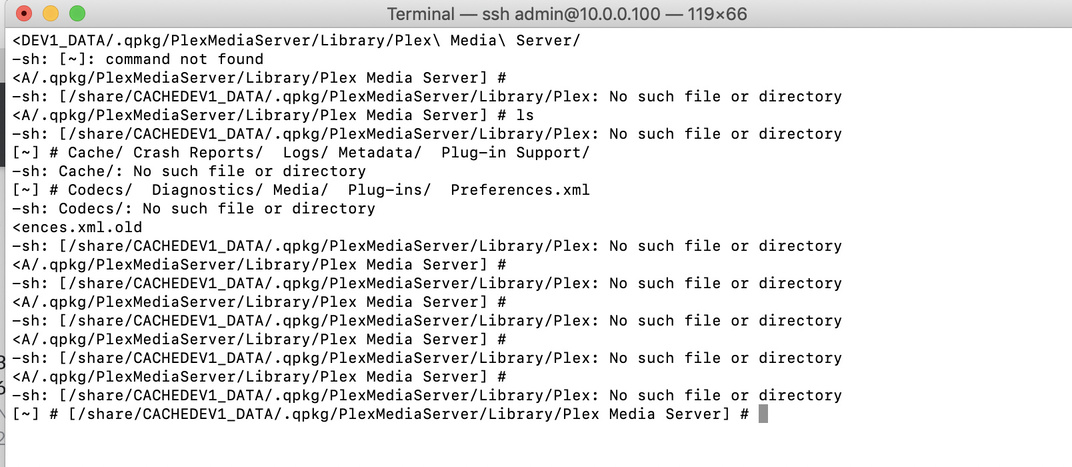
I managed to SSH from Terminal. When I ran the command I got this…
I get the impression something went wrong. When I opened PMS it had me already logged in.
Ta
ChuckPa
November 28, 2018, 3:06pm
8
Show me the output of ?
/sbin/getcfg PlexMediaServer Install_Path -f /etc/config/qpkg.conf
system
February 26, 2019, 9:50pm
10
This topic was automatically closed 90 days after the last reply. New replies are no longer allowed.