Server Version#:1.32
Player Version#:
<If providing server logs please do NOT turn on verbose logging, only debug logging should be enabled>
Plex error log.txt (33.2 KB)
Hello.
From the looks of it, the server fails to lookup information about it self
What happens, if you in a browser on the server itself browse to : http://127.0.0.1:32400/identity ?
Please post a screen capture of the output
Here is the info:
This XML file does not appear to have any style information associated with it. The document tree is shown below.
<MediaContainer size="0" claimed="1" machineIdentifier="6dc0cbc766ad318a067c4■■■526fbee5703624a6" version="1.32.5.7210-77f7f99fa"> </MediaContainer>
Hmm…
Above shows that the server is up running, and claimed
What happens, if you browse to http://127.0.0.1:32400/web ?
Here is what I get.
Problem loading page.txt (1.4 KB)
Also just an FYI:
I have a fixed IP Address .
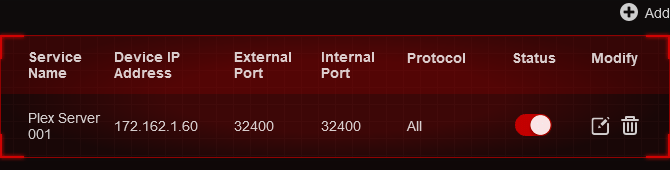
& this is what I did on my TP-Link router
Only 172.16.0.0 to 172.31.255.255 are considered reserved for private network communications within 172.0.0.0/8. 172.162.0.0/16 is a public block, so that might be confusing Plex (some reverse lookup services say that 172.162.1.60 is used by Microsoft’s Azure services).
Please remember that this is an internal IP address and not an external.
I have an entire network based on these with multiple fixed IP addresses within my organization (my house) including NAS, printers, etc.
What you are talking about is outside my internal NAT. Correct?
Yes, and the fact that it’s an internal IP might be why things are going wrong. Plex does quite a few things beyond what a printer or other devices will do on your local network, like automatically generating SSL certificates for both public and private IPs, and publishing those IPs so remote clients know how to connect to your server. It’s hard to say for certain without knowing anything about Plex’s code, but I wouldn’t be surprised if using a public IP range for internal communications is part of the problem.
What about 162.162.1.1 thru 162.162.1.100.
Would that be better?
10.0.0.0/8 (10.0.0.0-10.255.255.255), 172.16.0.0/12 (172.16.0.0-172.31.255.255), and 192.168.0.0/16 (192.168.0.0-192.168.255.255) are the only ranges officially recognized as reserved for private local communication: Reserved IP addresses - Wikipedia
With our new claiming method private address space is no longer required
See: New Claiming Requirement for Windows
Also, when @altv8 browsed to the /identity endpoint, it showed that the server was indeed claimed already
Since this is a new install, I recommend @altv8 uninstall, restart the server and then install again
After installing, select Open Plex from the system tray, as mentioned in the new claiming post I linked towards
And lastly, @DTR is correct in recommending you to use private address space due to security
I have the same issue,
i did a clean install from my pc (windows 11)
installed plex but can not complete the setup
When i check the link http://127.0.0.1:32400/identity i receive the following
<MediaContainer size="0" claimed="1" machineIdentifier="removed-before-posting" version="1.32.4.7195-7c8f9d3b6"> </MediaContainer>
when i go to http://127.0.0.1:32400/web i get the following message
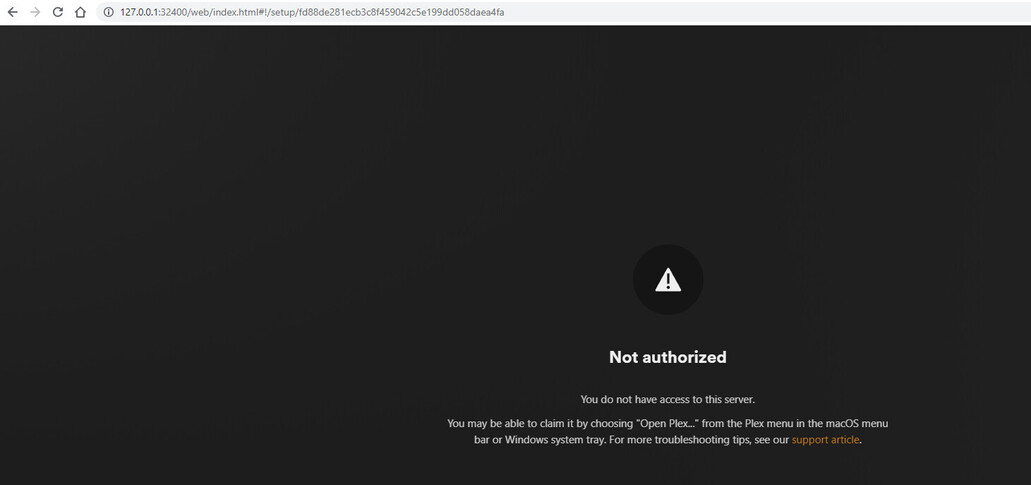
But then i finally resolved it by using this.
Windows Registry Editor Version 5.00

[-HKEY_CURRENT_USER\SOFTWARE\Plex, Inc.\Plex Media Server\PlexOnlineHome]
[-HKEY_CURRENT_USER\SOFTWARE\Plex, Inc.\Plex Media Server\PlexOnlineMail]
[-HKEY_CURRENT_USER\SOFTWARE\Plex, Inc.\Plex Media Server\PlexOnlineUsername]
[-HKEY_CURRENT_USER\SOFTWARE\Plex, Inc.\Plex Media Server\PlexOnlineToken]
[-HKEY_CURRENT_USER\SOFTWARE\Plex, Inc.\Plex Media Server\PreferredNetworkInterface]

[HKEY_CURRENT_USER\SOFTWARE\Plex, Inc.\Plex Media Server]
"PublishServerOnPlexOnlineKey"=dword:00000001
"ManualPortMappingMode"=dword:00000000
"LogVerbose"=dword:00000000
"secureConnections"=dword:00000001
