I have got plex running on a QNAP TS-453 Pro nas drive as a media server. The server is working fine apart from when I log into the nas I am unable to open the server to make any changes.
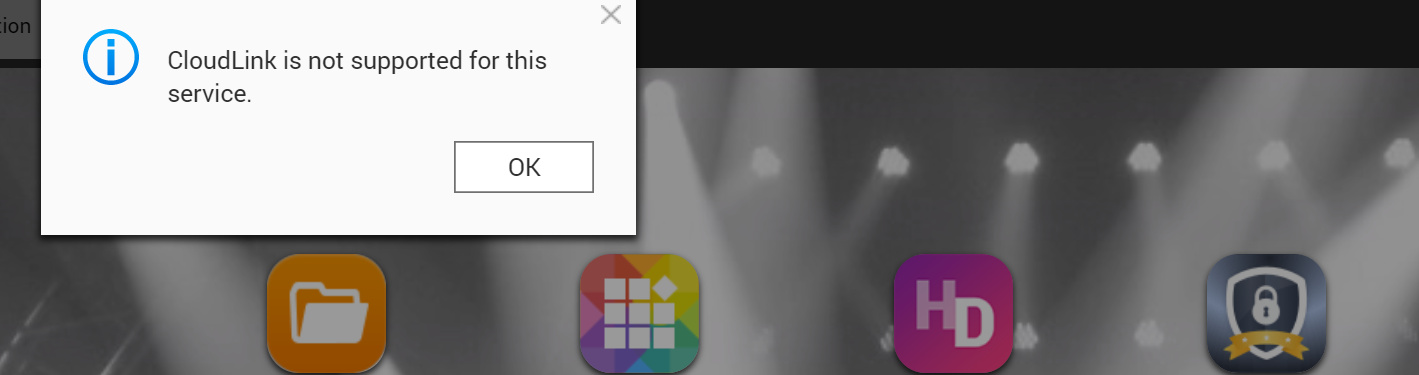
I am getting the following message:
Cloudlink is not supported for this service
I have contacted qnap about the problem and was told to role back the fireware I was using as the latest fireware did not support plex. I have done that but have the same problem and qnap have not provided a solution to the problem.
Any suggestion to resolve this would be a great help.
Would you tell us the QTS versions that you tried and which one you’re on now?
I noticed for your model there was a 4.4.1.1086 stable.
When QNAP said to you 4.4.1 doesn’t support Plex, I hope they didn’t misunderstand your issue and give you the standard (and correct) response that 4.4.1 does not support Plex Media Player because it can’t talk out the HDMI port in 4.4.1. I’m pretty sure that Plex Media Server is working however. ChuckPA must have installed it.
Okay I see how QNAP is responding. Let’s do our part and get some log files. Sorry I was offline due to California power cuts.
Let’s get all the details we can. Please describe your LAN hardware, how it’s setup, and how it’s configured. Describe your Player hardware and how it’s connected.
Describe anything that’s not default about your NAS.
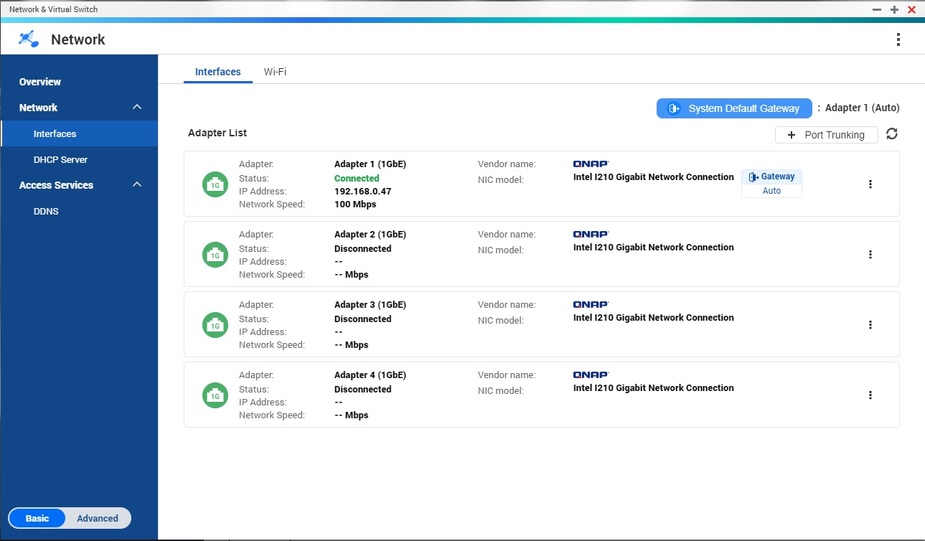
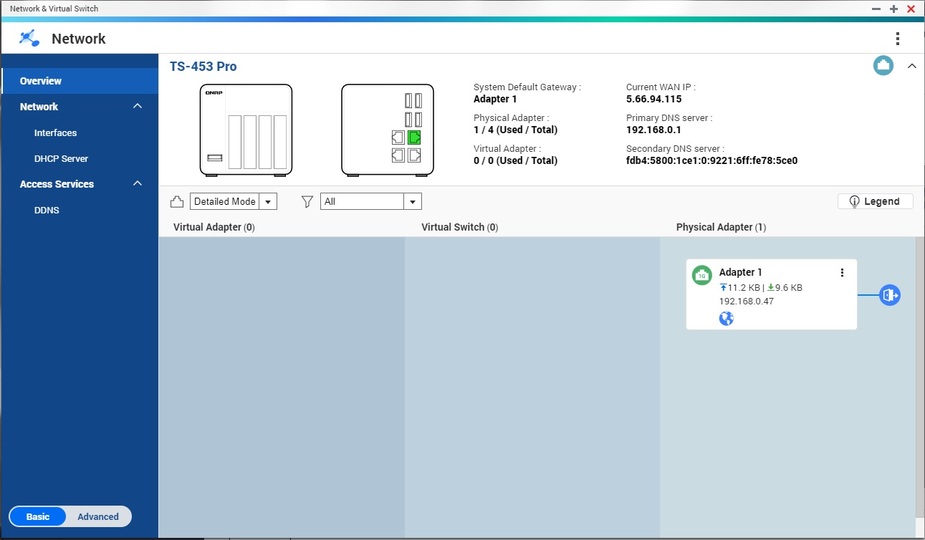
Go into your QNAP desktop and start your Network and Virtual Switch.
Click the Advanced switch so that you see 8 sections in the left hand column.
Screenshot these sections: Overview Interfaces Route DDNS
To get some clean logs,
Enabled PMS debug logs but disable verbose in Settings and Save.
Restart the QNAP
Give it 6-10min after you get a new login screen for PMS to start and initialize.
Go into Settings - Troubleshooting - Download Logs
zip up what it gives you and attach it with your next reply.
Apologies for not replying before now I have been away on business and only return home yesterday for a short period of time.
The NAS is setup up in a basic way. Nothing that isn’t default to my knowledge. I am running on the NAS firmware version 4.3.6.0993 there is an update but that I haven’t installed after being told by QNAP tech support that plex is not supported by the most up to date firmware version.
The NAS is connect via LAN to a UK Sky wifi route that is directly connect to the outside connect. This is the way the system has been since I installed it and until recently was able to access plex media server from my QNAP web login without any issues at all.
I noticed you were running 1.16.6.1592. Have you considered upgrading to 1.18.1.2019?
On a side note the Plex Media Server.log shows your networking and database look good, although there are some issues talking to two devices, trying to discover what they can do:
Nov 10, 2019 21:42:22.806 [0x7f712ba23700] ERROR - SSDP: Error parsing device schema for http://192.168.0.14:49153/description1.xml
Nov 10, 2019 21:42:52.138 [0x7f712ba23700] ERROR - SSDP: Error parsing device schema for http://192.168.0.14:49153/description0.xml
Nov 10, 2019 21:42:52.547 [0x7f712ba23700] ERROR - SSDP: Error parsing device schema for http://192.168.0.9:49153/description3.xml
Nov 10, 2019 21:43:22.056 [0x7f712ba23700] ERROR - SSDP: Error parsing device schema for http://192.168.0.9:49153/description1.xml
I am running the latest version that is given within the Qnap apps centre. I now that I can possibly update further with an external download. However when I have done this in the past it has had to re-compile my libraries etc which takes sometime.
Is there a way to up date with the most up to date that is not from the Qnap app centre so that the libraries do not have to be re-compiled?
Have you got an update on the issue from additional help?
I’m sorry I went AFK for some time and lost track of our conversation.
Would you let me know if your system still is having problems?
You asked:
If you disable most automated tasks in Settings - Show Advanced - Scheduled Tasks then Plex will do a lot less when you upgrade it. PMS-1.18.x uses a new Plex Music Agent for scanning your audio files. Because it’s new, installing 1.18.x will have to scan your entire music library again. That can take a while.
So the short answer is some tasks can be avoided during an upgrade, but the recent music thing, probably not.
The method for doing any updates to a running QNAP PMS install is:
Download the new version .qpkg file from Plex.tv.
Use a browser and log into your QNAP desktop as admin
Open QNAP AppCenter.
In the upper right hand corner, choose Install Manually.
Upgrading PMS before New Years is something you’ll want to avoid doing unless it has bug fixes you need. Good luck!
Sorry for not replying before now. I have updated to the latest version 1.18.4.2171. However I am still have the same issue with not being able to access plex setting via the NAS dirve (open the application via the NAS when I login through a browser)
I am getting the following message which is the same as before:
I reread the thread. In the beginning you asked about the CloudLink error and let us know how QNAP support replied that CloudLink isn’t used by Plex Media Server.
When I was trying to get log files from you to see what the Plex Media Server logs had to say about it, I noticed IPv6 which you fixed, and then I noticed a Plex.tv problem where their online version distribution system was offline causes a 404 Not Found when your Plex Media Server asked it for the Services.bundle
Two weeks ago another user came across this 404 problem, and I was able to recreate it by renaming my Services.bundle directory. About a week ago, @dane22 let us know that Plex had sorted that out and the bundle should be online as usual.
That being the case, your system would be able to update its bundle correctly. If that is true, then we are back to the same point, where we could use Plex Media Server log files after a reboot and a 6 minute wait that allows it to completely start up. Those clean logs without the bundle problem will go a long way to telling us what PMS is doing internally.
See if you can upload us some now, and maybe we’ll get the attention of someone who’s familiar with the underlying issue.
Tell us how your QNAP is configured too. The more details about storage and shares the better. Any VPN or Antivirus or similar services running on the QNAP?
Oops for some reason I guessed he wasn’t trying to use CloudLink. Thanks for help.
At least his Services.bundle is going to download again. Thanks also for that.