Server Version: 1.23.3.4692 - the server is installed on a Synology DS420+ with DSM 6.2.4-25556 (latest).
My Plex Server doesn’t find/list certain media files, whatever I do - very annoying!
I have already checked the permissions and rights, both on user, file and folder level, everything seems alright. Same goes for the naming of my files.
I am using iTunes for my media administration, especially for music.
iTunes is set to automatically manage the folder structure.
Whenever I add new media files to my library I do a manual rescan of the respective Plex library and the new songs or movies appear within seconds, thus all fine.
The “plex” user has read access to all relevant shares on my NAS, where the respective media files are stored.
Here’s a concrete example:
/NAS share/…/Movies/Rambo/01 Rambo.m4v
/NAS share/…/Movies/Rambo II - Der Auftrag/01 Rambo II - Der Auftrag.m4v
/NAS share/…/Movies/Rambo III/01 Rambo III.m4v
The first two are “seen”, the third one not, for whatever reason.
All permissions are identical (folders set to 775 and fiiles set to 664), none of the fiiles is any different than the other, they are not corrupt and do play without problems.
I am pulling my hair out and and already searched a number of forums on this matter.
Any concrete hint is much appreciated!
Plex cannot play DRM encoded media, so don’t bother trying to add movies purchased/downloaded via iTunes, Google Play Store, etc.
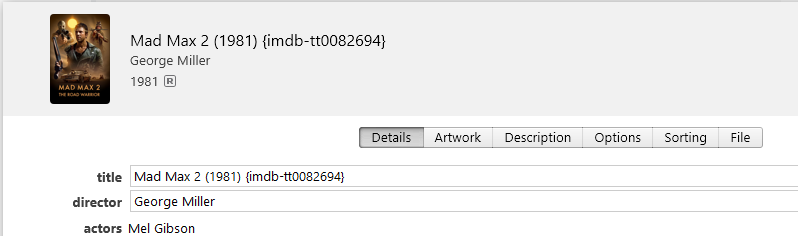
If you are using the new Plex Movies scanner/agent, you can add the IMDB ID to the movie name to assist with matching. It looks ugly in iTunes, but it definitely helps Plex match movies.
Example:
…/iTunes Media/Movies/Mad Max 2 (1981) {imdb-tt0082694}/Mad Max 2 (1981) {imdb-tt0082694} (1.m4v
Hard to tell what’s in those M4V files that Plex will prefer over your perfect file names - when you get some perfect file names, but disable that PITA and your life will less stressful.
There won’t be any embedded metadata in an M4V file - unless ‘Prefer Local Metadata’ is enabled - at my house.
It’s like Spooky Quantum stuff in that there is only embedded metadata if I don’t look to see if there is… so I leave Prefer Local Metadata off… then I don’t have to look…lol