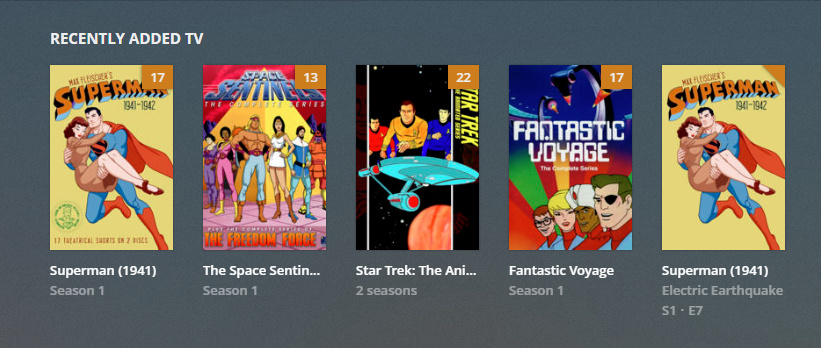
The forementioned cartoon is also listed in the Superman Season 1 correctly. The folder structure I have currently is :
Cartoons
Superman (1941)
– Season 1
— Superman 01 - Name of episode
. . .
— Superman 17 - Name of episode
I even tried this but no avail:
Cartoons
Superman (1941)
– Superman 01 - Name of episode
. . .
– Superman 17 - Name of episode
Plex showed the same issue with the two directory structures I tried above.
And I also have a Emby media server running and it no issues with the two directory structure above nor did it show the single duplicate episode.
What you are looking at is the ‘Recently Added’ hub.
If Superman appears twice in there, it means that at one time there were several episodes of season 1 added. And a few days later there was epsiode 1 added (or re-added).
It can happen in this particular hub, that some tv shows appear twice or even more often.
Take a look at the file dates. The date of this one episode may be off from the rest of the episodes.
If you add files in the course of a library creation, Plex uses the dates on the files as the ‘Added At’ date.
If you however first create the library, and then afterwards move the files into the folder ‘watched’ by Plex, Plex will use the current date as the ‘Added At’ date.
The duplicate single episodes that are in the “Recently Added TV” section have the same file dates as their duplicate counterparts that in their seasons.
Looks like I fixed my issue, here are the steps I took.
Deleted all libraries
Cleaned the bundles
Emptied the trash
Since I’m running the Windows version of Plex Server, I navigated to Control Panel -> Uninstall Software
I was going to delete Plex, search the registry and delete everything “Plex” and show all hidden file on the PC & delete those files, run CCleaner against the registry and reboot the PC (hmm…ahh…no)
Instead of deleting, I ran the “Repair” option (I had no clue what it does)
After the Plex Server rebooted the PC, I loaded the libraries again and currently the main web page shows what it should.