Plex Server Stops Everyday at the Same Time. Sinology 1019+

Server Version#: 1.32.6.7371-7000
Synology DSM 7.2-64570 Update 3

Ive been running Plex on DSM 7 ever since it updated. I have continued to update my NAS and Alex as it is required. My last update consisted of both.

Since updating, My Pal Server will stop on its own everyday as if its scheduled. I then click on run and i’m back to full operations till the next day. Im guessing its was the DSM update as no one seems to be having issued with the lated PLEX update.

Any guidance would be much appreciated.

Please attach a set of debug, not verbose, server logs that capture the failure.

Verify the server is set for debug, not verbose, level logs.
See Reporting issues with Plex Media Server.

After the problem occurs:

  1. Restart Plex Media Server.
  2. Wait three minutes for Plex to start and log everything.
  3. Pull the log files. Settings → Troubleshooting
  4. Upload the zip file to the thread. upload

Plex Media Server Logs_2023-09-05_19-22-50.zip (3.9 MB)

Hello FordGuy61, Thanks for such a quick reply,
I’ve had Debug on for months. I did put the server back in RUN prior to downloading the log file. I don’t know how far this log reads but when I look at the history on my Sinology 1019+, It show up as if I manually sopped the PLEX server. If its not a PLEX issue then I can only assume its a DSM 7 upgrade issue all thought Ive been running it for a long time with no issues, .

Thanks for the log files.

First, what is the size and number of documents in /PlexMediaServer/AppData/tmp? With Plex Media Server stopped, right click on it in File Station & choose properties.

There have been a couple of reports of Plex not cleaning up after itself and leaving multiple TB of files in the tmp folder. A GB is no big deal. A TB means Plex is not cleaning up as it should.

I don’t believe that is your problem. Just double checking.


Second, and this is what appears to be the problem, Plex crashes when performing Intro Detection on one specific file:
/volume1/Plex/TV Shows/TheThreeStooges/Three Stooges Collection, The 1952-1954 - Disc 1_t00.mkv

This happened during Scheduled Tasks shortly after 2 a.m. on Aug 31, Sep 2, 3, & 4.

Can you move that file out of the library, to a location not visible to Plex scanners? Then scan the library and empty trash.

Then see if Plex makes it through the night.

If Plex crashes again, please pull a fresh set of log files.


Here are the log entries from Plex Media Server.1.log:

Plex is running Intro Detection during the maintenance window, proceeding through the Three Stooges files. It starts to analyze the problem file:
Sep 04, 2023 02:06:24.870 [140472367364920] DEBUG - IntroDetector: Initializing for "/volume1/Plex/TV Shows/TheThreeStooges/Three Stooges Collection, The 1952-1954 - Disc 1_t00.mkv" (2382)

Throws an error:
Sep 04, 2023 02:06:24.900 [140472367364920] ERROR - [Universal] MediaDecisionEngine could not find an appropriate remux or transcode target

Then CrashUploader runs and Plex Media Server stops:
Sep 04, 2023 02:06:25.169 [140472367364920] DEBUG - [JobRunner] Job running: /volume1/@appstore/PlexMediaServer/CrashUploader "--directory=/var/packages/PlexMediaServer/shares/PlexMediaServer/AppData/Plex Media Server/Crash Reports/1.32.6.7371-b6a09ad81" --version=1.32.6.7371-b6a09ad81 --platform=Linux "--platformVersion=DSM 7.2.64570-3" --serverUuid=637a15710c34d0befb9e303097e24dede5665bf4 --userId=hawk7@charter.net --sentryUrl=https://o17675.ingest.sentry.io/api/1233455/ --sentryKey=xxxxxxxxxxxxxxxxxxxxxxxxxxxxxxxx --vendor=Synology --model=x86_64 --device=DS1019+

Hey FordGuy61. Sorry for the late reply but I have to work double.

17.3 MB and 317 file, 28 folders you your first question.

2nd, I do have a folder under Plex/TV Shows/The ThreeStooges/XXX. The 3 X’s represent 26 folders starting with /Season 1 and then 4 MKV files under that directory. They are, Plex/TV Shows/The ThreeStooges/Season1/The Three Stooges Men In Black = s01e03.mkv, Plex/TV Shows/The ThreeStooges/Season1/The Three Stooges Punch Drunks - s01eo2.mkv, Plex/TV Shows/The ThreeStooges/Season1/The Three Stooges Three Little Pigskinss - s01eo4.mkv, AND Plex/TV Shows/The ThreeStooges/Season1/The Three Stooges Woman Haters - s01eo1.mkv. Then on to Season 2 with 7 MKV files and so on and so on. It goes to Season 26 with 2 MKV files.

Sorry so long but I want to make sure this makes sense .

I DONT HAVE A /Three Stooges Collection, The 1952-1954 - Disc 1_t00.mkv. I even tried to search the entire volume for “Stooges Collection” and “1952-1954” and “1952” it and come up with no results. I did this search in my Synology File Manager and also in Windows Explorer.

So I guess the question is, Where might this phantom be hiding?

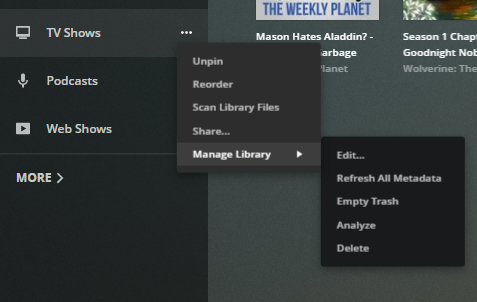
Scan all the libraries, empty trash, and clean bundles (see pic below)…

Let’s see if Plex makes it through the next maintenance window.

If it crashes again, then disable Intro Detection for the library containing The Three Stooges, and see what happens during maintenance.
Edit the Library → Advanced → deselect Enable intro detection → Save Changes

That will tell us if it really is Intro Detection or if the problem lies elsewhere.


dance

Howdy FordGuy61,

I actually scanned all my files yesterday and Cleaned Bundles. I changed my schedules tasks in PLEX from 2AM to 4AM. I also changed my task stop to run by 2 hours (8am). That way it’s still set to 4 hours total. Then I can run another log file and see if the time changes when you look at it. Anyway my PLEX was stopped again this morning so I put it back in RUN and left for work.

Now Im home. I am emptying trash on my Hawkerver. I am also emptying trash in each individual folder. Home Family Movies, Horror Classics, Movies, Music, Photos, and TV shows. I would think doing the HawkServer would do it for all the folder but just in case, It did it to the extreme.

I am scanning all the libraries the same way as mentioned above. Cleaning bundles was only available in the HawkServer and not in the individual folders.

Hopefully I didn’t need to do it in the order you mentioned?? I would thinks emptying trash first would be first. If not, Please let me know.

We will see what happens in the morning. If it STOPS again I will then un-enable detection on THE THREE STOOGES. If it stops the following day, I will send you a new LOG file.

Thanks again for taking time to help me with this. It makes no sense why this happened as Ive never had any issues with THE THREE STOOGES or any of my files. Everything has been on this server for 3 plus years and about the only folders that get updated are my Movie folder and my Photo folder. Other than that it an occasional DMS update and a PLEX update.

More to come.

Scanning the libraries first picks up any changes - additions, deletions, name changes, etc.

You can do it at the server level. No need to repeat for every library.

If it is stopped in the morning, upload a new set of log files. Then go ahead and disable intro detection.

Yeah, something odd. Just have to figure it out.

Will do.

Thanks

Happy Friday FordGuy61,

Plex was operational this morning and didn’t shut down. So all I did was Scan all the libraries, empty trash, and clean bundles,

I will check again tomorrow and let you know.

Thanks

1 Like

Hey FordGuy61,

Still up and running so it looks like scanning all the libraries, empty trash, and clean bundle did it.

Good info for next time. Not sure why it happened only after I updated Plex and DMS but good to know for the next time.

Thanks a MILLION!!!

Paul

This topic was automatically closed 90 days after the last reply. New replies are no longer allowed.