Plex crashing but synoligy showes running?

Server Version#:1.41.3.9314-72009314
Player Version#:7.2.2

I had to update my sinology to 7.2.2 and I updated plex after. Plex works fine for a few hours then my server stops showing up until I go into the nas and stop plex running and restart it. Then it runs fine for another few hours until the server stops showing up again making me go in and restart it.

A set of server log files that captures the crash is needed.

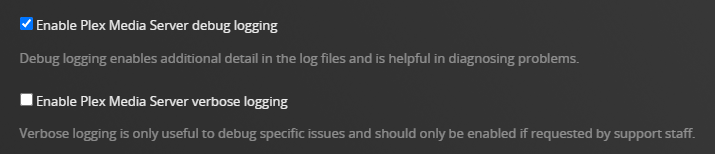
Ensure Plex is configured for debug, not verbose, level logging.
Settings → Server_Name → General + Show Advanced

After the next occurrence:

Restart Plex Media Server.
Wait 2 - 3 minutes for Plex to fully start and log the startup sequence.
Download the server log files (Settings → Troubleshooting)
Upload the entire ZIP file to the thread

Plex Media Server Logs_2025-01-17_18-11-14.zip (1.1 MB)
I leave debug logging on, this is the log from the last restart. I will upload another one when it happens again in an hour or so.

Thank you for the help

I see a few things in your logs:

  1. The folks who are sharing your server have not restarted their players since your certificate updated. They need to do that.
Jan 17, 2025 16:38:02.885 [140527977786168] DEBUG - [NSB] [com.plexapp.system] HTTP reply status 200, with 0 bytes of content.
Jan 17, 2025 16:38:14.025 [140528059689784] WARN - [CERT] TLS connection from [::ffff:24.207.163.122]:52042 came in with unrecognized plex.direct SNI name '24-207-163-122.e4b6e7b9a4384eda84e7e9de7f45f456.plex.direct'; using installed plex.direct cert
Jan 17, 2025 16:38:18.096 [140528061799224] WARN - [CERT] TLS connection from [::ffff:54.170.120.91]:4324 came in with unrecognized plex.direct SNI name '24-207-163-122.e4b6e7b9a4384eda84e7e9de7f45f456.plex.direct'; using installed plex.direct cert
Jan 17, 2025 16:38:24.116 [140528059689784] WARN - [CERT] TLS connection from [::ffff:24.207.163.122]:52088 came in with unrecognized plex.direct SNI name '24-207-163-122.e4b6e7b9a4384eda84e7e9de7f45f456.plex.direct'; using installed plex.direct cert
Jan 17, 2025 16:42:58.675 [140527994719032] DEBUG - SSDP departed after not being seen for 21.919971 seconds: 192.168.1.29 (Living Room TV)
Jan 17, 2025 16:42:58.811 [140527977786168] DEBUG - [NSB/SSDP] Parsing SSDP schema for http://192.168.1.29:8008/ssdp/device-desc.xml
Jan 17, 2025 16:42:58.912 [140528031140664] DEBUG - [HttpClient/HCl#94] HTTP/1.1 (0.1s) 200 response from GET http://192.168.1.29:8008/ssdp/device-desc.xml
Jan 17, 2025 16:42:58.913 [140527977786168] DEBUG - [NSB/SSDP] found 1 SSDP devices via http://192.168.1.29:8008/ssdp/device-desc.xml
Jan 17, 2025 16:42:58.913 [140527977786168] DEBUG - [NSB/SSDP] SSDP arrived: 192.168.1.29 (Living Room TV)
Jan 17, 2025 16:44:31.494 [140528059689784] WARN - [CERT] TLS connection from [::ffff:24.207.163.122]:52511 came in with unrecognized plex.direct SNI name '24-207-163-122.e4b6e7b9a4384eda84e7e9de7f45f456.plex.direct'; using installed plex.direct cert
Jan 17, 2025 16:58:10.265 [140528059689784] WARN - [CERT] TLS connection from [::ffff:185.172.53.163]:52247 came in with unrecognized plex.direct SNI name '24-207-163-122.e4b6e7b9a4384eda84e7e9de7f45f456.plex.direct'; using installed plex.direct cert
Jan 17, 2025 16:58:13.934 [140528061799224] WARN - [CERT] TLS connection from [::ffff:185.172.53.163]:41724 came in with unrecognized plex.direct SNI name '24-207-163-122.e4b6e7b9a4384eda84e7e9de7f45f456.plex.direct'; using installed plex.direct cert
Jan 17, 2025 16:58:23.391 [140527990442808] DEBUG - Request: [192.168.1.37:53355 (Subnet)] GET /web (3 live) #37b GZIP Signed-in
Jan 17, 2025 16:58:23.392 [140528059689784] DEBUG - Completed: [192.168.1.37:53355] 302 GET /web (3 live) #37b GZIP 0ms 235 bytes (pipelined: 1) -> http://192.168.1.27:32400/web/index.html
Jan 17, 2025 16:58:23.399 [140527990442808] DEBUG - Request: [192.168.1.37:53355 (Subnet)] GET /web/index.html (4 live) #37e GZIP Signed-in
  1. You have IPv6 support enabled (Settings - server - Network) when you are running an IPv4 LAN. Turn it off. It works much better with it off. It won’t trigger TLS errors expecting IPv6 over IPv4.

Thanks for the log files.

Have you tried to move the PlexMediaServer shared folder to a non-default location (i.e. something different than /volume1/PlexMediaServer)?

You have what appears to be a Plex Data Folder (or copy thereof) in /volume1/Plex Movies/ which is being scanned by the Plex Movie scanner.

This is causing your system instability.

QUESTION: Does the NAS have a /PlexMediaServer shared folder?

QUESTION: If yes, does it have the “normal” Plex Data folder structure, with .../AppData/Plex Media Server containing subfolders for Cache, Codecs, Crash Reports, etc.

IF YES TO BOTH:

  1. Stop Plex Media Server.
  2. Using File Station, delete /volume1/Plex Movies/tmp_transcoding.
  3. Using File Station, move /volume1/Plex Movies/Library to a location not scanned by any Plex library.
  4. Start Plex Media Server.

After Plex Media Server starts, use it as normal and see if it is stable. If the problem continues, pull and post another set of server logs.

If Plex Media Server is stable, you can later delete the Library folder you relocated from Plex Movies.

NOTE: Also, verify the Transcoder Temporary Directory in Settings → Transcoder. Make sure it is not pointing to any location where media resides (/volume1/Plex Movies, /volume1/Plex TV, etc.).

Jan 17, 2025 16:58:51.819 [139839905332024] DEBUG - [Notify] Now watching "/volume1/Plex Movies"
Jan 17, 2025 16:58:51.820 [139839905332024] DEBUG - [Notify] Now watching "/volume1/Plex Movies/tmp_transcoding"
Jan 17, 2025 16:58:51.820 [139839905332024] DEBUG - [Notify] Now watching "/volume1/Plex Movies/tmp_transcoding/pms-b9d5fc43-bfdc-430c-949f-34ab7fa3aa7e"
Jan 17, 2025 16:58:51.820 [139839905332024] DEBUG - [Notify] Now watching "/volume1/Plex Movies/Library"
Jan 17, 2025 16:58:51.820 [139839905332024] DEBUG - [Notify] Now watching "/volume1/Plex Movies/Library/Application Support"
Jan 17, 2025 16:58:51.820 [139839905332024] DEBUG - [Notify] Now watching "/volume1/Plex Movies/Library/Application Support/Plex Media Server"
Jan 17, 2025 16:58:51.820 [139839905332024] DEBUG - [Notify] Now watching "/volume1/Plex Movies/Library/Application Support/Plex Media Server/Crash Reports"
Jan 17, 2025 16:58:51.820 [139839905332024] DEBUG - [Notify] Now watching "/volume1/Plex Movies/Library/Application Support/Plex Media Server/Crash Reports/1.18.5.2309-f5213a238"
Jan 17, 2025 16:58:51.820 [139839905332024] DEBUG - [Notify] Now watching "/volume1/Plex Movies/Library/Application Support/Plex Media Server/Crash Reports/1.18.5.2309-f5213a238/PLEX MEDIA SERVER"
Jan 17, 2025 16:58:51.820 [139839905332024] DEBUG - [Notify] Now watching "/volume1/Plex Movies/Library/Application Support/Plex Media Server/Crash Reports/1.18.5.2309-f5213a238/PLEX TUNER SERVICE"
Jan 17, 2025 16:58:51.820 [139839905332024] DEBUG - [Notify] Now watching "/volume1/Plex Movies/Library/Application Support/Plex Media Server/Crash Reports/1.18.5.2309-f5213a238/PLEX MEDIA SCANNER"
Jan 17, 2025 16:58:51.821 [139839905332024] DEBUG - [Notify] Now watching "/volume1/Plex Movies/Library/Application Support/Plex Media Server/Plug-in Support"
Jan 17, 2025 16:58:51.821 [139839905332024] DEBUG - [Notify] Now watching "/volume1/Plex Movies/Library/Application Support/Plex Media Server/Plug-in Support/Databases"
Question 1: yes i have the /PlexMediaServer shared folder

Question 2: yes

Transcoder temporary Directory is not pointing to any folder, should I point it to someplace to make sure that it does not try to go to where the media is stored again?

Instructions followed and I will report back in a day or so

Blank is fine. It will use the default location in the Plex Data Folder.

Also, after restarting Plex Media Server (after moving the Library directory out of the way):

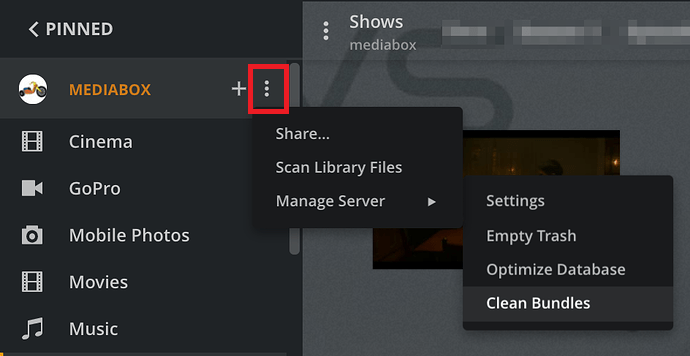
  1. Scan Libraries
  2. Empty Trash
  3. Clean Bundles

That should clean up the database.

Please forgive my not noticing earlier.

You should NOT have a /volume1/Plex Movies/Library ..... folder

This looks like an old DSM 6 Plex installation got moved to where it doesn’t belong
-OR-
Did you rename the old Plex shared folder to Plex Movies and still leave Library in it?

/Plex Movies/Library/Application Support/Plex Media Server

This was on dsm6 originally then I did the update to 7.2.2

How did you end up with the Library folder inside /volume1/Plex Movies? That is what is causing your system instability.

How did you update from DSM 6 to 7.2.2?

Did you follow the migration in the Plex FAQ (FAQ 27 - Migrating an existing PMS from DSM 6 to DSM 7)?

Did you install DSM 7.2.2 then create a new Plex Media Server, with new libraries, etc.?

Just trying to understand what happened, so we can help stabilize your system.

I got a notification saying something failed to auto update and noticed that there was a new dsm update from 6 something to 7.2.2+.

I updated to 7.2.2+ and plex stopped working.

Googled it and came to I needed to install and install plex 140.something

Plex was working and it said it had another update and I updated to the current version.

I have been fighting it till I found this forum and you lovely people got me all sorted.

This topic was automatically closed 90 days after the last reply. New replies are no longer allowed.
