Simple questions first… is your Plex Media Server up and running?
I take it you use http://app.plex.tv/desktop to access your server… make sure the server is actually running on your Windows machine.
My apologies… it appears I didn’t phrase my question quite right.
Can you open the Windows machine that’s running your Plex Media Server and check if you can confirm the Plex Media Server is running on it?
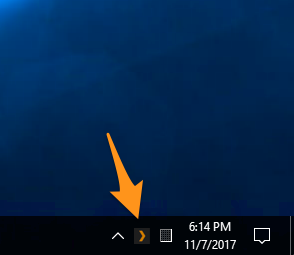
If it does, you should see a Plex icon in your system tray (see screenshots)
If the Plex Server itself is working, this should bring up the version of Plex Web bundled with your server. If your server is running but you cannot access its content, this will give us another hint to troubleshoot your issue.
I’m having this issue. Yesterday afternoon all worked fine. Tried to start the same film I’d watched earlier in the day and suddenly getting server unavailable. I’ve tried re-starting, installing latest download (although on PlexPass download channel with automatic updates on).
I’m working on the server machine directly to remove the external connections to players as an issue.
The media server seems to be crashing, but I’m getting no warnings. It just is no longer on the task list. If I start it manually I can get into Plex, and sometimes even to the film I was playing, but when I hit resume I get spinning circle then it tells me the media is unavailable. I can open it directly from the desktop without an issue. Usually then Plex tells me the server is no longer available and reverts to just Plex web content.
I have the same exact issue. But I’ll fast forward. I received that message, while remoted in to the server. Yup, im on DC010 and plex (yup it’s running) says DC10 is unavailable.
My housemate has been having pretty much issue for a month now. he will start his computer, the server starts, but when he tries to watch anything it says the server is unavailable and to retry connection, only way to fix this is for him to log the plex account out and then back in again.
I don’t know if people are still dealing with this issue, but I just experienced the same. A fresh Windows installation on the computer that hosts the server, fresh install of Plex Server, but kept receiving the error in question.
The odd thing was, there were two “servers” of the same name listed. Only one had my music in it, which couldn’t be accessed. The other was empty… I deleted the other server, and everything started working. I’ve never seen something like that happen with a fresh Plex install before (no database was restored, so it was completely fresh)
Anyway, I hope this manages to help someone in the future.
Hi All: Happy to share the success. I was frustrated to see that “My PLEX server” is offline. I tried so many things but finally succeeded; want to share with you friends.
Log out of PLEX completely
See in the Task Manager that PLEX is not still running; if so End the task
Open Control panel & go to Programs
Find installed programs & find PLEX
Select PLEX–> Select option “REPAIR”. Accidentally, do not UNINSTALL
Repair steps are automatic; just follow what system ask to do
After repair completion, do not log-in. First go to PLEX app (clients) on your mobile, Amazon stick, tab & fully uninstall. Download latest version & install
Log-in to PLEX on your server - See the magic; everything woks
HINT: If you have more than one account on same server, delete one of them; it creates confusion to the server, probably. Until you do REPAIR steps, second account info will go go out completely & you will continue to face “SERVER OFFLINE” issue.