Let’s get a few things sorted to reduce confusion.
- I have NO reference to 1.57.1 server anywhere.
- I do have reference for PMS 1.58.1 (current version) of the Plex Player app. This makes sense now.
1.58.1.3380-ea159c52

November 23, 2022
Your server version, from the server logs, is actually,
Dec 08, 2022 02:18:47.511 [0x7f5e0f2c9b38] INFO - Plex Media Server v1.29.2.6364-6d72b0cf6 - Debian GNU/Linux PC x86_64 - build: linux-x86_64 debian - GMT 01:00
Dec 08, 2022 02:18:47.511 [0x7f5e0f2c9b38] INFO - Linux version: 11 (bullseye), language: en-US
Dec 08, 2022 02:18:47.511 [0x7f5e0f2c9b38] INFO - Processor: 32-core        Intel(R) Xeon(R) CPU E5-2650 0 @ 2.00GHz
You can find this information at the top of every ‘Plex Media Server*.log’ file.
Your logs are showing me, as you relayed, the disk is full.
Dec 08, 2022 02:24:00.459 [0x7f5e0b67cb38] DEBUG - Request: [127.0.0.1:33410 (Loopback)] GET /:/metadata/flushMetadataCounterCache?metadataItemID=8142 (3 live) #58 GZIP Signed-in Token (fabian3357) (storage1.nl.euroservers.de)
Dec 08, 2022 02:24:00.459 [0x7f5e0ec64b38] DEBUG - Completed: [127.0.0.1:33410] 200 GET /:/metadata/flushMetadataCounterCache?metadataItemID=8142 (3 live) GZIP 0ms 195 bytes (pipelined: 35)
Dec 08, 2022 02:24:00.479 [0x7f5e0d363b38] ERROR - SQLITE3:0x80000001, 13, statement aborts at 7: [INSERT INTO vacuum_db.'blobs' SELECT*FROM"main".'blobs'] database or disk is full
Dec 08, 2022 02:24:00.493 [0x7f5e0b67cb38] DEBUG - Request: [127.0.0.1:33410 (Loopback)] GET /:/metadata/notify/changeItemState?librarySectionID=3&metadataItemID=8150&metadataType=4&state=-1&parentID=-1&rootID=-1&mediaState=analyzing (3 live) #59 GZIP Signed-in Token (fabian3357) (storage1.nl.euroservers.de)
Dec 08, 2022 02:24:00.494 [0x7f5e0ee67b38] DEBUG - Completed: [127.0.0.1:33410] 200 GET /:/metadata/notify/changeItemState?librarySectionID=3&metadataItemID=8150&metadataType=4&state=-1&parentID=-1&rootID=-1&mediaState=analyzing (3 live) GZIP 0ms 195 bytes (pipelined: 36)
Dec 08, 2022 02:24:00.494 [0x7f5e0b67cb38] DEBUG - Request: [127.0.0.1:33410 (Loopback)] GET /:/metadata/notify/changeItemState?librarySectionID=3&metadataItemID=8150&metadataType=4&state=-1&parentID=-1&rootID=-1&mediaState=idle (3 live) #5a GZIP Signed-in Token (fabian3357) (storage1.nl.euroservers.de)
Dec 08, 2022 02:24:00.495 [0x7f5e0ec64b38] DEBUG - Completed: [127.0.0.1:33410] 200 GET /:/metadata/notify/changeItemState?librarySectionID=3&metadataItemID=8150&metadataType=4&state=-1&parentID=-1&rootID=-1&mediaState=idle (3 live) GZIP 0ms 195 bytes (pipelined: 37)
Dec 08, 2022 02:24:00.496 [0x7f5e0b67cb38] DEBUG - Request: [127.0.0.1:33410 (Loopback)] GET /library/changestamp (3 live) #5b GZIP Signed-in Token (fabian3357) (storage1.nl.euroservers.de)
Dec 08, 2022 02:24:00.497 [0x7f5e0ee67b38] DEBUG - Completed: [127.0.0.1:33410] 200 GET /library/changestamp (3 live) GZIP 0ms 497 bytes (pipelined: 38)
Dec 08, 2022 02:24:00.499 [0x7f5e0b67cb38] DEBUG - Request: [127.0.0.1:33410 (Loopback)] GET /:/metadata/flushMetadataCounterCache?metadataItemID=8142 (3 live) #5c GZIP Signed-in Token (fabian3357) (storage1.nl.euroservers.de)
Dec 08, 2022 02:24:00.500 [0x7f5e0ec64b38] DEBUG - Completed: [127.0.0.1:33410] 200 GET /:/metadata/flushMetadataCounterCache?metadataItemID=8142 (3 live) GZIP 0ms 195 bytes (pipelined: 39)
Dec 08, 2022 02:24:00.503 [0x7f5e0b67cb38] DEBUG - Request: [127.0.0.1:33410 (Loopback)] GET /library/changestamp (3 live) #5d GZIP Signed-in Token (fabian3357) (storage1.nl.euroservers.de)
Dec 08, 2022 02:24:00.504 [0x7f5e0ee67b38] DEBUG - Completed: [127.0.0.1:33410] 200 GET /library/changestamp (3 live) GZIP 0ms 497 bytes (pipelined: 40)
Dec 08, 2022 02:24:00.506 [0x7f5e0b67cb38] DEBUG - Request: [127.0.0.1:33410 (Loopback)] GET /:/metadata/flushMetadataCounterCache?metadataItemID=8142 (3 live) #5e GZIP Signed-in Token (fabian3357) (storage1.nl.euroservers.de)
Dec 08, 2022 02:24:00.507 [0x7f5e0ec64b38] DEBUG - Completed: [127.0.0.1:33410] 200 GET /:/metadata/flushMetadataCounterCache?metadataItemID=8142 (3 live) GZIP 0ms 195 bytes (pipelined: 41)
Dec 08, 2022 02:24:00.513 [0x7f5e0d363b38] ERROR - SQLITE3:0x80000001, 13, statement aborts at 1: [vacuum] database or disk is full
Dec 08, 2022 02:24:00.517 [0x7f5e0d363b38] ERROR - Butler: Uncaught exception starting generator GarbageCollectBlobs: sqlite3_statement_backend::loadOne: database or disk is full
Dec 08, 2022 02:24:00.517 [0x7f5e0d363b38] DEBUG - Activity: registered new sub-activity 0f07ba11-81f6-400d-bfba-805a458d084c - "OptimizeDatabase" parent: 8680246c-3fdc-40c1-bb8f-0562465bbe31 overall progress: 0.0% (0/1)
Dec 08, 2022 02:24:00.517 [0x7f5e0d363b38] DEBUG - Activity: ended sub-activity 0f07ba11-81f6-400d-bfba-805a458d084c parent: 8680246c-3fdc-40c1-bb8f-0562465bbe31 overall progress: 100.0% (1/1)
Trying to tell PMS to use a different temp directory, when the disk is full, will never get saved to the database – so the problem perpetuates.
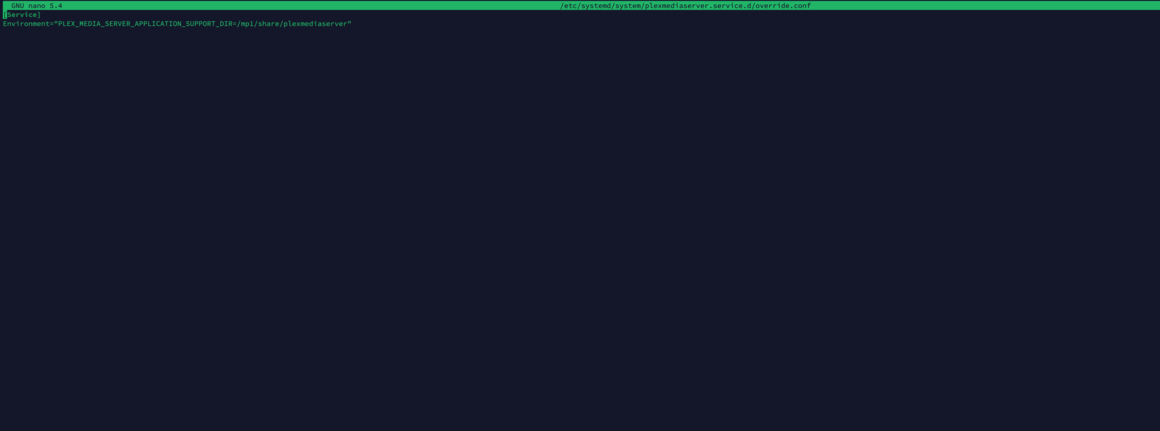
We can easily customize your server configuration both outside and inside PMS.
If you’d like, I’ll show you how to customize where the temp directory goes (Linux variable TMP or TMPDIR)
After that’s done , and there is room on the disk ,
-OR- if you want to move the entire metadata directory,
I can help you with that now. It’s very easy.
Do you have an idea where you want (which directory) PMS to use for Temp or where you might want to move all of PMS ? (you have both options)