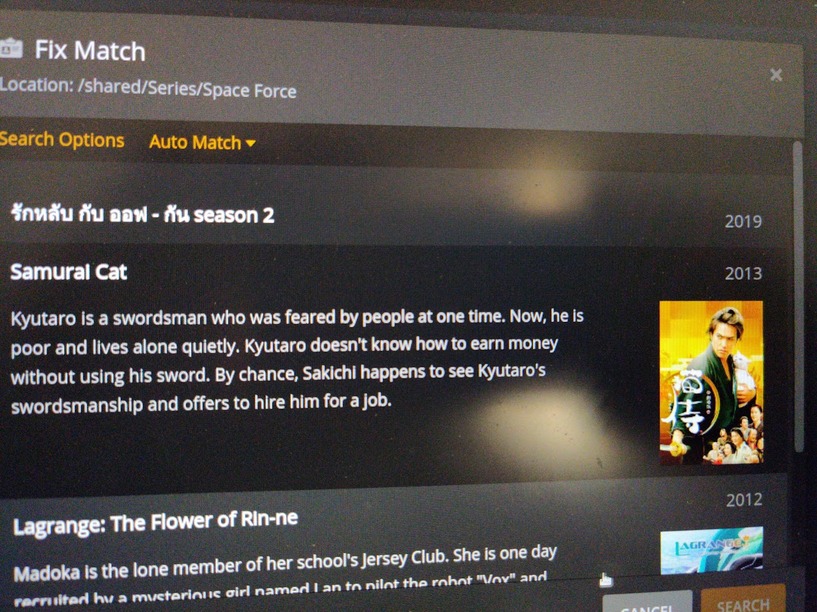
Plex thinks every new TV show is some iteration of “Samurai Cat”. The new season of Space Force, for instance, is deemed to be “Samurai Cat”. Going into ‘Fix Match’ and correcting the name fixes things, but why does everything initially appear as Samurai Cat?
It should be – though there’s a number of things that can throw Plex off course.
Could be an issue with embedded metadata, bad file naming inside that top-level folder or some confusion about the folders linked to that library (in particular if they’re causing recursive references).
The fact that Plex is considering “season 2” to be part of the show name implies there’s something wrong about this. Without knowing further details about your file names, my money is on embedded metadata
Everybody’s rather certain of that… until we can unearth the actual cause of the issue
Plex isn’t dealing with NFO files (except pulling movie IDs to support the matching).
Your naming / folder structure should be like this:
Series   <- the folder linked to your tv-show library
  Space Force
    Season 02   <- not Season_2
      Space Force - s02e01.ext
If you’re using the Plex TV Series agent, you can usually improve the matching by including the year this show first aired in the show’s top-level folder (here: Space Force (2020)). Optionally you can include a reference to TheMovieDatabase or TheTVDb (here: Space Force (2020) {tmdb-85922} or Space Force (2020) {tvdb-368667}).
You have not responded to the suggestion to check your files for embedded metadata. If your files are in mp4/m4v/mov format, Plex can consider the embedded information.
I’ve been using S##E##.ext for years and only recently has Plex had issues with it – it seems like something changed on/around December of 2021. Repeating the TV series name in the path twice seems… odd.
mkvinfo and mp4info show nothing special with regards to metadata.
/shared/Series/series name/Season_##/S##E##.ext
If /shared/Series/series name gets removed/archived, Plex never considers that directory as part of the series name and will mistakenly label anything under /shared/Series/series name/Season_## as “Samurai Cat”.
With /shared/Series/series name present and already in Plex’s database it has no problem determining /shared/Series/series name/Season_##/S##E##.ext is part of series name.
It seems silly and redundant to label individual episodes as /shared/Series/series name/Season_##/series name S##E##.ext.
I’m sorry I am not really clear what you mean by “remove/archive” or from what. If the parent folder is gone how would the scanner find the files in subfolders at all.
Are you ripping/downloading directly into the folder of the Plex library?
If you do, you might have to perform the Plex dance with all series which have been added since the issue occured the first time.
Including Samurai Cat in particular.
Did you see @tom80H’s comment? This should be Season XX.
Space, not underscore.
If it is named something else, the series name from the series folder may not be correctly associated with the episode files.
(Though … I tried to test this, and underscore _ does seem to work just fine.)
Can you share actual screenshots of your folder & file structure?
Can you share an actual screenshot of your Library → Add folders screen?
Or server logs?
I did, and it’s important to note that the scanner works fine with Season_xx and will happily label episodes correctly with my naming structure, but if that series directory is archived/removed and re-created later, Plex assumes everything is Samurai Cat.
It’s pretty simple: /shared/Series is the ‘root’ directory for TV shows. Everything under /shared/Series is its own show (eg /shared/Series/X Files is, you guessed it, X Files), then underneath that there’s the season directories (eg /shared/Series/X Files/Season_1), then underneath that there’s the individual episodes (eg /shared/Series/X Files/Season_1/S01E04.ext).
The use case is archiving Season_1 by moving /shared/Series/X Files to some non-Plex-monitored directory, then recreating the directory when Season 2 starts. One would expect, given the directory structure, the scanner would determine /shared/Series/X Files/Season_2/S02E01.ext belongs to the tv show “X Files” and not “Samurai Cat”.