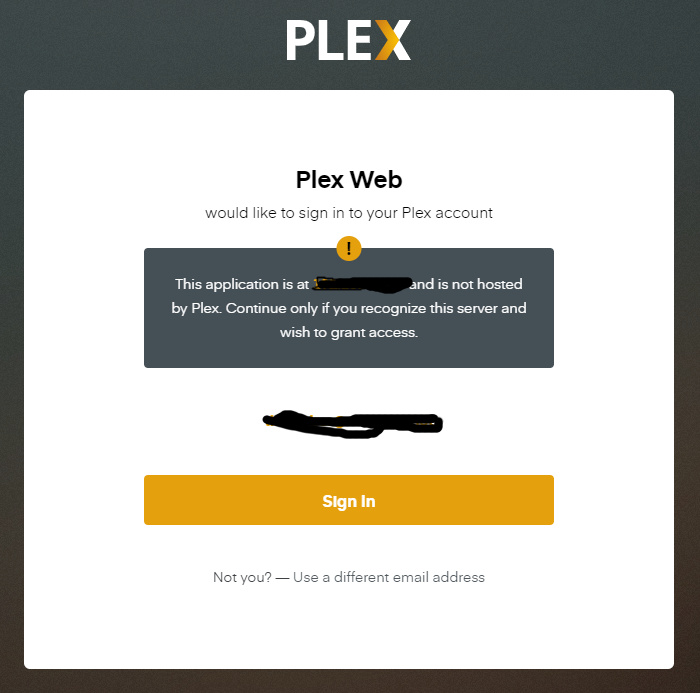
YOU SHOUL BE ABLE TO TEST IF THE CONNECTION IS LOCAL AND NOT DISPLAY THIS MESSAGE!
I AM A PROGRAMMER AND IT IS A TRIVIAL THING TO DO!
WHEN CONNCETING USING 192.168.XXX.XXX:32400/web WE SHOULD NOT SEE THIS!
I’m sure there are Plex servers on unsecured WiFi where your suggestion would be problematic.
OK, so there are some people who are not that smart.
How about a check box on the dialog that states “do not show again for this server”?
@TimNaber you can achive this with some settings within plex. I done this a while ago to make sure I can access plex when either my internet is down or plex online services are offline.
Once done restart plex for good measure and 192.168.x.x:32400/web/index.html should work without authentication where 192.168.x.x is the IP of your server running plex.
Just curious, what sort of help are you expecting to receive when you use every post to call somebody else’s actions stupid?
That did not work
Is your browser clearing it’s cache when you close it? If not, it should remember and not give you this message again. If it does, then having the dialog like you said wouldn’t help since it gets saved on the browser so that setting would get cleared as well.