My thread is a continuation of topic # 139565
`QNAP NAS, using the @Transcode folder` https://forums.plex.tv/t/qnap-nas-using-the-transcode-folder/139565
Idea
I’m trying to make Plex recognize and merge (auto) pre-transcoded versions of home videos to stream them on LG smart TV (webOS) smoothly. The original recordings are of 4K (with fairly high bitrate, GoPro Hero8 Black) typically which therefore get hardware transcoded in the background down to 360p and 720p by QNAP’s native Multimedia Console. This happens automatically upon file addition.
Problem
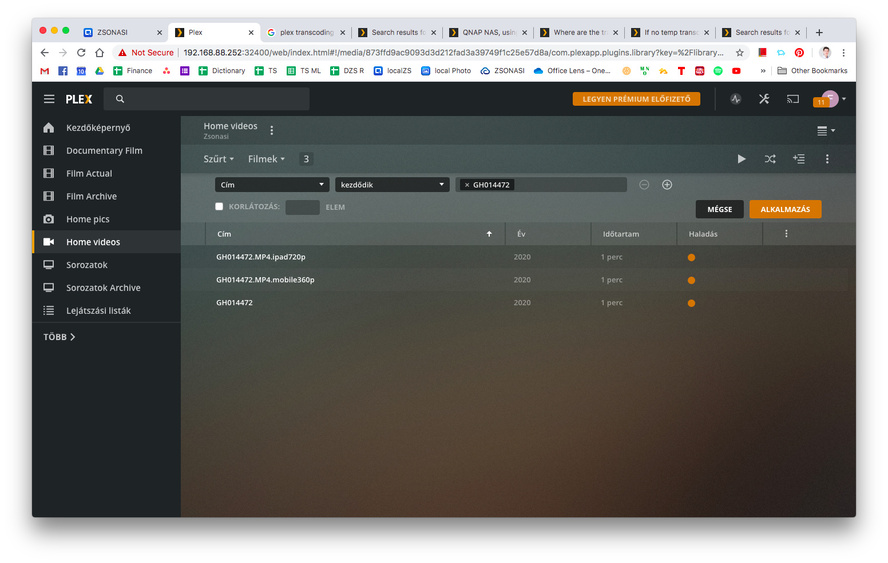
Now, what I am seeing is that both the original and the converted versions of these videos appear within the Home videos library - completely unnecessarily. For instance I observe 3 instances of my single GH014472 footage.
- GH014472
- GH014472.MP4.mobile360p
- GH014472.MP4.ipad720p
Workaround
Surely, manually merging any amount of related files is possible but definitely not something I want to do every time I get home and upload files to re-live my freshest memories.
Question
Now, I am wondering what I should change so that plex auto-merges corresponding transcoded versions of my home videos? Where should I tune and what? Ultimately, is there a way to set QNAP’s @Transcode sub-folders as proxy for converted versions? Shall I perhaps change the suffix policy (like mobile360p) by QNAP Multimedia Console?
Server Version#: 1.18.4.2171
QNAP TS-251A
QNAP QTS: Version 4.4.1.1146 (2019/12/06)
