I’m loving this beta version - thanks. The ability to search for subtitles is great as is the playing next episode feature in tv shows and to have live TV is awesome - any chance you can add the channel name in the tv listings in the future?
wow, didnt know about the functionality to search for subtitiles, need to check it out tonight.
My faith in plex has been restored with this beta version, i was getting frustrated with 4k files and subtitles and the transcoding process.
I still like how you can change subtitles or audio in the Orca version without stoping playback, i wish this is included in the future
Is it possible to add the feature that most other apps use whereby content displays above the app on the TV home screen not in Plex itself. So you could have the next episode of say three shows that your currently watching and a few of the most recent movies added. This way you don’t need to do the extra step of loading up the app.
This is great news, just found this thread. I am thinking about installing the beta but was curious what the general expected time frame from beta to release is. Since it has been over a month since original post, if it is expected to come out of beta in a week I might as well wait.
The iOS app shows the channel number and name in the Discovery view below each program. Can this be added to the Samsung app?
Thanks for this - such a shame that there’s no guide though. There seems to be a lot of buffering unfortunately - although it works fine on the link to the (dlna?) HDHOMERUN in Samsung.
A great start - the quality is so good from HDhomerun - as yet plex on samsung just can’t cope with it.
I’d also be interested to hear when this is coming our of beta…
has ( sofar ) solved buffering/freeze problem i had with the standard app. Thanks a mill
Jimmy/Copenhagen/DK
I’m so glad I accidentally found this topic this is great I can’t wait to install it later thank you so much I’ll let you know how it works out very excited
A few times now after a show has finished I press the back button and it returns me to main menu but the app is locked up won’t let me do anything. Can change source okay but if I return to app it’s still locked up need to hold the back button for few seconds to force close app.
- PMS Version: 3.73.1
- Device Model: UE49KS7000
- Tizen Version: 2.4.0
- App Version: 3.70.0
I’m a new Samsung TV owner, a UN55NU7100. What’s the best format/codecs to use with either the standard Plex app or this beta? Or, what should I avoid? I’ve tried a few remux-ed files that start fine but start to drop frames like crazy after 10 minutes. The server machine wasn’t working hard at all. This happens on the standard app and this beta version. Also, DTS isn’t working properly… Audio is routed to a Sony receiver via optic cable. It’s older, only DTS capable, nothing newer.
I’d like to take advantage of the UHD and HDR the TV is capable of just so the wife sees the value in the new purchase.
PMS Version: 1.13.8.5395
Tizen: 4.0
Plex for Samsung: 3.70.0
Did you ever get an answer to this question? I also have a 2015 model so the beta won’t work. Will the full release work?
Thanks
Yes, I have one also. Running Tinzen, but version 2.3, and not 2.4. Can’t be thath hard to let the app also work on our version??
Having tried 3.66 and not enjoying it at all, I just tried 3.70. It failed to play the very first file I chose (a 4K remux of a Harry Potter film). This was playing fine using the existing app from the Samsung store. Sorry for the lack of details - if I get around to installing another version I’ll post back with the required debug stuff.
I really don’t like the vertical browsing and menu navigation at all, and another vote for the ‘X’ in the middle of the playback buttons being awkward. Feels like there is so much less content on the screen now with this design. It’s showing the music tab even though I have no library for music.
Hopefully we can choose not to upgrade, before this leaves beta?
Did you solve the Secure connection issue I cant run plex app with Secure connection on PMS turned on I have the plex version that is not the beta on my Samsung 2016
Hello
just installed the new Plex v2 and it is still the same problem as the original one.
i have a Samsung Q8FN 2018 TV and with the new V2 it still can’t play 4K videos. it transcode them all and it buffers. I have a NVIDIA SHIELD device and the Plex on that plays all my $K video “DIRECT PLAY”
the new interface is nice and smooth but the playback for 4K has to be verified. no reason why a 2018 model should buffer 4k videos
thank you
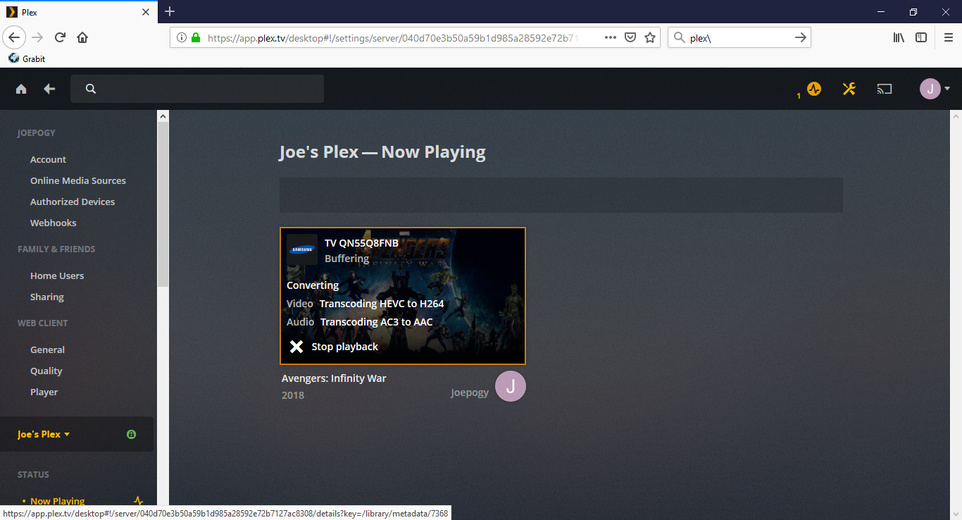
Without sample files or logs, there’s nothing I can do. All 4k files I’ve tested with work fine.
Are you playing with subtitles? If you’re playing PGS/Vobsub subtitles, it’ll transcode because Samsung doesn’t support Image-based subs. If it’s srt subtitles, there’s a bug where after a while of playing a video, it switches over to transcoding (this is fixed for our next Samsung released). If there’s no subtitles involved, we’ll need sample clips or logs to figure out what’s going on.
thank you for responding.
i will double check about the sub titles. what is the best way to retrieve logs?
i will send to you
hi there sLumpy
i did what you asked and it does work fine. it plays direct play. i tried all my 4K. it does transcode DTS 5.1 though. will it be soon the release to fix the subtitles? looking forward to it.
thanks a bunch
Image-based subs will be burned in and transcoded. There’s no way around it because Samsung devices can’t natively play them. I suggest downloading .srt subs for the videos you have, using the built in subtitles on demand or manually looking for them.
