I just reinstalled windows 10 on my computer and transferred my Plex media server folder back over. It seems ever since I did the reinstall that Plex has been becoming unavailable every hour or so. The only way to fix it is to either restart the computer or end every plex task in the task manager and reboot it. Plex is still open, and exiting the icon in the taskbar does not work without ending the tasks in task manager. It’s really quite confusing and frustrating.
My computer is not set to hibernate after any set amount of time or anything, not sure what is causing it to shut off. With Plex still running on the computer, it just goes away and is not even accessible locally (http://127.0.0.1:32400/web/index.html) until all Plex tasks are manually ended and rebooted or the computer is restarted. Remote access is no longer working either, and whenever I actually do get the server working it doesn’t show up on my iOS devices (iPad and iPhone) and on the Roku it no longer goes directly to the server page with all of the libraries and instead opens up on “Personalize Your Home Screen” page and requires you to click down and click on “more” to pull up the server along with its libraries.
Anyone know what’s going on here? Please help, thank you!
Server Version#: 1.15.8.1163
Player Version#: 3.100.1
If you intended to re-instate the same server instance after the windows 10 re-install, you would have also needed to re-instate the registry settings for Plex Media Server
on 29th May a new server instance was created
There could be a mismatch between cached data in the Plex Media Server folders (default location %LocalAppData%\Plex Media Server) and the registry settings
Is the port forward in the router for public port 50000 still there and routed to 32400 on 192.168.1.3 ? and is manually specify port selected on remote access settings and 50000 entered as the port ?
All i can suggest is signing the server out (settings/server/general), signing out of Plex web and then restarting the server and signing into plex web and reclaiming the server. You may need to close and re-open the browser after the claim for the server to be accessible
If problems persist, get screenshots of the problem and server debug logs
Hi @sa2000 thanks for trying to help me out here. So whenever I did the fresh install, I did move the Plex Media Server folder back and import the old registry key back using regedit. So that shouldn’t be the issue as I’ve done it this exact same way before and had no issues.
I did the server update on the 29th and then reinstalled Windows 10 and I didn’t copy the Plex Media Server folder over to my external drive or the registry key either until after the update so I don’t think that’s the issue but I could be wrong.
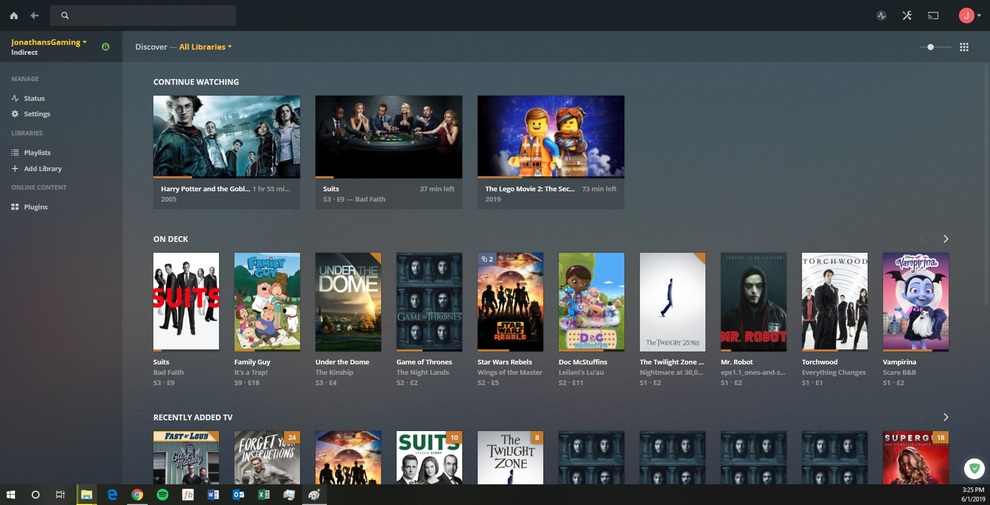
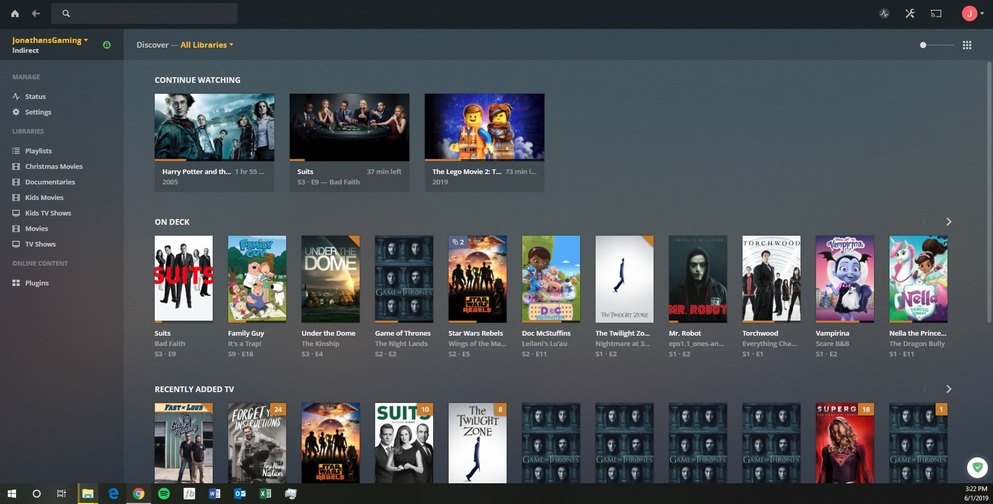
The remote access settings are exactly as you listed so not sure what’s going on there. I did as you suggested and signed the server out and then signed out of Plex Web and closed out of the Plex Media Server on the taskbar and then closed out of chrome and restarted my computer. Reclaimed the server after I signed back again and the one thing this did fix was on Plex locally (http://127.0.0.1:32400/web/index.html) it no longer shows as “indirect” and now shows as “nearby” although on Plex Web (app.plex.tv) it still shows as indirect on the same computer.
This also fixed the issue with the iOS devices so we’re making progress! What do you suggest as next steps?
Was this on Google Chrome ? I would expect it to show that way on Microsoft Edge but not chrome. Microsoft Edge has some security block on externally hosted apps connecting in.
If it was Google Chrome showing as indirect connection when the server is accessed on the same computer via https://app.plex.tv then would like to see Plex Web verbose log and server verbose log as well for that time.
Let me know if it shows indirect on chrome and I will give details of how to enable web logging
Need to verify that this is working. I could not get through
If you go to web page canyouseeme.org on the server and enter public port 50000, does it show success or fail?
If it is failing then need to check router port forward and DHCP reservation to forward 50000 to 192.168.1.3 and verify that the server is still on 192.168.1.3
Other thing to check is firewall - see what rules you have
As minimum there would be program rules allowing the Plex Media Server exe files. You may need to add inbound port rule
Protocol: tcp
local port: 32400
remote port: any
remote IP: any
Programs: any
Action: allow
check also that the network connection showing in windows as Private Network and not Public or Unidentified network
Ok so yes this is on Google Chrome, not Microsoft Edge. And it is still showing as indirect so that would be great if you could guide me on how to enable and retrieve the logs.
So first off remote access is now fixed from a very simple mistake that has caused me inconveniences for well over a year. In the Plex port forward rule on my Spectrum router in the external host box, for some dumb reason, I had inputted my own public IP address instead of leaving it blank.
So now leaves the issue of it still showing up indirect on Google Chrome in the Plex Web App on the server computer and as I was typing this it is bouncing back and forth between indirect and nearby on the local Plex app (http://127.0.0.1:32400/web/index.html) now. Also, every other time I’m accessing it locally or from app.plex.tv it will give me errors such as:
“The dashboard is empty. Browse and manage your libraries using the sidebar.”
“The server is currently unavailable right now.”
“There was an unexpected error loading the dashboard. Please visit our forums if you continue to experience problems.”
The logs show the indirect connection was instigated at 15:21 - about 4 minutes before the oldest log entry in the Plex Web verbose log; The Plex Web logs which were captured at 15:27 go back to 15:25 - so I cannot see why Plex Web decided to start the indirect Plex Relay connection
Was Plex Web window already up when the server was restarted? It could be a timing issue going back to when the server was relaunched
What happens if the server is relaunched and then Plex Web app is started a couple of minutes after?
Basically to understand why it is indirect I need to capture the plex web logs for when the indirect connection is established. In this case it was 15:21. There would be benefit in getting logs again later as well.
The other issue that the plex web log shows is that it was not using a token for some of the 127.0.0.1 requests to the server and as a result failing to get through. I have seen this arise before - but was after a server claim - in your case it was not. Closing the browser tabs to Plex Web and re launching normally resolves that. would like to see logs taken initially and then again after doing that
(please in future do not crop screenshots as I would like to see the url at the top - and the time (good that you did not crop the bottom !)
Ok, I’m trying to follow you here, forgive me if I’m off track.
So no the Plex Web window was not already up when it was restarted and I tried starting the Plex Web app a couple of minutes after the server had been restarted as you suggested but it is still showing up as indirect.
I also tried closing all Chrome browser tabs and restarting the server and then relaunching Chrome which seems to have eliminated the indirect issue which is good news! Although I am still having some pretty bad load time issues both locally and on Plex web which I’ve never had before, and I have 300 Mb/s down from my ISP so that shouldn’t be an issue.