Good morning community,
I’m new here, if my topic ended up in the wrong area, I apologize and ask for it to be moved.
I’ve been using Plex for some time and have now encountered the following “problem”:
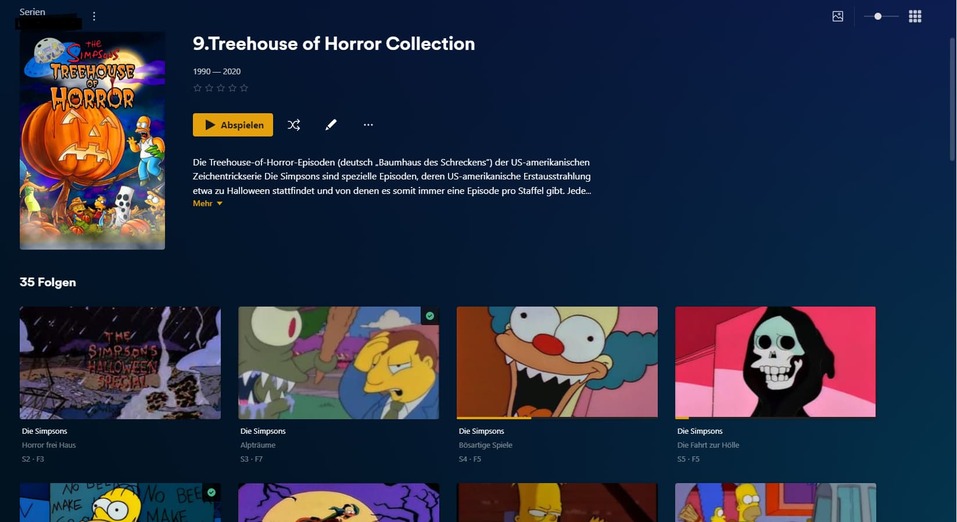
I have compiled certain episodes of a series into a collection. Plex Web or Plex Server on the PC shows the contents of the collection as desired, video thumbnails are generated from the episode with the exact title underneath. Unfortunately, this does not apply to the app variants such as TV/Tablet/Smartphone, where I am shown the same thumbnail for each episode, namely the cover of the series and without an exact title, so that you first have to “go in” for each episode. to find out more.
Do you have an idea how I can change that?
I have attached two screenshots
Unfortunately, you cannot.
Colections always use posters. But TV show episodes don’t have posters. So the client is falling back to the season or show poster.
thanks for your response. Maybe I can get around this by renaming the episodes in question, e.g. 00X01, so that Plex lists them or collects them as special episodes. So I would then create a collection and add this “season” with the specials themselves rather than individual episodes. I hope I haven’t made any mistakes in my thinking.
That won’t work. Episodes are episodes – special or not.
The problem is the collection, not the tv show.
All right, I understood. Thank you, you saved me a lot of work that I would have done unnecessarily. Then I’ll have to come to terms with the fact that you can’t have everything.