Server Version#:
Player Version#:
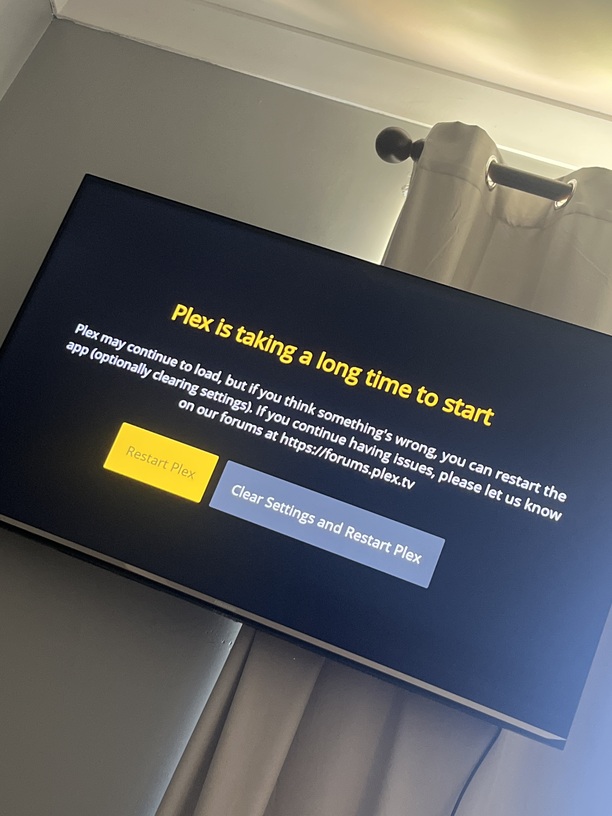
Plex wont work has been working for ages but stopped work today. I have factory reset the tv and still getting the same results.
Me too mate, hopefully plex fix this soon!
Good to hear it’s not just me
Plex on my Hisense has also stopped as the app is just starting. Tried all the usual remedies but good to know it’s not just me. Plex help us please
Me too,
Same with my Hisense TV
having exact same issue. glad not just me. but would love a fix / update
Same here, there was an update to the u4 app yesterday and it’s basically wrecked the TV
@markus101 please can you look to roll back the previous update, it’s basically nonfunctional…
Thanks for the ping, I’ve located the issue and it should be working again after restarting the app. I’ll also be investigating what we can do to prevent the same thing from reoccurring again in the future.
Wow, thanks for the quick response. Only issue now is the covers of items don’t show, and when you select them you can’t see anything. The theme music plays on TV items, but you can’t see what the thing is. TV, you don’t seem to be able to play the thing you’ve selected. Movies play, but you can’t see the cover.
Hopefully a quick fix…
Ok, if you go into settings, advanced, and set “allow insecure connections” and prefer insecure connections" both to never the covers come back 
Ah, but when you go onto TV items you still can’t see anything, no episode list etc.
@markus101 also found when you go into libraries you can’t see anything at all 
Ok, so restarted my pms and it’s now all working. Don’t know if it’s something you did or the restart. But we’re back in business 
Thanks @markus101
I think it was a bit of both.
There was a caching issue on our side that prevented the app from loading correctly, once that was resolved the TV cached some resources, which were invalid (it had HTML cached where it should have had Javascript), I’m not sure where it got the bad response from, but on my test TV it didn’t refetch the correct content until after I told it not to cache things. In your case restarting the app or TV might’ve kickstarted the cache refresh (or it just expired and the TV did it on it’s own).
Glad to hear it’s working for you!
