Plex Server: Version 1.15.3.876
Player Player: Web Version 3.83.1
There were a bunch of albums I deleted, but Plex wouldn’t remove them. So I pointed the music directory to a blank directory, and then back to where the music actually is. Now the albums that are gone have trashcans on them, but so do the entire artist they’re under. Now I can’t shuffle play or start from the most popular songs on that artist from the web player. Everything looks and plays fine on the Android player.
If I try to empty the trash can I get, " There was a problem emptying the trash.". I tried manually deleting one the these phantom missing items, and it worked. But I don’t want to do all of these manually. Plex Media Server Logs_2019-04-10_17-55-11.zip (5.4 MB)
Try restarting the server and see if that helps.
I’ve restarted a number of times, and I’ve tried the Repair a Corrupt Database as well
also check your folder/file permissions, improper permissions can cause weird errors.
I’ve checked file permissions on the database files and they aren’t read only
not the permissions of the database.
the permissions of your files with the trashcan
I’ve changed all my songs over to not be read only, but it still won’t empty the trash
Edit your library again.
On the Add Folders tab, make sure that all of the paths (if there are several):
- are valid
- available/accessible
-
don’t point to folders which are completely empty
My music library only has one master directory added. It’s also located on an ssd connected to my motherboard.
The drive is responding well, and new music adds fine to the library
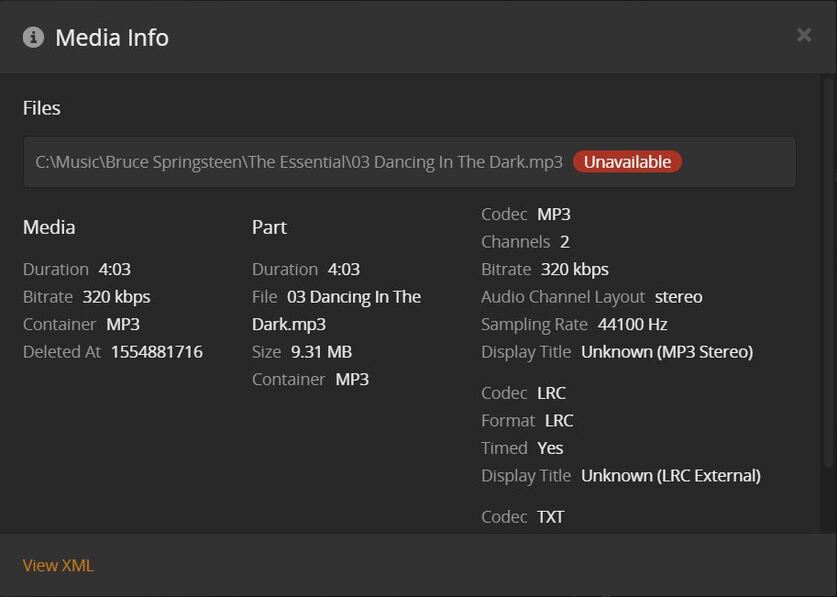
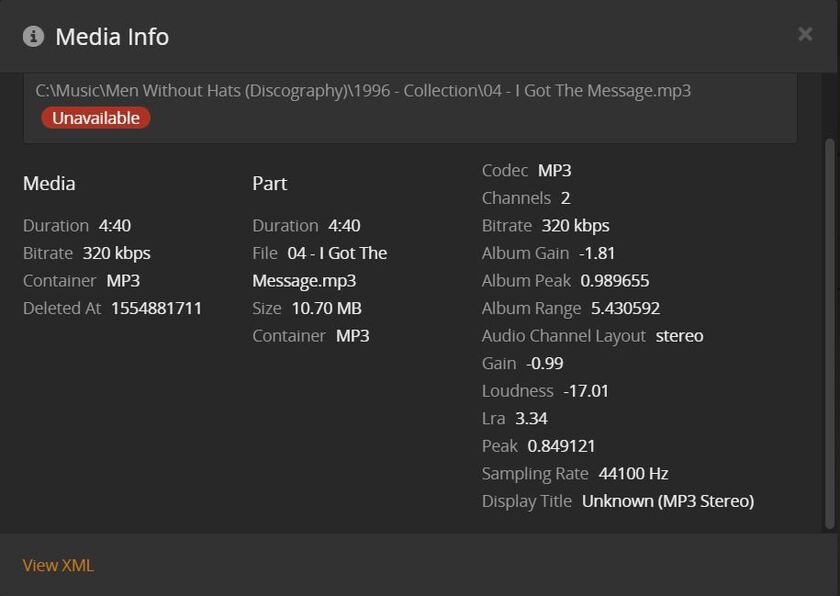
Please make a screenshot of the Plex media info of such a “trash-canned” song.
Here are three different songs with the same problem
OK, the ‘deleted at’ key says these tracks were explicitly deleted at Tuesday, 2. April 2019 16:15
Normally, ‘empty trash’ should remove them from the Plex library.
Why this doesn’t work needs to be investigated.
First, try using a different web browser,
then try to use the hosted web app instead app.plex.tv
Don’t try to empty the Plex library trash during the Maintenance period and also not while Plex is busy with updating libraries, recording TV or transcoding media.
Have you ever started Plex server ‘As Administrator’? Because if you did, then some files/folders in the Plex data folder might be now write-protected and cannot be changed.
As a last resort, I’d try the database repair procedure:
https://support.plex.tv/articles/201100678-repair-a-corrupt-database/
I’ve tried both Firefox, Chrome, local web app, and the hosted web app but still the same.
I don’t believe I’ve ever run Plex as an administrator
I tried the database repair before when this first started happening, and I tried it again just about an hour ago. Still the same.
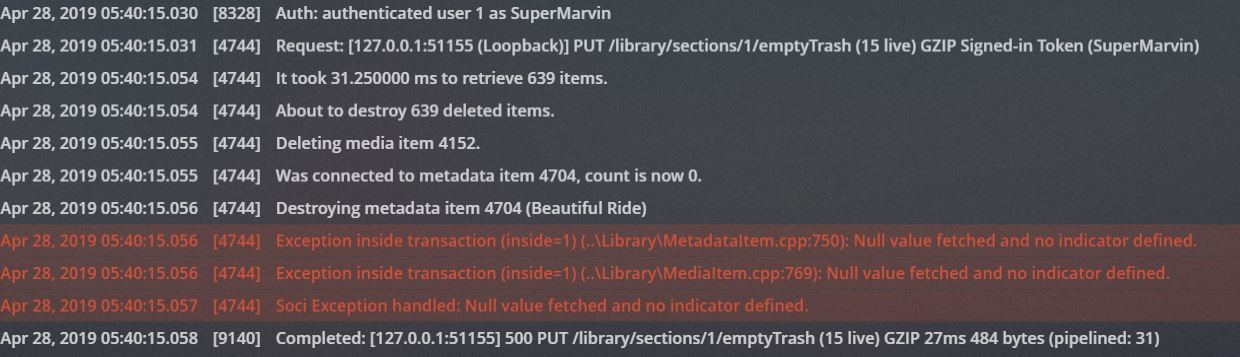
If it’s any help this is what the console spits back at me each time I try to empty the trash,
I tried your steps with the reboot, but I’m still getting the same result and the same read out on the console
Here you go. The database files were too big for the forum upload, so I used Firefox Send instead.
[moderator edit: link removed]
Thanks for the database.
Here’s what our expert has found out:
“some weird data in the db for the music track Beautiful Ride - it is track 14 of album Walk Hard:The Dewey Cox Story but has the parent as the artist Dewey Cox and not the album entry
Does the user remember any specific actions he did for this ? or any db manipulation?”
Plex was splitting the album into three albums, and I wanted to change the artist from John C. Riley over to the fictional character Dewey Cox. I right clicked on the files went to Properties>Details and then changed the values there. Changing these didn’t seem to affect Plex so I manually made both of the changes myself through the Plex web app.
Aside from that I don’t really recall any more interactions
Edit:
I don’t know if this information helps. I just noticed when I search for “Dewey Cox” in the web app’s media where it lists the number of albums for the artist it thinks there’s an extra album under Dewey Cox, but the number of albums is correct when I actually click on the artist.
Also I tried deleting the song causing the problem. It still wouldn’t empty the trash after that.
I edited the database according to these instructions:
shutdown PMS - save copy of the db. Open database with product like SQliteStudio (that is what i use). Open metadata_items table. Find record with ID 4704. Edit the parent_id from 4697 to 5548. if it does not, then re-instate the saved copy of the db
I’ll send you the download link per PM
The developers are very interested in the exact steps which lead to this situation…
Do you remember them precisely?
Did you perhaps perform them while the library was still in the ‘scanning’ stage?