Server Version#:
Player Version#:
Tuner Make/Model:
Guide/Lineup name:
Using XMLTV?:
Channel number/Name:
<If providing server logs please do NOT turn on verbose logging, only debug logging should be enabled>
I recently started using Xteve as a “pseudo antenna” so that I can use my IPTV service.
I can get Plex to recognize most everything and can even watch programming using my IPTV service.
However, when I try to record I’m not seeing what I want. For instance, if I want to record Forensic Files I select Record and all instances of Forensic Files is selected. Is there a way to only record one episode? How about scheduling a few episodes while ignoring other airings?
What is the process you’re following to record a show?
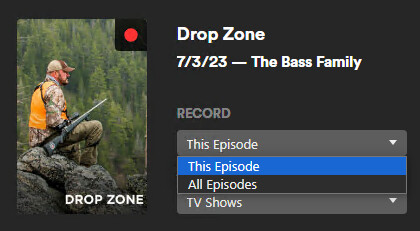
When I select a show to record it pops up a dialogue and the default options is “This Episode”. I have to manually change it if I want “All Episodes”. Here’s a screenshot, but “This Episode” would record only that specific episode you’ve selected. I chose this example by going through the guide but it is the same regardless how I try to record. It is also the same regardless of source (e.g. xteve, antenna, etc.).
That’s exactly what I’d expect to see but that’s not what pulls up. While in the Guide when I select Record I only get the option to select where to save. What I did find, however, is when I go over to the Browse tab I can then select which episode to record whether it be the one currently airing or all episodes as your screenshot shows. The problem there is that only 2 channels are populating the Browse tab even though I have “All” selected for my channels. I’ve refreshed my guide a couple times now and that doesn’t seem to help any.