I’ve been loving the new Plexamp! I have a question about these two options in settings, seemingly both having to do with setting the download quality.
In Settings > Downloads, I have the quality set to “320kbps” (assuming mp3?):
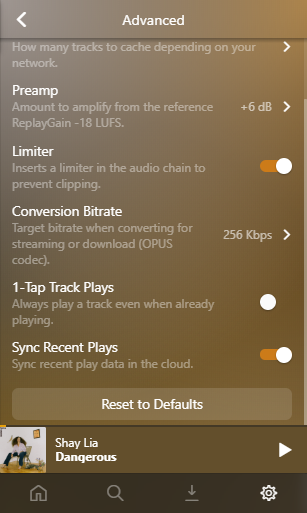
But in Settings > Advanced > Conversion Bitrate, the quality is set to 256kbps opus:
However, the final download quality ends up being the opus 256kbps (source material is 44.1khz/24bit flac):
If I leave the “Conversion Bitrate” under Advanced settings at 256kbps, but set the Downloads quality to 96kbps, I then get opus files at 128kbps, which neither setting specified.
I’ve experienced this behavior on both Windows and Android. So for clarification, what is the difference between these two settings, and how are each being used?
Okay, I understand then what the options are meant to be. Maybe having a bit of text on the Downloads settings page to explain that “music above this quality will be transcoded to the bitrate found in Advanced Settings” or something similar? Otherwise that makes sense! Was just a little thrown off by the 96kbps problem. But great work, hope to see more!
 I have a question about these two options in settings, seemingly both having to do with setting the download quality.