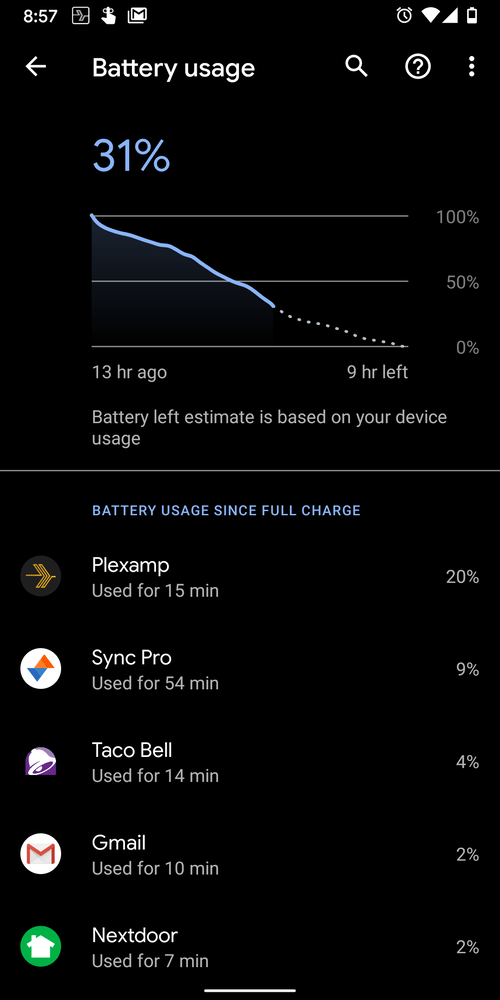
I noticed my phone (Pixel 3 stock) was majorly low on battery tonight. Since I’m working from home, like many I’m sure, my battery is usually 50-60% or more left at the end of the night, but today I’m down to about 2-3%! I just got the April OS security update a couple days ago and thought maybe it was something to do with that, but I had no problems yesterday. I tried to think what changed since then and of course the one thing I added was Plexamp! Sure enough I went in to the battery settings and looked at my usage and Plexamp has used 36%! I installed the app this morning, poked around with it for ~10 minutes, and used it during a short 10 minute car ride this afternoon. That is pretty much it, maybe 20 minutes of usage. And yet it has chewed up a huge chunk of my battery! Anyone else getting major drain from the new app?

Make sure the visual stuff is off. It specifically states it will drain the battery.

Yes, mine too. I’m also on a stock Pixel 3XL and it is caining the battery
I don’t care about the visualization stuff, have never used it, and it is turned off on mine.
Even if it were on, it shouldn’t affect battery to this level when I’m not even using Plexamp!

Yeah, I noticed this after trying PlexAmp yesterday on my Pixel 4 XL. My phone reported that I used the app for 3 minutes, but that it used 8% of my battery. Amazing!
Yeah, seems a bit higher for me too, compared to the normal Plex app: Tidal HiFi streaming while screen off consumes an average of 11% per hour (data from the last 8h)
I didn’t use Plexamp yesterday and it seemed to mostly behave itself (didn’t show up in my Battery Usage). But I had to drive somewhere again today so I ran it for less than 10 minutes probably and apparently that activated it again somehow to start draining battery.
I noticed the notification never went away on its own either. After playback is stopped and if playback is not resumed in 10-15 minutes then I think it should dismiss its own notification. I’ve seen plenty of music apps do that. I let it sit there for a while to see if it would eventually, but after a few hours I just dismissed it on its own. Still didn’t help with battery drain anyway as that continued, but at least it wasn’t sitting in my notifications anymore.

Had to uninstall from my Pixel 3xl today due to the battery drain issue. From reading this thread it appears this may be an issue with stock android, used on Google phones. Can we have a reply from a mod to acknowledge the issue please?
I really want to use this app, I use plex for everything at home except music! I’ve been a monthly plex pass user for years now and am highly invested in your product. Can you please help with this issue?
Hi @deusxanime, @Thatgeeza and anyone else experiencing this!
I’ve been using Plexamp on my Pixel 4XL for a few months now, and haven’t personally seen this issue at all. That’s not to say it’s not happening though, and I’ve raised the issue with the relevant people to investigate. I will let you know once we know a little more! Meanwhile, if anybody’s able to help by providing steps to reproduce this, it would be greatly appreciated!
Thank you for your reply.
It was a fresh install with no changes to the settings at all. Background battery usage was turned off. I streamed music for 7 minutes on my WLAN before checking the battery usage. Can’t think of any other steps I took.
But if I can be of any further help, please just let me know and I’ll try to answer any questions that I can.
Thanks for the offer to help! Battery drain issues are often a difficult one to diagnose. I’m going to go mobile (while still in lockdown lol) for a few days to try and pin this one down 
After 7 minutes the battery usage was 7%, or was it after some time in the background that the usage crept up? (trying to gauge if the problem is idle/background battery misuse or a lot of foreground CPU time).
I used Plexamp on my Pixel 3 pretty much as I said in my posts. When I first installed (launch day), I fiddled with the new app, checked settings (adjusted a couple such as max bit rates), and listened to a couple songs for probably 10-15 minutes total, at home on WLAN over phone speaker. Then later that day I used it for about 10 minutes in the car on mobile data of course, listening via bluetooth. I didn’t use the app at all the next day and it seemed to have finally calmed down since I didn’t see any usage by it that day. The third day I again used it for about 10 minutes in the car on mobile data via bluetooth and after that the battery started dropping as usage was up again as you can see in the screenshot.
The battery usage wasn’t all at once when I was using Plexamp in those short 15-20 minutes. It continued to creep up through the day even though I wasn’t actively using the app anymore. Possibly related, but as I said the notification didn’t go away on its own either (not sure if it is supposed to) and eventually I just swiped it away a few hours after I stopped listening.
A mostly unrelated thing - noticed in my car when listening via bluetooth that I can pause music and if I start it immediately up again it seems to be ok and respond, but if I leave it paused for a couple minutes (say to order food or pick it up at the drivethrough window) then it seems to not respond to the play button on the car anymore. I have to unlock my phone and open the app to resume playback from there instead. That seems odd in that if it is continuing to run and chew up battery like above, the least it could do is continue to respond to commands!
Noted, thanks so much for the extra details!
Hey @SimonXCIV ! I should have come to report this yesterday, but put it off until today.
This is actually a problem with the normal plexapp sometimes too.
The plex process is preventing android from ever allowing the CPU to enter deep sleep. I did not start plexamp today, but the audiomix had an active wakelock 100% of the time.

Thanks for the info. I’ve passed it on to the team
Yep, thanks for the detailed info! The AudioMix wakelock has given us a lead which will hopefully lead to a 

