If you can reproduce, I’d actually be interested to see debug logs from the app after it’s been idle for a while to see if there’s anything at all (suspicious) in there.
@aubrey.wodonga @SamFromPlex @elan
I tried to recreate the situation and it seems to be pretty consistent.
Took my phone off the charger at around ~8am, at 100% battery of course. Didn’t really use my phone much through the morning. Here’s how it sat at around noon:
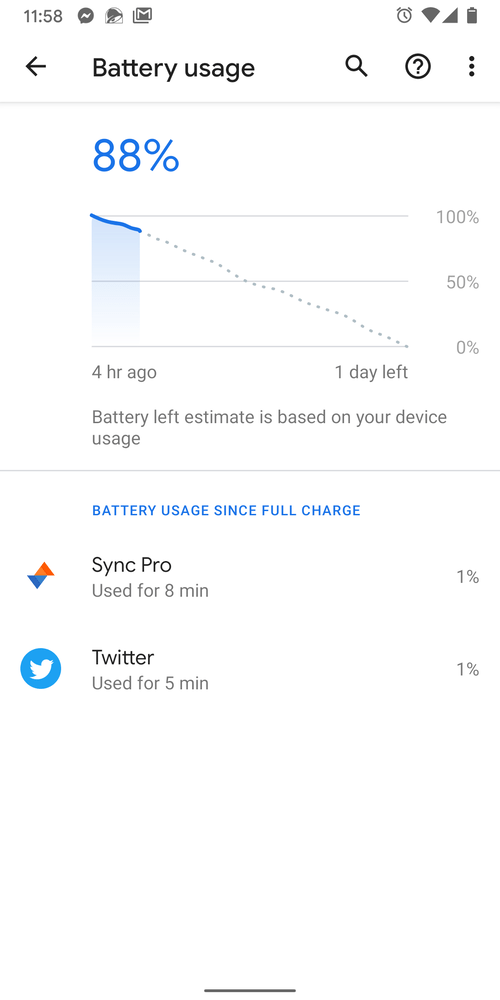
At that point I ran out for something around lunch time and used Plexamp for ~10 minutes in my car (btw, still seeing the problem where if I pause it using the car’s radio controls for more than a few seconds, I can’t resume using the car’s control anymore and have to unlock my phone and resume playback from within Plexamp or its notification). When I got home it was stopped/paused and I left it.
I checked just before ~5pm and the Plexamp notification was still there. I swiped it away at that point to at least get rid of it. Here’s how the battery was looking then:

I was on Reddit (using Sync Pro) quite a bit in the in the evening, so that app’s usage was up as well, but Plexamp’s usage also continued to climb throughout the evening. Fell asleep while putting the kids to bed (whoops!) and when I woke up at ~12:30am it had just about totally drained my battery at that point.

Exported an app log at that point, hopefully it is useful for you.
277779261565258.zip (116.6 KB)
Thanks @deusxanime for the extra info, we are just testing a fix. I think the workaround for the moment is to force stop Plexamp when you pause the music (not ideal I know, but we just want to make sure the fix doesn’t cause some side effects before unleashing it).
btw, still seeing the problem where if I pause it using the car’s radio controls for more than a few seconds, I can’t resume using the car’s control anymore and have to unlock my phone and resume playback from within Plexamp or its notification
Yeah that’s on my radar to look at, same problem with bluetooth headphones. I can repro just need to find a suitable fix 
Thanks for looking into this stuff!
The pause/resume thing isn’t a huge deal, but with all the new car phone laws coming out nowadays, it isn’t ideal to have to take out your phone to start playback again. Technically illegal in some states and countries now. 
Not sure if this is helpful, but just wanted to point out something.
I charged my phone overnight (I use the Pixel Stand wireless charger, if it matters), as most people probably do. I didn’t ever do a “Force Stop” on Plexamp or kill it or anything else with it at all, just left it doing whatever it was. I also didn’t reboot the phone either. Just charged it overnight and took it off in the morning like any other night.
I’m not sure if something happens where the OS does some cleanup overnight while charging or what, or if maybe Plexamp finally times out, but it seems to stop running whatever is draining the battery after doing a charge cycle.
As you can see, there is no sign of it doing anything as of midday today.

Hey @deusxanime, @AeliusSaionji, and everyone else in the thread that reported battery drain issues on Android. Version 3.0.1 has now been available in the Play Store for a couple of days with an important fix for battery consumption. How has it been behaving for you so far?
All seems good here! 
I’ll report back if it starts acting up again, but so far it seems like you’ve fixed it- there’s no more audiomix lock.
( Sorry I didn’t see the message about debug logs until just now  )
)
Glad to hear it! The fix wasn’t mine though, you can thank @SamFromPlex for that 
I tried Plexamp out again today and it did much better.
I used it for ~10 minutes (around noon) in my car like before and then paused/stopped the music. The playback controls/notification did stay up for a few hours until I finally swiped it away later in the afternoon.
Looking at my battery usage this evening, it was #2 and used 4% still, which is MUCH better than the 20%+ I was seeing before. It seems a bit high for only using it for ~10 minutes, but maybe it is because the notification was stuck up and so was still using some?
I’ll try to use it tomorrow for ~10 minutes again and then swipe away the notification right away when done to see if that goes down even more from 4%.

Big up, thanks for the updates!
The notification shouldn’t impact things. When you pause playback the music service will stop after about a minute at which point the notification is disconnected from it.
We keep the notification around for easy access so you can resume playback easily (otherwise I would disappear after a minute which is a bit quick if you are pausing in your car for a fuel stop or something).
Let us know if things go awry again!
Tried it again today and seems to be holding up well! I swiped the notification away immediately after I was done driving around and it didn’t seem to impact battery usage either way better or worse, so there’s that. I’ll mark this thread solved since it was mainly to do with battery usage, but…
Funny you should mention “pausing in your car for a fuel stop” because I still do also have that issue I mentioned earlier which is a bit annoying. If I pause it for a minute or so (or perhaps even less but I haven’t done a definitive timing test), I can’t resume playback from the car’s controls and instead have to get my phone out and resume from the app or notification. Or if I need to go into a gas station or store and shut the car off it is good about pausing on it’s own (an issue I had with the regular Plex app and music playback is that it would just start blaring over the phone speakers instead), but when I get back in the car it doesn’t auto resume playback upon reconnection to the car’s bluetooth or again allow me to resume playback from the car’s control. I have to get the phone out and resume from the Plexamp app or notification. Is this by design or should it work differently? Most music apps I’ve used automatically resume playback if I reconnect to bluetooth within a certain amount of time (or at least have it as an option/setting) and also of course let me resume playback from the car’s controls as long as it hasn’t been so long that the notfication/app has timed out and closed itself, usually 10-15 minutes or so.
I’ve noticed this issue as well. Would be good to have a fix for it.
You mean the battery issues, which should be solved now with the new version?
Or the pause/resume issue?
Pause/resume.
Sorry that wasn’t clearer!
I’m also seeing a massive improvement with battery. Well done!
My thought on the notification. I think it should dissapear if paused for a certain amount of time. For example after an hour it should clear away automatically.
Just been trying Plexamp (3.0.3) on my OnePlus 6, whilst also playing Words with Friends (so Plexamp wasn’t doing any screen stuff ). Within 20 minutes my phone was almost too hot too hold and was visibly throttling the processors, becoming unresponsive and screens jerky. When I shut down Plexamp, it was fine again. It’s still the same, I started Plexamp as I started writing this (2 days 20 minutes to go on the battery, 63%), and you can see on the graph how it’s eating battery charge.Screenshot_20200526-221215|690x1456
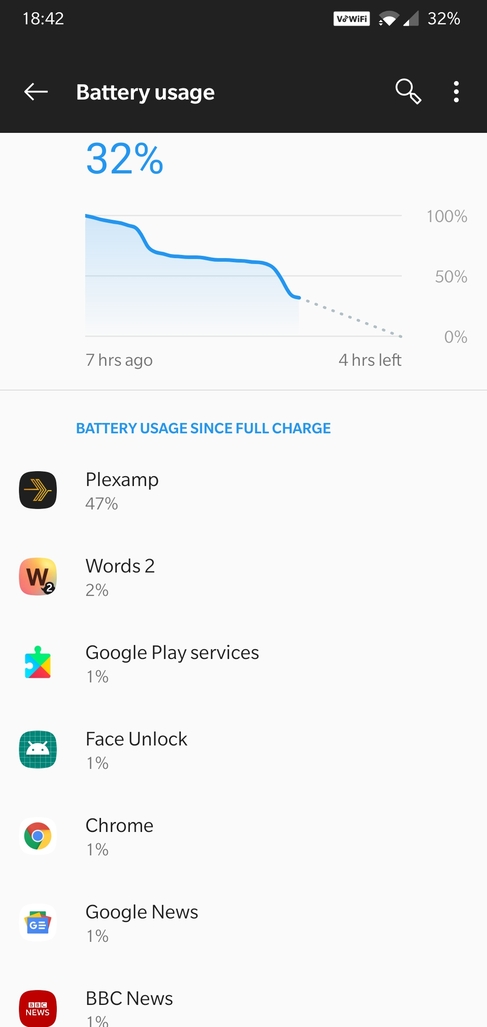
Plexamp on my phone (OnePlus 6 Anddroid 10) is now at version 3.1.0 , but it still converts battery charge to heat at an alarming rate. The screenshot shows clearly the devastating effect on the battery of Plexamp 3.1.0 on my OnePlus 6 /Android 10.
I used Plexamp for two periods while I was in the kitchen, lunch and dinner time, you can see clearly on the screenshot both periods Screen was off, phone was doing nothing else, got very hot both times.
It’s a shame because I like Plexamp.
Pixel 2 XL, android 10. Same battery issues. Hot as hell 
We’ve identified an occasional source of high CPU usage on Android (and desktop), will be fixed in the next release.
Thanks for keeping on top of this!

