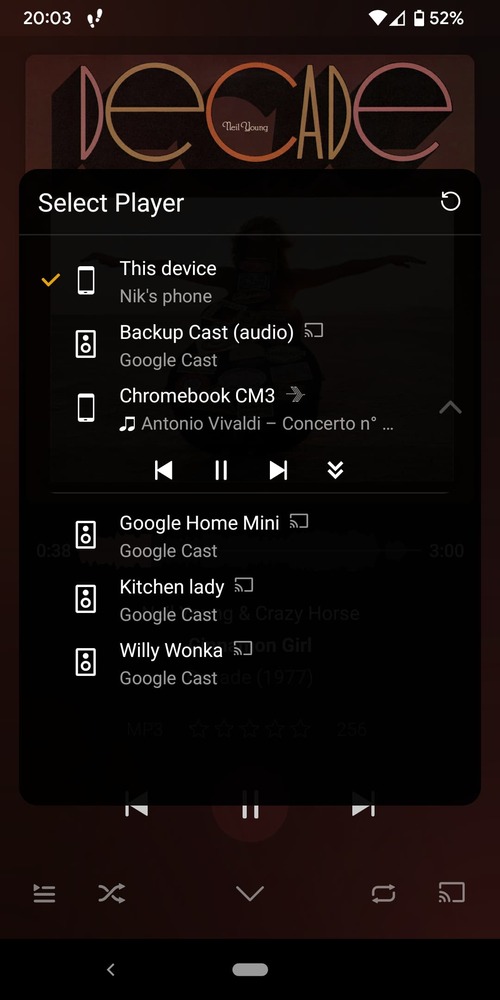
I’ve looked around and the most relevant post is focused on Plexamp clients installed on AndroidTV.
We have two different model Chromebooks, one is a tablet which we use as a music hub. I would LOVE to be able to control it remotely, but the device does not appear among other available devices when attempting to use remote control (through “cast”).
I have toggled remote settings, restarted all devices, restarted PMS, without luck. What’s interesting is the Plexamp client running on the Chromebooks (Android) can remote control other android devices like my phone without issue.
Sorry to hear you were in the hospital, hope you’re doing better.
The Chromebook looks like it’s registering properly:
Mar 16, 2022 21:47:42.929 [Javascript] INFO - Companion: Registering device at 100.115.92.14:52283.
However, the Pixel doesn’t seem to be able to connect to that address:
Mar 17, 2022 20:49:09.237 [0xd68d5cb0] DEBUG - Networking: Completed request 155: (GET http://100.115.92.14:52283/resources) with code -28 (have 0 bytes) in 5001 ms.
That code is CURLE_OPERATION_TIMEDOUT which means it never managed to connect. So I would check that (a) that is the correct address to be registering and (b) that you can reach it from whatever network the controllers are on.
Here is a screenshot of the network interfaces on the Chromebook from the logs. It seems they sandbox the Android apps with virtual IPs for security and don’t let IP calls through. See Jim Dantin’s long comment in here (couldn’t see a way to direct link on mobile): Chromebook Community
Not sure how to address the issue but there aren’t any related network configuration options in Chrome OS (unsurprisingly).
Random thought: hospitals, hotels and other public WiFi installations usually activate “client separation” on their networks.
Thus preventing different devices within the same network from contacting each other.
Something changed with the most recent update as I can now see the Chromebook listed in the cast devices from the phone. It still won’t allow sending a song…
INFO - Companion: Registering device at 100.115.92.14:52283.
The phone claims to be enable to reach it:
WARNING - DEVICE: Player connection http://100.115.92.14:52283 didn't work for Chromebook CM3: HTTP status -28
Perhaps they are on different subnets?
The reason you’re able to do basic remote control is because of a feature we added in v4.1 which allows some control via the cloud, which works around local network issues.
Only one subnet in use on my network. What else can I provide to make this work?
Pausing and skipping playing tracks using the cloud features is helpful, but ideally users could remote control the Chromebook similar to an Android device.
Chrome OS puts Android apps in an isolated network, where they get these IPv4 addresses. Outbound traffic goes through a layer of NAT translation. Android apps on Chrome OS aren’t expected to be IPv4-reachable.
IPv4 traffic will pass through an internal layer of network address translation (NAT), and IPv6 unicast traffic will be routed through an extra hop. Outbound unicast connections from an Android app to the internet should mostly work as-is; but in general, inbound connections are blocked.
There’s no point in Plexamp ever registering an RFC 6598 address as a controllable endpoint.
What else is needed here? I’m currently using a workaround of casting music to the browser on the Chromebook via the main Plex app (which smartly opens within Plexamp, though no remote volume control through).