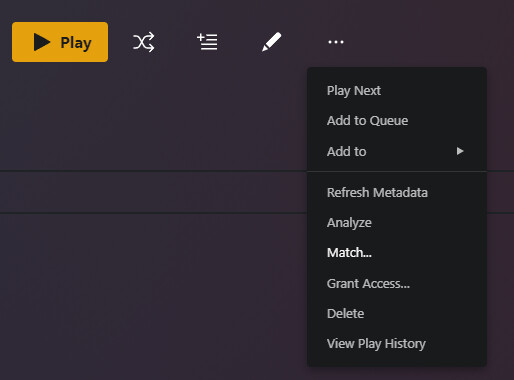
That doesn’t necessarily mean that Plex was able to find a match for your album/tracks. If you try to match the album in the web/desktop app, does the menu entry say “Match…” or “Fix Match…”? If it just says “Match…”, it’s not matched:
You can also use Get Info on a track that doesn’t have a share link, and then “View XML”, look for guid="...". If it doesn’t start with plex://track/, it’s not matched with the Plex Music agent.
It could be a bunch of different things - naming that doesn’t match what Plex expects, albums/tracks that aren’t listed in MusicBrainz, or some temporary hiccup that prevent Plex from matching it when you initially scanned it into your library.
If you have well tagged tracks it can be hard to tell at the track level, since everything will be loaded from those tags/local assets. At the album level, one indicator would be a lack of album description, but that could also just mean there’s no online description available. Outside of the answer to #3 below, the ‘Match’ vs ‘Fix Match’ is the quickest way I know of to check when looking at the album.
There’s an advanced filter that you can use to find unmatched tracks in the library view:
Not that I know of, but that’s not something I’ve ever looked into. The quickest way may be to use the same filter as above, but at the Album level, and individually try to match them. The Plex Dance would force Plex to try and rematch them all, but it will reset ‘date added’ metadata, (as well as playcounts/ratings for previously unmatched items IIRC).