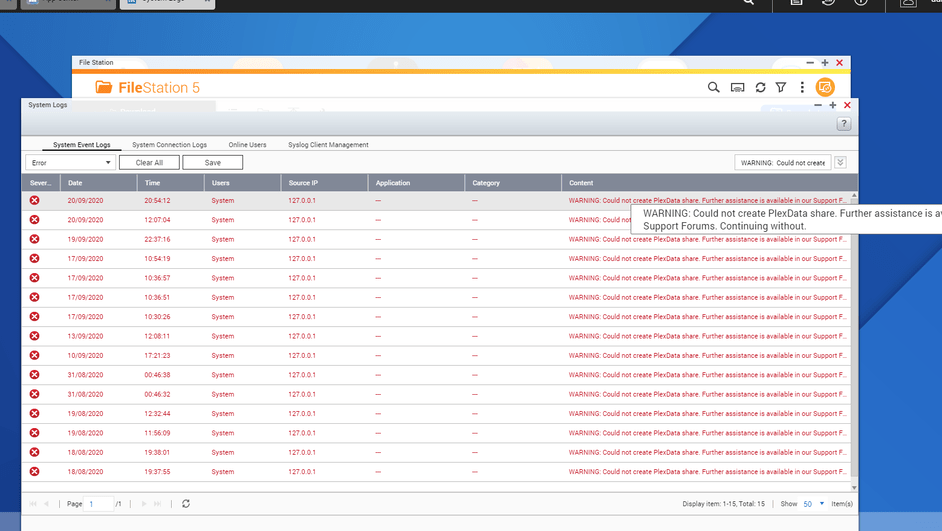
How is everyone automating backups for the Plexdata share? I normally use HBS 3 (hybrid Backup Sync) on my QNAP but it looks like this app does not backup symbolic links. When I start the backup it does not find any folders or files. I know there is a policy option “Exclude symbolic links”, this is not checked.
I want to be able to create a schedule on the QNAP that backs up the Plexdata share to an offsite NAS and to an external HDD.
I also have this error with no impact on Plex operation.
TS453D with QTS 4.4.3.1421 and PMS version 1.20.1
I tried to stop the error with your suggestion (Close PMS, delete Plexdata, create new Plexdata with share and permisssions) but I still get the error.
It looks like I will also wait for the next update.
I don’t know of any cases where it reports errors after creating the share manually.
It only reports the error if it can’t see a share (/share/PlexData )
Is the shared folder actually shared (CIFS / NFS / AFP) ?
Thank you for your prompt reply.
Please see attached images of the shared folder settings, how it looks in file station and the error list.
When I created the new shared folder I named it Plexdata (not with a capital D)
After your reply I checked the shared folder properties and the path was pointing at /Plexdata.
It actually shows 2 folders /PlexData and /Plexdata.
I changed it to /PlexData and now I can see the files correctly.
So I restarted PMS with a hope but it still gave me the same error, (please see last image).
the path was pointing to /share/Plexdata (not with a capital D).
I changed itto point to /share/PlexData
please stop this “Automatic” creation of shares on peoples servers. It is just not good data practice.
If you WANT to create a share - YOU ASK FIRST. If admin says NO you accept and do not start that function.
I’m in a foul mood now due to this QNAP / Plex data share - but the thing that got me really angry was the attempt to create a share on my server without my explicit consent.
It is just as bad when companies make folders in my /Documents folder. I do not force all my clients to have a ring binder only with my invoices in. I should NOT be forced to have any “Folders” that are company specific and especially not SHARED folder no matter HOW important someone thinks it is. Yes having things and configs stored in a location to relevant to the software is fine.
But this blatant creation of SHARED folders is simply not acceptable behaviour.
I would humbly request that Plex BIN this feature ASAP - and put it in as an ADMIN SELECTABLE OPTION that CAN be enabled.
I understand that point of view and sort of agree, but I’m mostly just happy there’s a dev actively working on Plex on QNAP devices, so happy with whatever changes come as long as they aren’t too obnoxious. I can live with this one, and honestly wouldn’t have even known or really cared without the error.
I also want to report I just had to manually remove and recreate the share and now all is well. Thank you.
If the community (not just a few) wants this removed, I will remove it.
I hope, at this point, with 1.20.2 and the ability to completely disable it, there won’t be any more compatibility or usability issues.
I really do not want it removed, as you say 1.20.2 make sis a non issue for anyone who doe snot wish it, it becomes completely invisible and changes nothing for them.
Da ist bereits ein Ordner PlexData, Allerdings kann ich damit nichts machen. Ich kann keine Einstellungen in irgen einer weise einsehen oder den Ordner selber öffnen. Über FileStation kann man den Ordner aktuell auch nicht sehen.
If so, what happens when you try to create it? Einen weiteren Ordner PlexData kann ich nicht erstellen.
ChuckPA first time NAS user (Day 4) how do I " Create a linkage named “Plex Media Server” , in the PlexData share, which directly connects to the directory in `/share/_installation_volume/.qpkg/PlexMediaServer/Library" I love my plex account and I am ready to move on to bigger and better things now that I have a NAS just want to save all my metadata from my Windows 10 plex account, I have 2,471 audiobooks sorted and with book art I would hate to have and create it all again!
Nevermind ChuckPA I found the GitHub that created a link, I think your way would have been better. But I managed to copy the metadata from Windows to Qnap.
Thanks