My Plexify is not on the Plex Server - it's on the MBP because the Plex Server is on Mountain Lion server and I can't figure out how to add the DNS there so my lazy way is to put it on another computer, but I'm sure it's not a unique setup. It's all in my signature.
My Plexify is not on the Plex Server - it's on the MBP because the Plex Server is on Mountain Lion server and I can't figure out how to add the DNS there so my lazy way is to put it on another computer, but I'm sure it's not a unique setup. It's all in my signature.
Slightly off topic but check out my posting at the end of the OSX server thread, it may resolve that issue for you ;)
Can you give me the URL. I kinda got a bit lost on that thread that’s why I put Plexify on the MBP instead of the server.
Can you give me the URL. I kinda got a bit lost on that thread that's why I put Plexify on the MBP instead of the server.
https://forums.plexapp.com/index.php?/topic/71085-A-guide-to-how-I-got-PlexConnect-running-on-OS-X-Server-%2810%2E7%29/page__view__findpost__p__512139
Speaking of git pulls...
I think that at some point over the last weekend Plexify overwrote my settings.cfg file.
My evidence is that my custom DNS server listed was overwritten by the default Google DNS servers - which I caught when Hulu plus no longer worked on and I was confronted with the geofence error message.
I did manually shutdown Plexify and restart, and I also have rebooted the iMac/restarted the Plexify app in the last few days.
I'll be on the lookout to see if it happens again.
Thanks but I think I'd rather stick with using Plexify on my MBP. To be honest it looks way too complicated and at least Plexify does work with my setup apart from the updating from Github which I'm sure Cyberon will fix. Personally I think an update manually might be the best route.
Speaking of git pulls...
I think that at some point over the last weekend Plexify overwrote my settings.cfg file.
But the Settings.cfg is created by running Plexconnect. It is not in the github package, how would it overwrite on update?
But the Settings.cfg is created by running Plexconnect. It is not in the github package, how would it overwrite on update?
Not sure - maybe it wasn't a pull that did it, but somehow the settings.cfg was reverted to default
(no, I wasn't mucking about in the advanced preferences)
Unfortunately I'm not backing up my Library folder to CrashPlan or TimeMachine so I can't see when it actually changed. I just know that some point over the weekend hulu stopped working with the geofence error and it took me two days to think to check the settings.cfg.
I tried to donate money to you but I'm getting this error:
Your recipient is not able to receive funds at this time. Your recipient must first set up his or her account to receive funds.
Thanks everyone, looks like it's my fault. Sorry for that :( .
Why it's not working?
Instead of pull, it's doing fetch. In the simplest terms, git pull does a git fetch followed by git merge or git rebase. By default, the second step is git merge.
Workaround
Open terminal
Type:
cd ~/Library/Application\ Support/Plexify/
git pull
SCREENSHOT: http://cl.ly/image/0M2g1j2Y2e2W
Will be fixed in the next version (coming soon)
Workaround
Open terminal
Type:cd ~/Library/Application\ Support/Plexify/ git pull
Thanks Cyberon - I did that on my own this morning when fixing my Settings.cfg.
I assume that we should only do this after exiting Plexify so that all the PlexConnect files can be refreshed and then pulled into memory when we re-launch Plexify, correct?
Thanks Cyberon - I did that on my own this morning when fixing my Settings.cfg.
I assume that we should only do this after exiting Plexify so that all the PlexConnect files can be refreshed and then pulled into memory when we re-launch Plexify, correct?
No need to quit Plexify. It's enough to just shutdown it :)
No need to quit Plexify. It's enough to just shutdown it :)
That's the trick I couldn't get working... Clicking on the "pause" button in the app doesn't appear to do anything - the status doesn't change, nor does the icon go read as I would expect.

Is there another way to shutdown, or am I misunderstanding the pause button?
That's the trick I couldn't get working... Clicking on the "pause" button in the app doesn't appear to do anything - the status doesn't change, nor does the icon go read as I would expect.
Is there another way to shutdown, or am I misunderstanding the pause button?
Same here :(
Its like the app is frozen after clicking the pause button…
That's the trick I couldn't get working... Clicking on the "pause" button in the app doesn't appear to do anything - the status doesn't change, nor does the icon go read as I would expect.
Is there another way to shutdown, or am I misunderstanding the pause button?
Hold down the Command Key then click Pause to Stop it.
That's the trick I couldn't get working... Clicking on the "pause" button in the app doesn't appear to do anything - the status doesn't change, nor does the icon go read as I would expect.
Is there another way to shutdown, or am I misunderstanding the pause button?
Not enough information.. I don't know what's your specific situation. I just tested the pause button and it's working properly. Give me some more info (plexconnect log, plexfiy log from console). At least something.
It's really hard (impossible?) to know why it's not working without any additional info.
Not enough information.. I don't know what's your specific situation. I just tested the pause button and it's working properly. Give me some more info (plexconnect log, plexfiy log from console). At least something.
It's really hard (impossible?) to know why it's not working without any additional info.
That was actually the first part of my question - is the pause button the method to start / stop PlexConnect as I thought. The answer was yes.
I simply re-installed Plexify RC1 over the top of itself and the pause button now works - for the record, PlexConnect was working, but it was the button itself that wasn't doing anything. To the point that it didn't even act like it was a clickable piece of interface, it was just "dead" to clicks.
I opened the log file from Plexify and it's normal:
12:21:25 PlexConnect: started: 12:21:25
12:21:25 PlexConnect: IP_self: 192.168.178.104
12:21:25 DNSServer: started: 12:21:25
12:21:25 DNSServer: ***
12:21:25 DNSServer: DNSServer: Serving DNS on 192.168.178.104 port 53.
12:21:25 DNSServer: ***
12:21:25 WebServer: started: 12:21:25
12:21:25 WebServer: ***
12:21:25 WebServer: WebServer: Serving HTTP on 192.168.178.104 port 80.
12:21:25 WebServer: ***
12:21:26 WebServer: started: 12:21:26
12:21:26 WebServer: ***
12:21:26 WebServer: WebServer: Serving HTTPS on 192.168.178.104 port 443.
12:21:26 WebServer: ***
Where is the plexify.log file, I don't see one in my ~/Library/Application Support/Plexify/ directory
Also for the record, the links in the TroubleShooting section of "Help" tab don't open - I copied the link and checked the package and there is no troubleshooting.html file in the package.
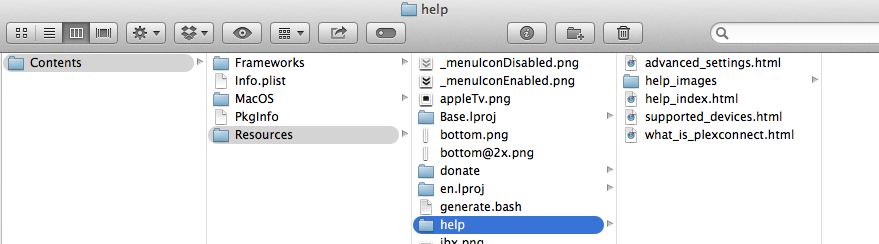
EDIT - I tried inserting the link I copied from the help section - but the forum code keeps ripping it out
This happened to me as well when I first used the latest a Plexify. It fixed itself after the first reboot of my computer.
this is what has been happening to me for a while. I think it is related to me crash bug.
can you all check your console and see if you have some message about being unable to spawn some process and then the plexify status messages stop?
