I have no idea what you mean. Could you share a Screenshot?
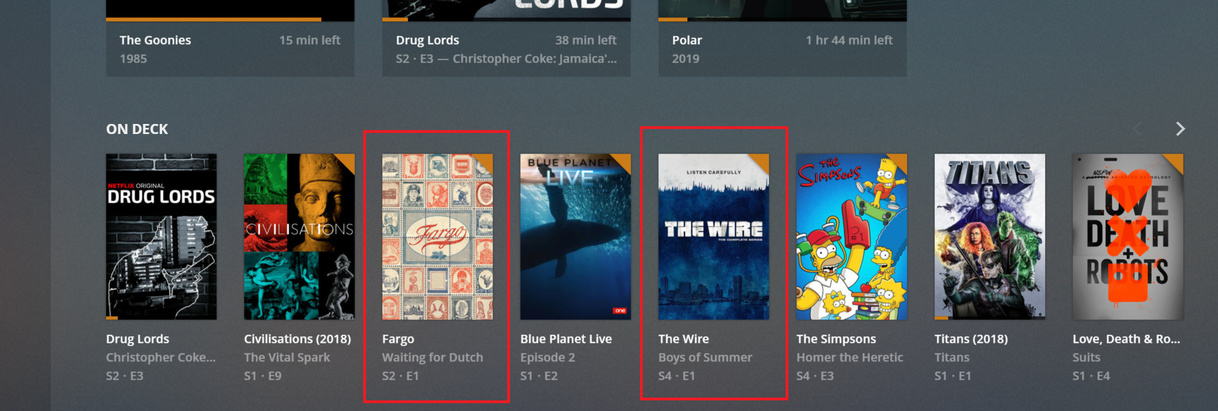
Did you delete the previous seasons from Plex?
PKC should use exactly the same information as e.g. Plex Web does. Navigate to Add-ons, Video Add-ons, PlexKodiConnect, then your tv show library, then On Deck. Do the 2 episodes show up?!?
Yeah my bad. I was using Kodi widgets instead of PKC ones.
Season Premieres as far as they relate to On Deck is a newer Plex feature I believe that you can select in the library settings of your PMS.
Its there because the time between season sometimes/usually is longer than the cut off point of what Plex considers when adding new stuff to On Desk.
By selecting this in the PMS, Plex will add a new season to On Deck even if, say, a year has gone by between the last episode and the newest one.
I would think PKC would show these as normal as long as your connecting to the actual On Deck PKC node.
Hey @croneter. Every now and then I run across this weird problem and not sure if you have seen it. I’m trying to gather some logs and will post a github ticket but want to check here first.
I have 3 profiles on each of my kodi boxes and 3 profiles on my PMS that have specific libraries. Every now and then I log into the kodi box and it sync’s all libraries. Even libraries the profile shouldn’t have access too. I can go in a deselect the other libraries but it shouldn’t even be seeing these. If I go through the select user profile again it selects the proper libraries to sync again.
Just waiting on it to happen again so I can grab some Kodi logs.
I’ve recently updated to LibreElec 9.0.1 (Kodi Leia 18.1). My UnRAID server is running PMS 1.15.3.876 (PlexPass). I am using PKC V2.7.10, PKC Movies V2.0.9, PKC TVShows V2.0.10. Whenever I setup and connect to PMS, the initial sync seems to work. In that the progress bar indicates it is syncing, and then it goes away after everything has synced, as expected. But then I get constant “error syncing library” popups, and then a reconnected to PMS message.
This is an excerpt from the log where it is happening:
2019-04-09 20:58:49.521 T:139982165800704 WARNING: PLEX.download: Server unreachable at: http://192-168-1-11.d7c865e44d5a46cc82f531dc1c2284d2.plex.direct:32400/playlists
2019-04-09 20:58:49.521 T:139982165800704 WARNING: PLEX.download: HTTPConnectionPool(host='192-168-1-11.d7c865e44d5a46cc82f531dc1c2284d2.plex.direct', port=32400): Max retries exceeded with url: /playlists (Caused by ReadTimeoutError("HTTPConnectionPool(host='192-168-1-11.d7c865e44d5a46cc82f531dc1c2284d2.plex.direct', port=32400): Read timed out. (read timeout=30.0)",))
2019-04-09 20:58:49.522 T:139982165800704 WARNING: PLEX.download: Failed to connect to http://192-168-1-11.d7c865e44d5a46cc82f531dc1c2284d2.plex.direct:32400/playlists too many times. Declare PMS dead
2019-04-09 20:58:49.522 T:139982165800704   ERROR: PLEX.playlists.pms: Could not download a list of all playlists
2019-04-09 20:58:49.523 T:139982165800704 WARNING: PLEX.sync: Could not finish scheduled full sync
2019-04-09 20:58:49.523 T:139982165800704  NOTICE: PLEX.utils: It took 0:02:02.572069 to run the function _run
2019-04-09 20:58:49.523 T:139982165800704  NOTICE: PLEX.sync.full_sync: Done full_sync
2019-04-09 20:58:49.523 T:139982165800704   ERROR: PLEX.sync: Initial start-up full sync unsuccessful
These messages appear every minute. I was having a similar issue with the previous LibreElec install I was using too, which makes me think it might be unrelated to LibreElec, Kodi, and PKC, and more to do with PMS.
Here are my complete logs:
kodi.zip (269.5 KB)
Thanks for any help!
Follow up:
I noticed the playlist message, so I disabled syncing the playlist in PKC. Sync error went away.
I then checked out the playlist tab in PMS, there were over 200000 duplicate playlist entries.
I’m now in the process of running the script provided by @croneter to remove these entries. I’m guessing this is my issue.
Is this playlist duplication still an issue in the latest version of PKC?
Yes, that’s most likely your issue.
It’s a mean bug that should be fixed with the newest PKC version
FWIW, I had the same issue. But when I disabled the PLEX option for using embedded tags (edit /music library/Advanced/Use embedded tags), the issue went away and I did not get thousands of identical playlists.
Hi,
I have a weird problem. My PMS server is recording Dateline on NBC, however in KODI I cannot see any of the episodes. The season folders are visible, but not the episodes. I can see them fine in any Plex app. I also can see them fine in Windows Explorer on the machine running KODI. I’ve reset the KODI dB. I also can map the folder the episodes are in as a source folder in the KODI file manager, and can see them. Nothing though seems to solve it. Any ideas?
Thx
If that does not help, activate Kodi debug logging, reset the Kodi DB, restart and resync, and navigate to the empty season folders. Then share your log file (How to Report A Bug · croneter/PlexKodiConnect Wiki · GitHub)
Hey @croneter, I’m having some other issue now in relation to the nodes. I am on the latest Libreelec on Leia, latest PKC, and using the Titan MOD skin.
When I add my Movies shortcut, I navigate to Add-On–>Video Add-On–>PlexKodiConnect–>Movies–>Movies
According to the skin, the action is:
ActivateWindow(Music,library:video/Plex-1/1_all.xml/,return)
If I select Add-On–>Video Add-On–>PlexKodiConnect–>Movies (More…)–>All Movies–>Create meu item here, I have the following action:
ActivateWindow(Videos,“plugin://plugin.video.plexkodiconnect/?id=1&mode=browseplex&key=%2Flibrary%2Fsections%2F1%2Fall&plex_type=movie”,return)
If I navigate directly to the PlexKodiConnect addon via the Addon browser and go to Movies–>Movies, I see what I would expect. But the shortcut to this via the skin is not working.
I have tried a couple other skins, and they have the same issues. Skin or PKC issue? Need additional info? Would logs help any here?
I looked at that bug, but in my case the problem is limited to one tv show. I experimented some more by renaming my KODI profile directory and starting with a fresh new KODI. With PKC disabled I added my tv shows to KODI in the normal way, and this same tv show wasn’t showing. However I could see it in KODI’s file section. I brought up the context menu for one of the selected tv show files and selected the scan to library option, and it showed a match for the tv show, which I selected. Then the show was visible in the tv show library.
Plex has correctly identified the tv show, so I’m not sure why KODI is ignoring it as if it needs to be manually scanned in like I did above. In theory this shouldn’t happen right?
I updated the Github issue. I’m still pretty sure it’s a Plex setting causing your issue. Please follow the second part of the workaround titled If not all but only some TV shows are missing episodes
Just tested again using Pellucid. Worked just fine. Could you please open a new Github issue (as I expect there will be some conversation between the two of us  ) and be very specific in how you tried to setup your skin. Also, please use an official skin like Pellucid - that narrows down issues.
Changelog
version 2.7.13 (beta only):
- Fix transcoding not working
- Fix 4k H265 not being transcoded
- Fix some appearance tweak settings
- Fix music and picture nodes pointing to video library
- Fix unequality when comparing sections
- Fix Plex Companion logging error messages
Confirmed. That setting somehow got changed on that season. It’s now showing up in kodi. Thanks!
Is there anyway to get both On Deck nodes for Movies and TV Shows into one node? The main On Deck node only shows TV Shows, whereas if you dig into the specific On Deck nodes for movies and tv shows (Plex Kodi Connect Add-On > Movies > On Deck and Plex Kodi Connect Add-On > TV Shows > On Deck) you will get in progress Movies for Movies and In Progress + Next Episode in the case of TV Shows. Is there a node that shows them both in one? Or is there a specific path I can point to to get this node and add it to my favourites in Kodi?
