Oh wonderful. Im just getting an error. Should I post my error log here or on the Github page?
Open a new issue on Github please
Hello all,
I tried to figure it out myself but couldn’t find an answer for this:
In plex, I have 3 movie categories: cartoons, music concerts and movies
When I import plex in kodi via your great addon, all movies are put together in 1 menu. I would like to have cartoons in another submenu for my son. But it mixes them all up in one movie category. Is it possible to seperate them?
Yes! But it needs some work and a skin that supports this.
See here to get you started: Video Nodes and Skins · croneter/PlexKodiConnect Wiki · GitHub
Hi, I’m having a very strange issue with PKC. When I import my libraries from plex, if i choose Direct Path it will import all the files, but it won’t assign my TV libraries from Plex to TV shows in Kodi. Movie libraries on the other hand show up as movies in kodi as they should.
If I choose all my shows from the plugin menu everything is there, but for some reason it’s like kodi can’t tell these are tv shows.
Choosing Addon Path instead when importing actually makes it work correctly.
Anyone ever seen this issue?
No. It shouldn’t make a difference as all the metadata is the same. Did you try switching to another Kodi skin, then resetting the Kodi database in the PlexKodiConnect settings under Advanced?
Also, some screenshots would help
Hi croneter, yeah not only did I switch to a different skin and reset the database, but I even did a clean install of kodi. I tried 17.7 and 18.9 but the result was the same.
I actually lied when I said there were no tv shows on the library, there was one and it was always the same. It leads me to believe that some metadata is persisting even after a clean install of kodi, because I see no reason why it would only add one show as a tv series and always the same one.
It’s an anime library and the show is Garo by the way.
Again, if I open All Items from within the addon the I can see all my shows, they are just missing from the kodi TV Shows Library. I checked and kodi only assigned the tag “Anime Series” (the name of the library in Plex) to that single show.
Like I said before, this is only when I scan the library for the first time setting Direct Paths, If I choose Addon Paths then it works as expected, and I even can change to Direct Paths afterwards and it continues to work just fine.
To summarize, my anime series library is only recognized as a tv show if I do a full scan once using Addon Paths.
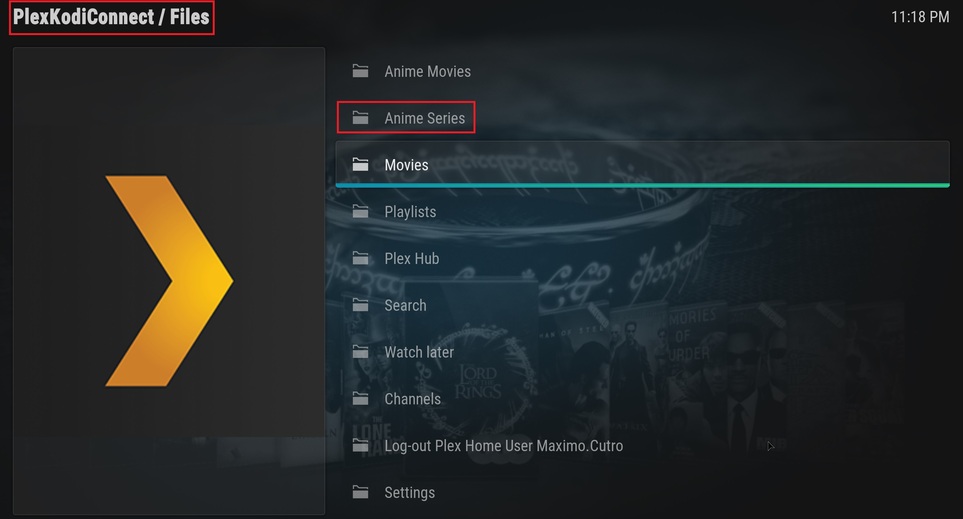


Really wierd! Please be so kind and open a new issue on GitHub according to How to Report A Bug · croneter/PlexKodiConnect Wiki · GitHub.
Please share a DEBUG Kodi log file after you having reset the Kodi database in the PlexKodiConnect settings under Advanced, then restarted (using direct paths!). I can then see the sync process that went awry. If you can even drop your VIDEO Kodi database on GitHub that be great! (Location: https://kodi.wiki/view/Databases). You can select only the single anime Plex library that doesn’t work to sync - that would still be sufficient
I’ll try to do that over the weekend.
Can I turn on automatic video transcoding? I am connected to my server via VPN. Unfortunately, I currently have very slow internet and playback is out of the question.
Yes! In the PKC settings under Playback, choose e.g. A bitrate limit
Turns out that the reason kodi isn’t recognizing my anime library as tv shows is the folder structure. Garo was the only one working because I forgot to put it inside a season folder.
My current structure is Series(where plex is pointing)/Anime name/Season XX
If I dump all files regardless of the season inseide “Anime name” the it woks.
That should not really matter, wierd! I got some tv shows that have season folders, others don’t. Never noticed this behavior. But glad you solved it! 
Changelog
version 2.12.5 (beta only):
- Greatly improve matching logic for The Movie Database if Plex does not provide an appropriate id
- Fix high transcoding resolutions not being available for Win10
- Fix rare playback progress report failing and KeyError: u’containerKey’
- Fix rare KeyError: None when trying to sync playlists
- Fix TypeError when canceling Plex sync section dialog
Want to use PlexKodiConnect with Kodi 19 Matrix and you know what you’re doing?
Then manually install PKC and the 2 helper add-ons from ZIP using these branches:
- PKC itself: https://github.com/croneter/PlexKodiConnect/tree/python3
- Helper for movies (required): https://github.com/croneter/plugin.video.plexkodiconnect.movies/tree/python3
- Helper for TV shows (required): https://github.com/croneter/plugin.video.plexkodiconnect.tvshows/tree/python3
No support whatsoever, still in development. Music needs some more love, for example
Small question (because I’m not sure if I missed it or not)
Does PKC autosync stuffs if new content has been added to Plex (automatically sync to Kodi after a library scan) ?
Yes it does.
Hmmm, that’s neat, but I also don’t see the option to follow the Plex content sorting stuff, some of my media looks completely un-sorted using PKC, though it’s a neat addon
It highly depends on what you’re doing within Kodi and what view you’re using. Where did you navigate to in Kodi, exactly? Please share a Screenshot of what the media looks like. What did you expect the sorting to look like?
If you want to exactly replicate the Plex logic of how items are displayed, navigate to Addons, Video Addons, PlexKodiConnect. Link the stuff you want on your Kodi homescreen using widgets, see Video Nodes and Skins · croneter/PlexKodiConnect Wiki · GitHub
