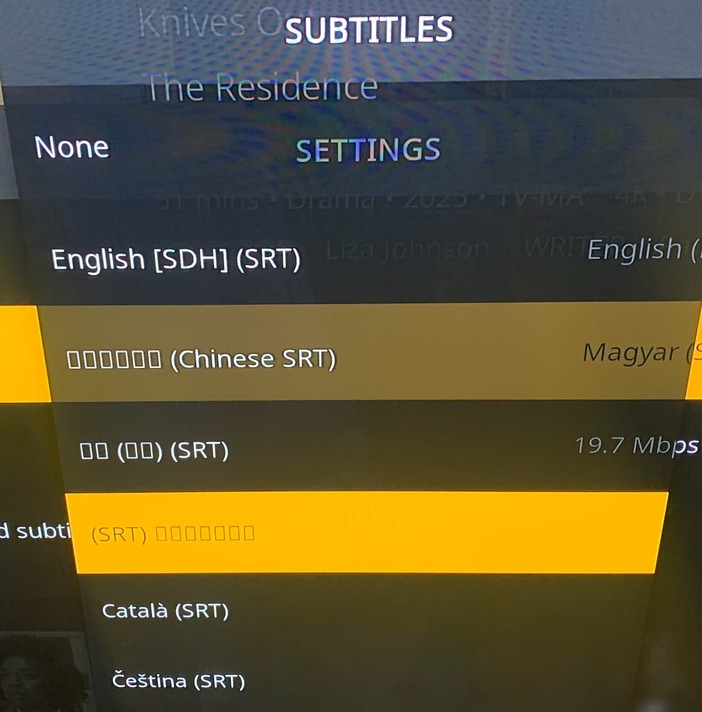
EDIT: ignore my message, I had to set Arial-based font in the Settings - Interface - Skin - Fonts
Now it is better, but Thai is still displayed with squares. Not a big issue.
Maybe this info about unicode fonts should be added to PM4K wiki. Just an idea.
Hi, I observed that some of the subtitles in the subtitles lists are not displayed properly, only squares are visible. Examples are like Chinese, Arabic, Hebrew, Japanese, Korean, Thai. On the Plex web or Plex macOS client they are presented properly. Is there anything we can do about @panni ? Maybe some more fonts should be installed? Is it something I should rather report at the CoreElec forums? Thanks.
Anyone else having issues playing music library files with the recent Kodi 22 builds and PM4K?
The files are either not playing at all (track loads with album cover etc. But stays at 0:00) and PM4K / Kodi directly freezes or the file loads after some time of waiting - then when track finishs it does not proceed with next track. Also can’t stop pause or skip the track then due to freeze of UI.
Don’t know if it’s related to a fireos update thing or something outside Kodi / PM4K.
Definitely not related to my server setup and normal Plex app / plexamp etc. is working fine.
Tried downgrading to older kodi 22 versions and PM4K 0.7.9 but did not solve it.
dont have any other ideas atm.
Edit: Movies / Concerts etc. are playing fine without issues. Issue also not related to specific tracks or albums.
Update: Seems to be an issue in one of the nightly builds. Don’t know with which one it started. Did a downgrade to the oldes available from mid February and now music loads faster again and with no issues.
Hi @panni , are you pannal the developer of PM4K? If so, thank you for that awesome add-on, I like it a lot!
I have an AM6B+ and I have a problem that seems somewhat related to PM4K. If I use PM4K and play about 4 movies and navigate then the movies start to micro stutter. It ressembles when you play a 59.94 movie in 60 fps for example but the intervalls that it stutters is not constant enough for it to be that. It seems like something is making the movie stutter in PM4K?
When the stutters start, if I quit PM4K and restart it, the stutters are gone again until I play about 4 movies and navigate a little. It doesn’t take a long time for the stutters to come back.
Also, I tried playing a bunch of movies using SMB in the “Videos” section of Kodi by simply clicking the files in the directories and it plays fine all the time. I could not reproduce the stutters in SMB directories.
I tried:
Using 1080p as a resolution for CoreElec and PM4K
Using SMB path mapping or https in PM4K
Using the official PM4K 0.7.9 from the Kodi repo
Using PM4K 0.7.9-rev4
Stutters still remains no matter what.
Do you have any other ideas I could try in the PM4K add-on settings or something else?
Hey, thanks for this kodi addon. This ended up as my preferred way to access Plex for my LE/CE boxes.
I do have one question though. Is it possible to add 4K transcoding options to this, similar to iOS players? Currently it only shows max 1080p, similar to web/desktop/Android clients. I’m not really aware why only some platforms have these options. For example: iOS vs Android Plex App available streaming quality options
I don’t think this is a server transcoding limitation either. For example, if I try to use the “Convert Automatically” option for a 4K HEVC HDR10 movie with the Android app or in Firefox app, it is able to transcode to 4K H264 SDR with no issue. So it’s possible, but the option is just hidden maybe?
Hi @panni , I did more tests using kodi.log and I can’t see anything too much out of the ordinary when I start getting the stutters.
I did one interesting find though, once the stutters were getting evident, as they seem to be getting worst with time, I went back to the home CoreElec screen without quitting the PM4K add-on and I played the same file using direct SMB playback with CoreElec and I have the same stutters.
I then went back to PM4K and did a full exit of the add-on and then replayed the file using direct SMB with CoreElec and the stutters were gone.
It seems like it’s the PM4K add-on doing something in the background creating the stutters?
I had problems with A14 and TVHeadend being out of Synch, CPM advised the problem lies with Corelec update Implemented in A13 and not his program, he didn’t advise or to change Audio Latency just for TV programmes in Corelec and said I should go back to A11 / A12. If anybody knows how I can implemet an advanced audio delay for 25hz / 50hz media only please let me know, Thanks.
Unfortunately, it didn’t fix my problem. I saw the thread you linked and the video that shows the stuttering and the stuttering I have is not while the OSD is displayed but even when it is not displayed and the stuttering is quite less intense than on that video on the linked thread, it’s frame skips here and there only but still bothersome. With time, they become more and more frequent. If I quit PM4K and restart it, the stuttering stops until it comes back a little later again.
I cannot use CoreElec 22 because I want DV FEL and I don’t think I can have that with NO.
Can I put all three lines with the fronttobackrendering and geometryclear options or is that only for CE22? For now, I am on one of the latest CE NG 21.2 nightlies and I tried only the one line like so and it didn’t work:
Only the first line will work for you, the last two are only for kodi 22.
Edit: I did some more tests and it seems that in the latest version CE NO nightly it is not necessary to use the dityregions line anymore, there is still stuttering when opening the player process info OSD where it shows temperature, etc. But when opening the normal OSD there is no more stuttering. As a result of this the temperature decreased about 10 degrees in stand-by.