I resolved this issue for me at least.
I was in Plex using a managed profile. Switching to the main profile promted me to install something and now its fine.
I resolved this issue for me at least.
I was in Plex using a managed profile. Switching to the main profile promted me to install something and now its fine.
Maybe DNS rebind issue - media but not posters showing up is something other users have seen. Fortunately the fix is pretty easy:
Either add the plex.direct exemption into router settings or have PM4K handle the rebinding by toggling the setting described in the thread above.
New to plex and also the Plexmod. I was having an issue with the native plex app where i if i was playing truehd7.1 audio. There would be a delay.
This never happened with Kodi, i just installed the PM4K and everything is working great. No audio desync or delay.
Quick question, (Might be a silly one and not sure how to type this down). If im watching something on the PlexModforKodi and my plex server dashboard reports the stream as Direct Play. That does mean its direct playing? not direct streaming.
Thank you kindly
What else would it mean?
Yes I agree it was a dumb question. Thank you for this amazing add-on
(I tried a different add-on before yours. But I had issues with it you see. And one of the quirks of that add-on, was even though the Plex dashboard would say Direct Play, it was actually Direct Stream. I had to set some direct paths or something to enable direct play, but I found it a bit difficult. I’m quite a novice when it comes to servers)
But your add-on works amazing. I’m getting proper truehd7.1 with no delay. (I was getting a slight audio delay when using the native Plex app on my Shield with that truehd7.1)
Hello Panni, thank you for this addon which works perfectly well on rpi4.
However, for at least a year now I’ve had a problem/bug with the series sheets: the addon no longer shows me the season or episode number.
There should be :
Season 1 , Episode 1 Title
Instead I have Season , Episode without any number.
I’ve looked in the addon settings to see if this is related to the anti-spoil option or something else, but I haven’t found anything that corrects this.
Can you tell me if I’ve missed an option or if there really is a problem with the script?
Thanks a lot.
Can you get me screenshots and a DEBUG log via DM? Thanks!
Hello @panni, good evening. Brazilian Portuguese subtitle download still not working?
Not sure. You might be able to backtrack in this thread as I don’t remember exactly what the issue was. If I remember correctly, this was a Kodi limitation.
You had posted about this in November.
Ah OK. I haven’t checked whether that’s changed.
Homatics r 4k Plus
Android v14.8.2463
Server Version 1.41.6.9685
Kodi Version 21.2 (21.2.0)
Addon Version 0.79-rev4
New user for both Kodi and PM4K. Appreciate your work.
I’m really enjoying some of the features you’ve added and playback has been excellent.
I am, however not able to get my skip intro kicked into gear. I have tried Automatically Skip Intro ON and OFF with “Show intro skip button early” both ON and OFF in combination with no change. I can also see in the 3 dot menu that those selections are respected as being on for all episodes.
I should mention this works on all my other clients for the same shows/episodes. Any idea what might be happening? Any suggestions appreciated, thanks
Huh, interesting. Please send DEBUG logs of a typical series view visit via DM.
Edit: Oh. You’re using the latest stable. Try using the latest beta.
Hello, DM send.
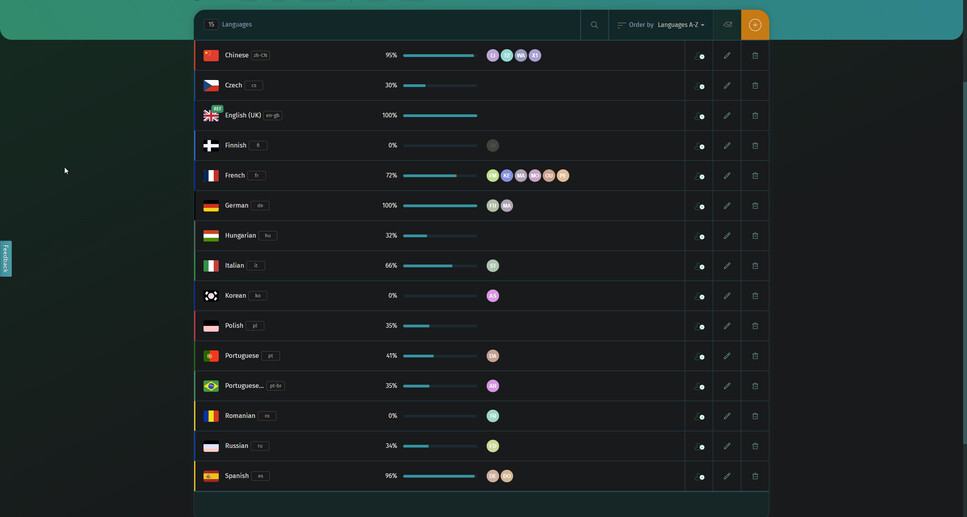
Ah, seems like you’re using PM4K translated and the translation isn’t up to date. Right now, the only reasonably complete translations are: German, Chinese and Spanish. You seem to be using French, which is only at 72% completion:
That means that there are possibly invalid/old untranslated strings. It might be better with a current 0.8.0 beta, but no guarantees.

Disregard, I think this was a rookie move unless something else is going on.
It looks like I just missed a setting. I had toggled on and off automatically skip under Playback (user-specific)
What I didn’t realize is that there is another setting for skip intro under Video Player > Show buttons. It says Only applies to video player UI.
I assumed this meant that automatically skip intro would work if it was enabled, I just wouldn’t see the little countdown timer button in the bottom corner.
I should have tested that so I apologize for wasting your time. Honestly, I saw that setting when I first installed it but forgot it was even there.
I do have a few other questions. Actor bios? Is that feature not available?
Long press menu? Are the options I see in the popup menu configurable? Mark as played/unplayed ect…?
I cant wait for a release that will move all your hubs to the home screen like the actual plex app
Do you have any ETA for collection view when you have movie open? So for example if you have “Iron Man” open and tagged with 2 collections, MCU and Iron Man, it shows both under cast, when you have movie open.
It is not a priority and not important, was just wondering since you said that this feature was added to your list. Thanks.
It is, apologies for the slow development right now, I’m very busy at the moment. In the coming days there’ll be a small update, hopefuly soon I’ll find the time to tackle Watchlist to finish 0.8.0. Then I’ll look at the list again