PMP: Folder View in Home Videos Library – bug or feature?

Server Version#: 1.18.3.2156
PMP Version#: 2.47.0.1035 (OS X)

Just giving Plex Media Player another try after having abandoned it for about a year. Among others, I have a Home Video library with a Folder - [Subfolder -] Video structure. PMP is set to display this video library in “Library” mode and “List View” mode. First-level folders are correctly displayed in list view. Everything below—i.e. videos in first-level folders and subfolders with their corresponding contents—is displayed in “Grid View” with no metadata whatsoever shown, and there appears to be no way to change this (no on-screen controls except play and shuffle).

Is this behaviour, which is completely different from the previous PMP version I used (pre-Uno V. 2.20.0.909) a bug, a feature or am I not getting something here?

Using Plex.app is not an option since my machine won’t run OS X 10.13.

Hello,

also oberving weird behaviour here (I think since the “Recommended / Library” tabs were introduced.


My folder structure is like:

Blockquote

  • dance (no videos in there)
    - subfolders (afro, rumba, salsa, etc.)

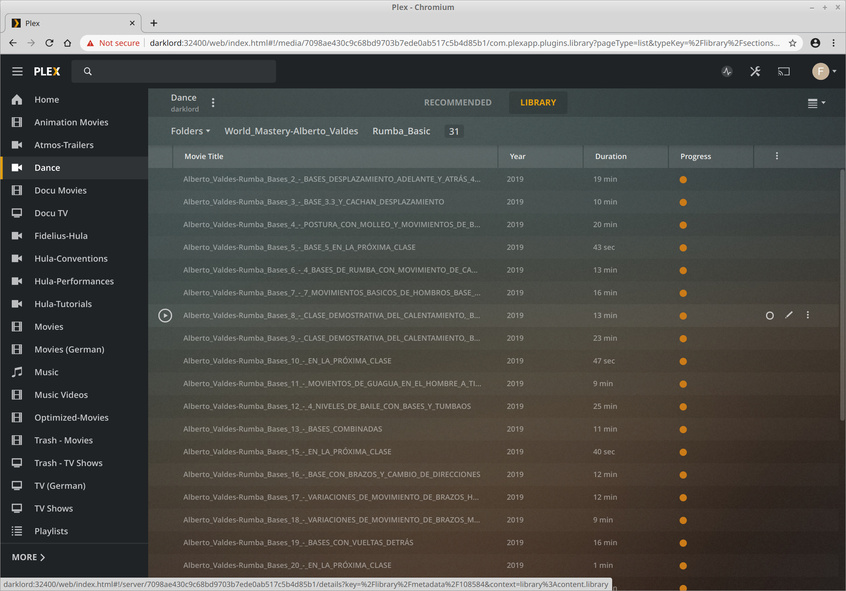
as you can see in the picture, PMS is listing videos inside the “dance” folder, although they are actually stored inside the “salsa” subfolder.

Now the next odd thing is:
As soon as I click on “Library” above, the view jumps into “dance/salsa/World_Mastery-Alberto_Valdes/Rumba_Basic”. Every time, no matter what my previous place in the folder structure was (also after server restarts).

Definitely needs some reworking.
Server Version#: 1.18.4.2171 on linux mint 19.4

Best regards,
Fidelius

This topic was automatically closed 90 days after the last reply. New replies are no longer allowed.