Server Version#: 1.14.1.5488
Player Version#: 2.26.0.947-1e21fa2b-windows-x64
I am trying out PMP on Windows and the app can’t seem to find the libraries on my server. It finds the media, and seems to populate the Home screen, but I can’t select which libraries I want to browse.
Next to the Home icon, there is just a spinning circle. It never stops spinning. See the screen shot below…
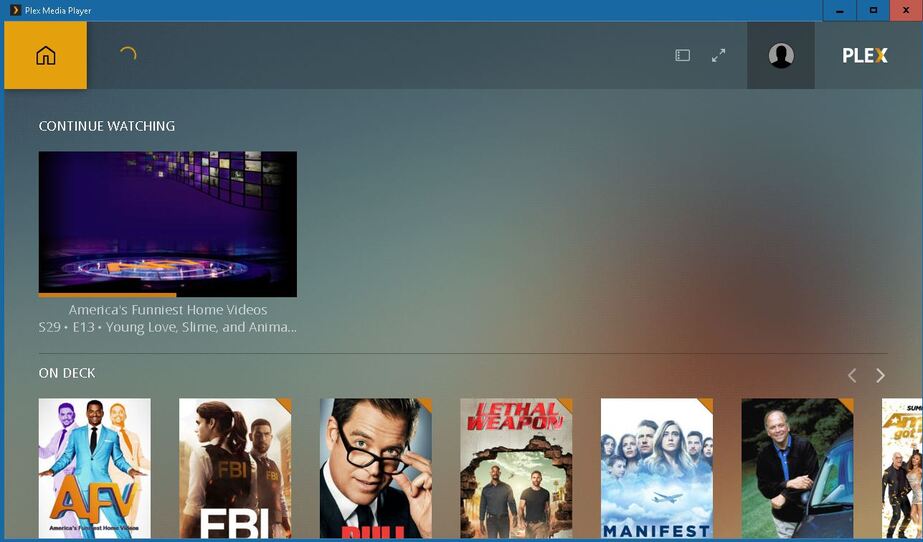
The only options on my Home screen are:
Continue Watching
On Deck
Recently Added TV
Recently Added Movies
Recently Added Videos
Recently Added Music
If I select any of the items in those selections, and select the three dots (…), I get a drop-down menu where I can choose “Go to Movies” for example, and it will take me to the Movies library. I can’t get there from the main screen, nor can I see any other libraries that I have.

I have tried this on both Windows 7 and Windows 10, both show the same behavior. I have also upgraded from PMS 1.8 to 1.13 to 1.14 trying to fix the problem and still no luck.
I don’t think the problem is on the server as the web client interface there works just fine.
The only error that jumps out at me in the PlexMediaPlayer.log file that looks like it might be related is:
2019-01-31 02:46:52 [ WARN ] SettingsSection.cpp @ 82 - Looking for value: “discoverHomePageDeprecated” in section: “webclient” but it can’t be found
I don’t know that it is, but I’m guessing the problem is with trying to draw the home page icons?
Anyway, I’m baffled. If anyone has seen this before, or has any idea where I might look for ways to fix it, please let me know.
Thanks to you all in advance,
-Michael
