PMS app on Qnap NAS > Public access without relay

Server Version#: 1.28.0.5999
Player Version#: 8.7.2

Hi folks,

I’m running PMS app on Qnap TS-253B and want to have public access to it.

On my router I’ve already configured portforwarding for TCP/32400>NAS and added an exception from DNS Rebind for plex.direct.

Usually the remote access check in the settings is failing… sometimes it is successful.
How can I troubleshoot?

Best regards
Benjamin

Maybe:

I’ve already read this postand some other content in the board.
MTU is 1500 and port 32400 is reachable from the internet.

*edit: Webplayer is working.
I use https://MYNASNAME.myqnapcloud.com:32400

Any ideas? I really read the topic and support pages.

Does https://app.plex.tv/ works?

Without relay, it doesn’t:
“Unable to connect securely.”
When I change “Secure connections” from prefered to required:
“currently unavailable”

I ran out of ideas. My infrastructure is quite simple.

  • Qnap TS-253B right behind the router
  • Plex server app qpkg (continuously updated from plex.tv)
  • Router: FritzBox 7590 AX (manual Port forwarding TCP/32400 (no UPnP) to my Qnap NAS & exception from DNS rebinding for “plex.direct”
  • No jumbo frames

*edit: Ive found this in the log:
Aug 22, 2022 01:11:24.838 [0x7f166a54eb00] WARN - NAT: UPnP, error mapping port 16719, error: Unknown Error, controlURL: http://MYROUTERIP:49000/igdupnp/control/WANIPConn1.
Aug 22, 2022 01:11:24.838 [0x7f166a54eb00] DEBUG - PublicAddressManager: Mapping failed.

The Plex Media Server is claimed, correct? If not, you’ll need to claim it.

Your NAS may not be able to resolve app.plex.tv or other plex.tv hosts.

Try configuring the NAS to use a public DNS server such as 8.8.8.8 (Google), 1.1.1.1 (Cloudflare), or 9.9.9.9 (Quad9).

plex.tv can be resolved by my nas.
My PMS seems to be claimed:

http://MYNASIP:32400/identity

MediaContainer size=“0” claimed=“1” machineIdentifier=“MYMACHINEID” version=“1.28.1.6104-788f82488”> </MediaContainer

Please post a zip with PMS Logs

Here are PMS and iOS app logs:

Plex Media Server Logs_2022-08-22_11-13-38.zip (5.2 MB)
PlexDebugInfo-n0cturne-8.7.3-1 (2022-08-22 11.13.10 +0200).zip (878.8 KB)

From the looks of it, I see a few things here:

You have multiple interfaces on the same IP Net, which is not recommended!

* 3 eth0 (192.168.42.10) (24-5E-BE-17-D7-20) (loopback: 0)
* 16 qvs0 (192.168.42.158) (24-5E-BE-17-D7-21) (loopback: 0)
* 17 qvs1 (192.168.42.159) (24-5E-BE-38-85-7E) (loopback: 0)
* 18 qvs2 (192.168.42.113) (24-5E-BE-38-85-7F) (loopback: 0)

So recommend you move interfaces 16, 17, 18 to other IP Nets, and then restart your QNAP

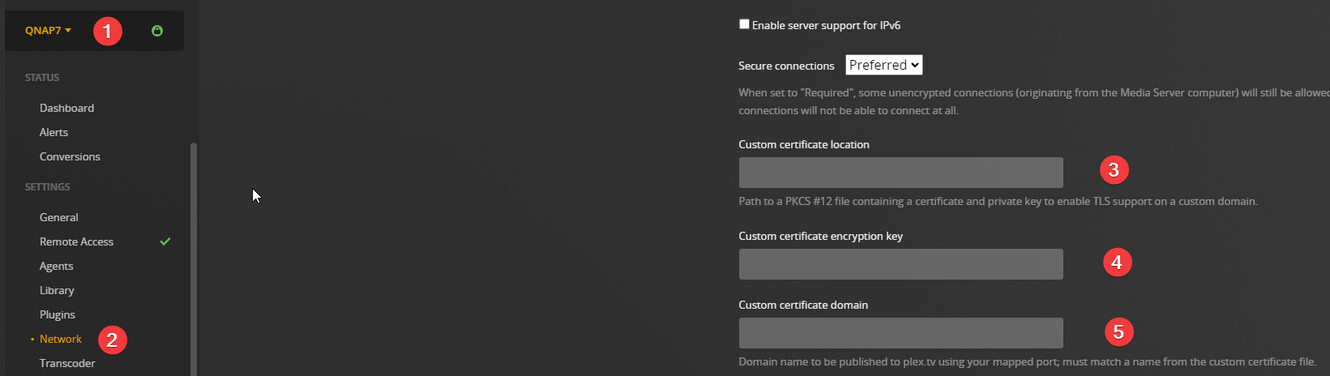
Also it looks like you are using QNAP’s myqnapcloud.com which is not supported

Getting that to work is not something I’ve tried myself, and would req. that you add valid custom certs to PMS, as well as specify the custom domain/host it should be registered as

As well as:

Recommend you for a start only use normal Plex access, ( https://app.plex.tv ) and when working, you can start to look into the QNAP Cloud stuff, if needed

I’ve removed all IP addresses from interfaces 16, 17 an 18.
Since your question regarding app.plex.tv I don’t use myqnapcloud.com anymore. So I don’t think that a custom certificate is not needed.
Unfortunatelly it still doesn’t work.

So here are my new logs.
Plex Media Server Logs_2022-08-22_13-54-08.zip (68.4 KB)
PlexDebugInfo-n0cturne-8.7.3-1 (2022-08-22 13.54.45 +0200).zip (1.0 MB)

We are getting closer here, since now your PMS does register itself against plex.tv as online, but sadly shortly after that fails.

So some Q’s for you:

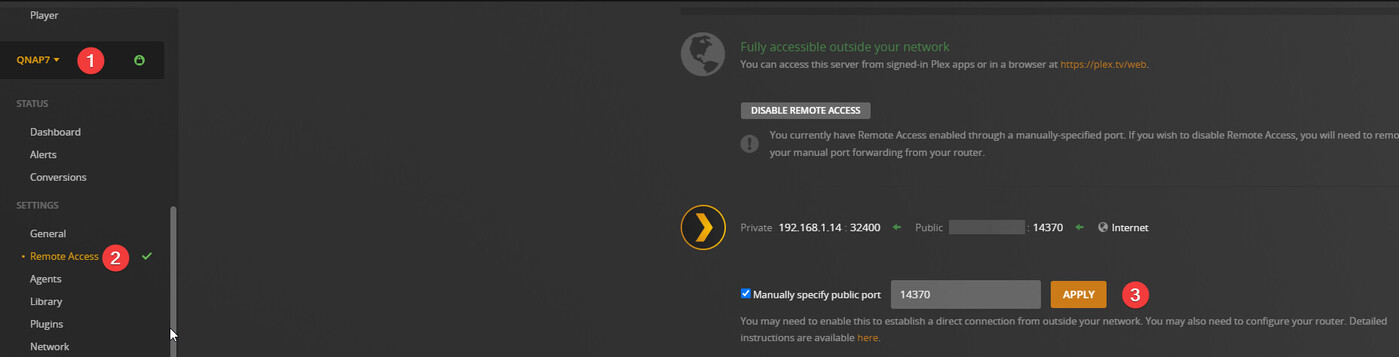
I use manual port forwarding in my router to the default Plex port 34200. I didn’tchange the port as mentioned in #3.

On plex.tv, your PMS registered as 2.203.X.Y:32401

So please dbl. check your port forwarding rule!

I checked it. Port 32401 is a docker container which was coexisting for while.
Im pretty sure, that the forwarding to the Plex Qnap app always was 32400.
But your PMS was seen with that port!

Suggest the following:

  • Delete your port forwarding rules
  • Create a new rule, and use a new port, like 62400
  • Lock that port in PMS, where I showed you in the screen capture item 3
  • Restart PMS

Then report back

Hey,
sorry for the delay. There was something strange in my router.
Since resetting and reconfiguring it everything is fine.

1 Like

This topic was automatically closed 90 days after the last reply. New replies are no longer allowed.