Sometimes I can see my library as an option for Media Libraries with certain actors, or approached from certain paths. But, this issue has gotten a lot worse…
I used to think it’s the performance of my server or a possible issue with the size of the database. Sometimes I could go back and pick the actor name again to display my library titles. The more shows they list, the longer it takes for the toggle to function. Now, it doesn’t work at all.
The most recent trend I’ve noticed with this bug is that the actors who are in more than one library are unable to display titles from my library under ‘Media Libraries’. It shows other shared libraries with both Movies and TV Shows. It’s actually very performant for that feature! Instantaneous in fact!
I have to use search for the actor’s name, and then pick from my library (e.x. Movies or TV Shows) to view their titles on my server.
@zbeak If you can enable debug logging, reproduce the issue, download your PMS logs, download your Database, and share both with me, I’d be happy to check it out.
You don’t have “Allow matching to explicit content” enabled in the affected libraries, by chance?
Do all your libraries use the default, modern metadata agents?
I’ve confirmed none of the affected libraries have “Allow matching to explicit content” feature enabled.
Both “Scanner” and “Agent” are set to “Plex Movie”
and “Plex TV Series” - “Plex Series”, respectively.
Under Agents (Legacy) - Movies > Plex Movie (Legacy) includes the default Plex Movies (Legacy) and I have also enabled “Local Media Assets (Movies)”
The Movie Database includes the default The Move Database, and I also have enabled “Local Media Assets (Movies)”
@zbeak I was able to load your DB and test a couple People and things look like they’re working. I did see that your DB is over 2.5GB. I recommend running the Optimize DB action and waiting until it completes.
In your logs there are a lot of error entries and warnings about DB transactions being slow or held for too long. The DB optimization might improve the DB transactions and help elevate the reported issue of this thread. However, there are still other issues here that might also be contributing to the symptoms reported.
One example is a permission warning:
Denying access due to session lacking permission to transcode key
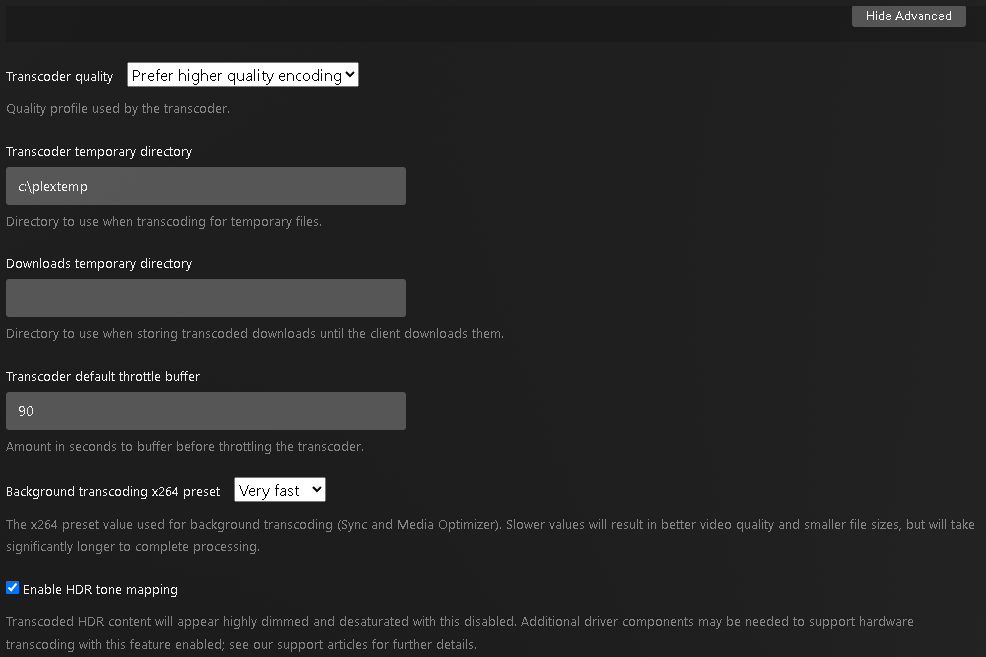
Are you using custom directories for your Transcoder path? Can you take a screenshot of your Server Settings > Transcoder?
Yes, I use a custom folder c:\plextemp for the “Transcoder temporary directory”. I’m willing to adjust the permissions or simply remove that attribute/value with your recommendation.
A couple of configuration variables to consider which may or may not affect this issue…
I’m using the PMS Service applet to auto-start the service at boot. Not sure if the permissions there could be a contributing factor, but the service starts and runs as expected.
My Movies directory does not use folders. It’s just populated with the video files, .mp4, .mkv, .avi, .srt, etc… I’ve read where some folks have recommended to use folders for each title. I’ve suspected that could be part of the cause of the long delay in fetching those discovery values.
I am a DJ and have a lot of music files which aren’t properly meta-tagged. At one point I took the time to fix most of those tags within plex, vs within the file metadata itself. Then, migrated the music directory to a new drive - added the new path as a duplicate directory to the library - scanned and confirmed they were duplicated. Then removed the original directory, as I have done with Movies and TV Shows folders with success, but the music metadata just went to ■■■■. I continue to add new files and the problem persists. It’s not a plex issue, I know, but that may be part of the database size condition. I get the impression 2.5 GB database is large for Plex? I’ve worked with hundreds of GB databases in my past professional life so 2.5 GB doesn’t give me concern. I’m just trying to understand the scope of this application.
I also added my Photos directory at one point and it didn’t like the volume of data I suspect, causing unending scanning. I removed that feature then and optimized the database. I just want to provide full disclosure to aid you in aiding me
This would definitely be something that I would recommend.
Following our naming schema will result in the best experience. There is reportedly some benefit to organizing Movies into their own folders so the scanner does not have to read the entire location when a change is made and instead can simply scan the subdirectory. I would also recommend making this change.
Got it! Yeah that makes sense as to why the DB is so large. Nothing to change here other than running the Optimize DB and .
I would recommend fixing the naming piece first, then running the DB optimization. Let this sit a bit then see if you’re still seeing the same problems with Credits pages. The custom transcoder path is likely unrelated to this issue but something you should double check the logs after making the change to see if these log warnings are no longer being reported.
Even if you don’t want to go the full route of creating a folder for each title (best practice for sure), even creating a few folders to break it out a bit can reduce some overhead. For example I have letter folders with batches of files in them. I’m currently working on getting that fixed up and the recommendations I got might be helpful if you go that route.
@zbeak Any update on your end? Have you had time to make any of the recommended improvements? Any changes? Are you still observing this?
Also, I don’t see you calling out a specific client where you were observing this issue. Could you call out any clients where you’ve observed this issue, if you are still observing it.
Thanks for the follow up. I’m saving for a new drive to copy, apply changes to the folder structure, and scan as a new library source. I’m not willing to start rearranging my movie files on a in-production resource. I hope to have that in place before the end of the year and will follow up with the results.
I did select all of the titles for this actor and refreshed the metadata on them all, as OttoKerner suggested. The TV Shows titles did populate after that, but Movies still fail to load. I did just checked again, and TV Shows have disappeared from the list again. It only shows the titles of shared libraries for that actor.
It happens on every client I’ve tested - the Web client, PC client, and Roku client, at this point.
It is consistent failure if the actor is in multiple libraries (e.x. TV Shows and Movies). The issue does not occur if the actor is in a single library.


 .
.