So PMS doesn’t allow broadcasting externally if a VPN solution is on. In my case, it is NordVPN. Recently, NordVPN released a feature called split-tunneling, which is pretty much a “white-list” for applications that the VPN should exclude.
Scenario #1 - VPN is on:
Since I share my PLEX libraries with my family (who don’t live within the same household with me and consequently, will access my PLEX content remotely), this has never worked if VPN is on. The server simply isn’t visible outside of my home network.
The solution was to switch off VPN completely, in which case my PLEX content could be accessed remotely.
Scenario #2 - VPN on, but PMS white-listed:
Since NordVPN now allows white-listing apps that should be excluded, I did use this feature to white-list PMS, screenshot below:

What happens is the following:
#2.a) on a local client which sits on the same network as the PMS:
The server settings page will simply not load. There’s only one message: Server settings are unavailable, screenshot below:

(I get this message on both the web client, as well as on the desktop client)
#2.b) on a remote client, outside my home network:
Playback works, meaning that the white-list, split-tunneling feature in NordVPN works as it should, if I place PMS on it.
However,
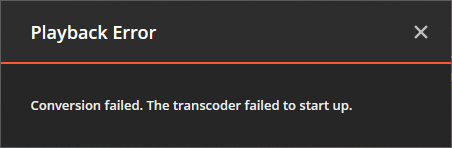
…playback fails when trying to watch any content with subtitles. It starts out okay, runs for a few seconds, the client will display a failed to start transcoder kind of message, then playback stops. The exact wording:
Playback Error.
Conversion failed. The transcoder failed to start up, screenshot below:
But as soon as Off has been chosen in the subtitle dropdown:

…playback will no longer fail after a few seconds.
So it seems that white-listing PMS on my VPN doesn’t help much. Locally, server settings become unavailable, remotely no content can be played (only if subtitles are on, transcoder fails to start). The only way to get it to work is to simply disable the VPN. Which kinda beats the purpose of owning a VPN solution in the first place.
Is there any way I could get access to server settings and remote play with subtitles without turning off VPN?
Server version#: 1.21.1.3876-3c3adfcb4
Player version#: 1.26.0.1531-92029e9e
