New Shield Pro with 512GB USB storage configured as Removable. Plex Server storage location set to USB Drive. Initial Plex server setup completes successfully with USB storage selected during setup. Plex still insists on recording to internal storage and quickly fills it. I blew everything away and started from scratch just to be sure something hadn’t gotten dorked up during initial setup, all with same result in the end. Never see a “Photos & videos” folder land on the USB drive, only the “Misc” folder that the Shield lays down on it. Any suggestions as to how to proceed are appreciated.
Been a while since I used PMS on my Shield’s. Did you set the Transcoder location to a folder on the external drive? The transcoder location if not specified would be on the Internal storage.
The NVIDIA_SHIELD directory on the device is the only area that Plex can write to.
My Libraries also have a directory specified inside the same NVIDIA_SHIELD directory. When a recording is setup the save location should be to the NVIDIA_SHIELD TV or Movie folder.
I started a recording of the first show in my guide and captured screenshots of the transcoder folder showing the transcode session folders created and the TV show .grab folder showing the recording.
If you allowed Plex to setup the standard libraries they were probably configured pointing to internal storage. You will need to reconfigure them to point to the NVIDIA_SHIELD folder and to directories you create in that location.
Okay, so I was confused then. I assumed that when I set the Plex Media Server to the USB drive in the Plex DVR settings (via the on-screen interface), that it respected that setting (especially since it will let you switch it back and forth between USB Removable storage and Internal Storage, assuming both are available). From what I read from you, the Library location setting for the “TV Shows” library itself actually dictates where the recordings get stored, not just where Plex looks for content to make available in the library?
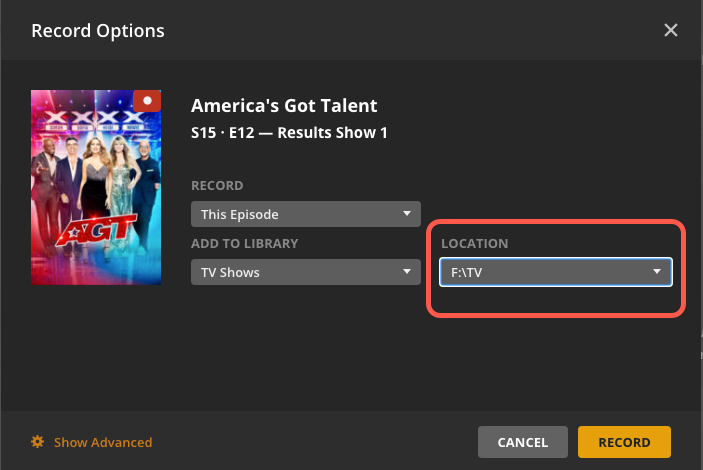
No. If you have two locations in a library when you setup a recording you will see an additional dropdown selection to select which location to use for the recording. When you only have one location for the library this additional dropdown is not displayed.