Server Version#: 1.25.3.5448 → 1.32.5.7431
Player Version#: 9.31.0.3817
Hello everyone,
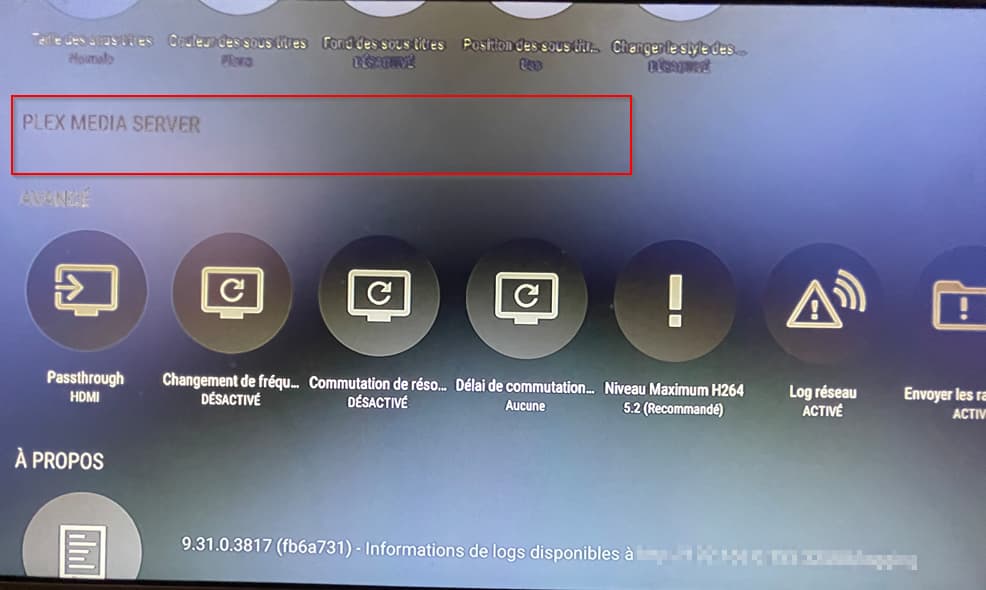
I’m facing an issue with Plex Media Server (PMS) on my Nvidia Shield. The Plex Media Server option has disappeared from the settings, and I’m unable to restart it.
Steps Taken:
Restarted the Nvidia Shield.
Checked for software updates.
Re-established the connection to my NAS where my videos are stored, just in case.
None of these steps resolved the issue.
I’ve looked into backup options for my configuration and found that a crucial preferences.xml file, which could potentially solve my issue, is not located in an accessible directory. I came across this article on Plex Support that provides steps to move server data storage location on Nvidia Shield, but it appears these steps should have been done before encountering the issue: Moving Server Data Storage Location on Nvidia Shield.
Does anyone know of a workaround or alternative method to access this file or fix my problem?
I’ve just noticed that there was a specific update available for Plex Media Server on the Google Play Store. To find it, you need to search for “Plex Media Server,” not just “Plex.” I’ve updated to version 1.32.5.7431, but unfortunately, the issue remains unresolved.
Is anyone else on this version experiencing the same problem? Any insights would be helpful.
I’ve had this a couple of times in playing around.
I’m not certain on this, but you may need to run it from the apps list (Settings > Apps > See all apps > Show system apps > Plex media server > Open)
[quote=“vMatt95, post:1, topic:853972”]
I came across this article on Plex Support that provides steps to move server data storage location on Nvidia Shield, but it appears these steps should have been done before encountering the issue [/quote]
super important! If youre trying to move the storage location you probably need to do a fresh install and pick your storage location before before adding any libraries. In my experience the menu option in question will disappear after adding a library or two and isnt coming back. Ive had this issue with plex on my shield for years and still havent found a proper solution. Ive kinda just chalked it up as one of the corks that comes with running plex on a shield.
I’m disappointed with my Shield, to be honest. I’d been hearing great things about it for years, and initially, I wanted to replace my Apple TV with it. However, I couldn’t even last a month with it, especially considering how much better everything, particularly the Plex player, is on Apple TV. So, I repurposed my Shield as a Plex server instead of a VM. Over time, though, I’ve encountered quite a few limitations and maintainability issues.
This weekend, I’m planning to do a fresh reinstall, even though it means I’ll probably lose my library information. This time, I’ll move the storage location to ensure easier access in case of any issues. Unless someone has a better idea before then.
It might be wise to spend some time “future proofing” your media now to save yourself the hassle of having to manually edit so much metadata later. You may have already done this but others may read this too. Some “future proofing” suggestions…
-Get your folders in proper order and follow the the naming conventions closely.
-Add “tmdb-id#” to all your movies folders and movie files.
-Add “tmdb-id#” to all your tv show folders.
-Side loaded apps like “automatag” can easily edit or add missing id3 tags to music files.
-Even think about how your libraries are organized now and reevaluate how well they work for you. I started over from scratch not too long ago and cut down on the amount of video libraries I had with some creative use of collections and it was a major improvement for me.
Anyways, i feel your pain about restarting . Hopefully someone out there has a real solution to this problem because id love to hear it. Good luck
 super important! If youre trying to move the storage location you probably need to do a fresh install and pick your storage location before before adding any libraries. In my experience the menu option in question will disappear after adding a library or two and isnt coming back. Ive had this issue with plex on my shield for years and still havent found a proper solution. Ive kinda just chalked it up as one of the corks that comes with running plex on a shield.
 . Hopefully someone out there has a real solution to this problem because id love to hear it. Good luck