Server Version#:4.102.1
Player Version#:1.59.1
Apple TV App version: 8.16
The video quality on my Apple TV using the Plex App (version 8.16) has suddenly gotten terrible. I am streaming 1080 p video files but they look like 480 p when streaming through my Apple TV. They look fine on Plex player on the laptop that has my Plex server. I have checked all the setting on the Apple TV app and have the quality set to maximum.
I just checked a second Apple TV I have that has Plex Apple TV App version 8.15 and the video quality is excellent. All other settings are identical. Is there a problem with the latest version of the Plex Apple TV app???
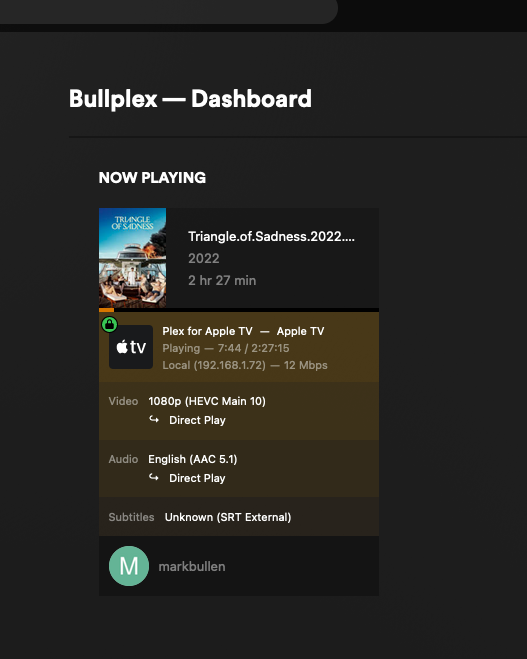
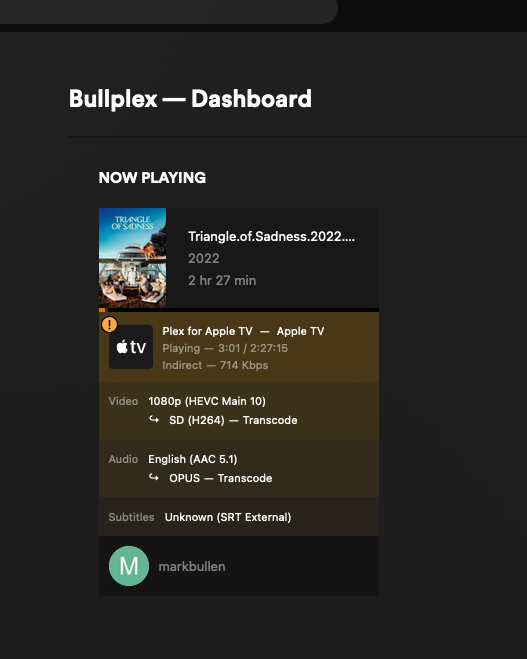
Can you check and compare the streaming details on the server dashboard’s „now playing“ section while streaming to the two Apple TVs? I’m primarily interested in the streaming mode (local, remote, indirect) and if/what tracks are being transcoded. https://support.plex.tv/articles/200871837-status-and-dashboard/
Ok, the problem Apple TV (Apple TV 1)is transcoding and the good quality Apple TV is using direct play but both have direct play enabled. Any idea how I fix this?
Problem seems to be that the 2nd Apple TV is considered remote and your remote access setup is somewhat broken. This is why the video is only indirectly streaming – those relayed streams are limited to 1 Mbps (2 Mbps for Plex Pass members).
Best start checking why the 2nd Apple TV is considered remote. This usually happens if the server and device are on different subnets.
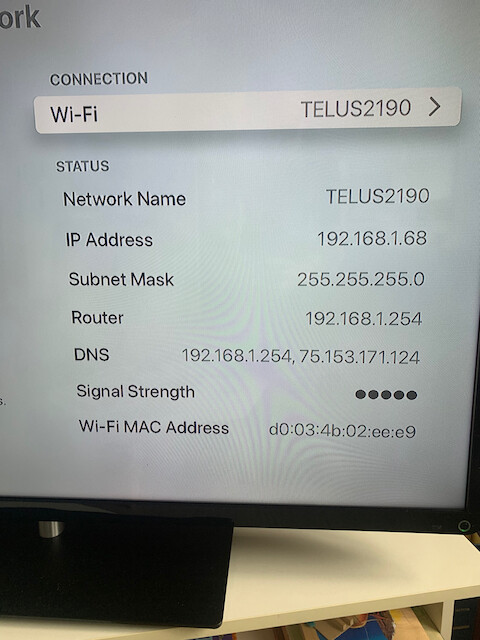
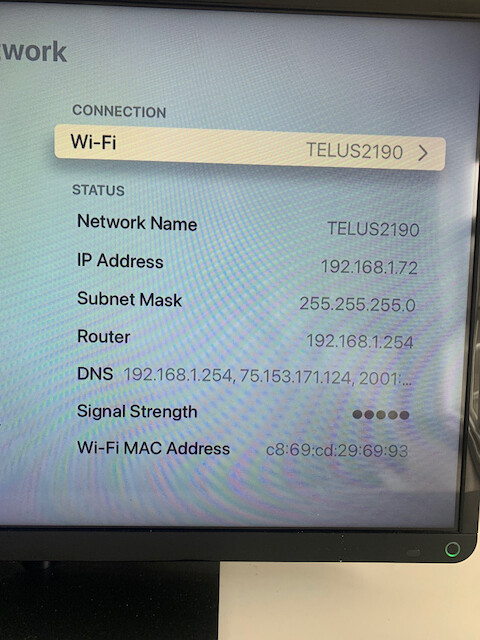
Ok, thanks. Any suggestions for what to look for? I’ve checked the network settings on both Apple TV devices and they look pretty much the same. There’s a slight difference in the DNS settings. See the screen shots.
I also disabled remote access on Plex but that just produced a “plex server unavailable” on the problem Apple TV.
Should I reset the problem Apple TV?
I don’t think resetting the Apple TV will fix a network problem (though there’s always a chance).
Good news:
devices are listed to belong to the same subnet
devices are using the same router / subnet mask
You could double-check the DNS options… though that shouldn’t interfere when it comes only to your local network.
You might want to verify if there’s an option in your router to treat the problematic Apple TV somewhat different (e.g. assigning it to a guest network or other applying other restrictions).
Ok thanks. This makes no sense. I haven’t changed anything with my set up other than to install the server update. It was after installing the update that the problem started. I haven’t changed any of the router settings.
I just reinstalled the server app but that didn’t help. The problem Apple TV is still connecting remotely.
I’m not saying it’s a server problem…just pointing out that the problem started after the server update. And it gets weirder…I restarted my router, signed out of Plex and signed back in…it no longer says I’m connecting remotely but now it won’t play anything. When start a video the screen comes up blank with just the time elapsed at the bottom. Can’t get any video to actually stream.
Ok, I think I’ve solved the problem. I restarted the router and that definitely changed something. At first it seemed like I couldn’t get any video to play but then I realized it was only the HVEC files that weren’t playing, H264 was fine, so I reviewed the settings again and turned off “Play video at original quality” and now both HVEC and H264 are playing and at the right quality. The strange thing, though, is that I don’t have that setting turned off on the other Apple TV and it has no problem playing HVEC files. Makes no sense to me but everything seems to be working now.
Ok, I"m having the same problem again. I can’t get videos to play directly, without transcoding and the quality is poor. This seems to happen every time there is an update to the Plex app. I have tried everything I can think of.
App Video Quality settings are:
Auto Adjust: ON
Home Streaming: Maximum
Internet Streaming: Maximum
Play Smaller Videos at Original Quality: On
I have attached the dashboard screenshot from the desktop.
Ok, it seems that all that was needed was a computer restart. It would be nice if that advice was given when there is an app update. I’ll add this to my notes so I don’t waste an hour trying to figure this out next time.