Server Version#: 1.15.8.1198
Player Version#: 4.30.1
I’m doing a custom (personal media) TV show for family videos. In order to mix the date and multiple parts into the episode code, I’m left with a 5 digit episode code:
Show - S2020E02150 - Title
When using this format, Plex forgets how to read the title of every episode, and instead shows “Episode 2150” as the title. The proper title is in the metadata of the mp4 file and also in the file name.
When the file is named with a 4-digit episode it will work fine:
Show - S2020E0215 - Title
… and you have them in a Season 2020 folder?:
A TV Show Library/
... Show/
......Season 2020/
.......Show - S2020E215 - Title.mp4 <---try without the 0 leader.
… and in a TV Show Library with Personal Media as the agent?
Plex acts funny with this structure in an Other Videos Library.
Plex will never get the episode name from the filename, but it should from the MP4 - I’m told.
I have them in the “Season 2020” folder.
I’m not sure if I can get rid of the leading 0, because I’m basically putting the date in as the episode number. Later in the year it will need that spot, and probably have the same problem.
I’ve tried using the date episodes but those are confusing as well, especially when I want to do multiple episodes per day.
I was hoping to just be able to use whatever code number I want as the episode number and have it sort by that, but that doesn’t seem to be working.
So far my best solution is:
Show - S2019E1225 - Xmas-pt1
Show - S2019E1225 - Xmas-pt2
But it groups each episode into a single episode. I’d rather they be separate.
Well, stop naming them like ‘2 parters’…lol
You’ve hit exactly one of the ‘tags’ for a 2 part item. What luck, eh?..lol
https://support.plex.tv/articles/naming-and-organizing-your-tv-show-files/
Episodes Split Across Multiple Files
Episodes that are split into several files (e.g. pt1, pt2), can be played back as a single file if named correctly. Name the files as follows:
- /TV Shows/ShowName/Season 02/ShowName – s02e17 – Split_Name.ext
Where Split_Name is one of the following:
- cdX
- discX
- diskX
- dvdX
- partX
- ptX
…and you replace X with the appropriate number (cd1, cd2, etc.).
Just pick a ‘part number’ that isn’t in that list…
It might not get you what you want, but it won’t get you what you don’t want either.
You’re going to have to name each episode with a unique episode number. If you have two of the same ‘Episode’ Plex is gonna Merge them, or want them to be 2 parters.
I predict you’re going to have to give these ‘episodes’ unique episode numbers so they’ll play in order, and you’ll have to hand edit each one to give it an episode title and a description.
This kind of thing NEVER works out in the Plexiverse like it does on paper.
NEVER.
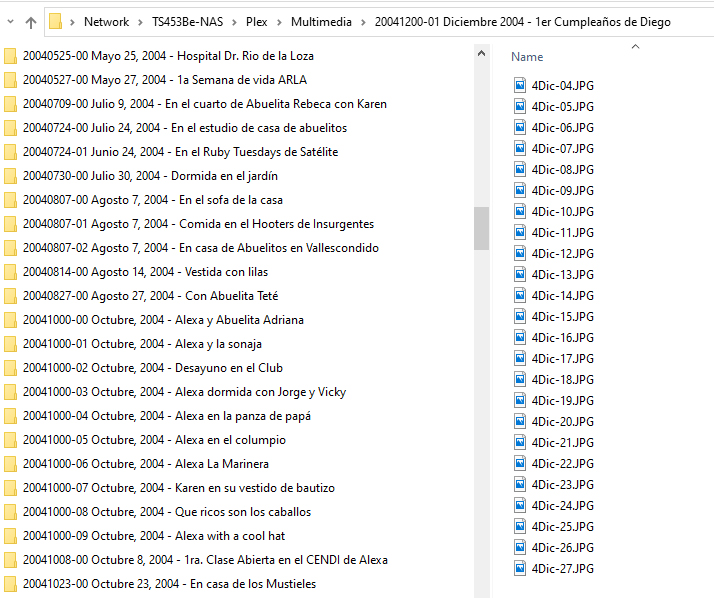
17K+ photos and videos later the best solution I have found and that I can live with is using the following naming structure for photos and videos:
yyyymmdd-## - Title
All these folders are inside a “Multimedia” folder on the Plex server as seen in this image:
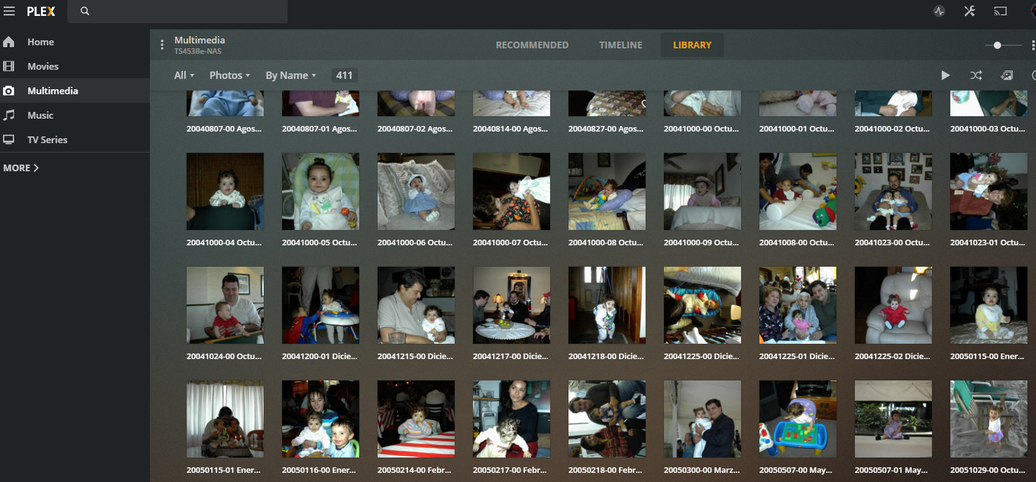
The library listings are in chronological order, and You can still se the title:
and in the timeline everything show up correctly:
Not the best solution, but it might work for you.
Thanks for the tip. It doesn’t seem to be working for me, it just makes the content disappear. It might be because I’m trying to create my own “fake” TV show with episodes rather than just a gallery of videos. I think those use different media scanners and such.
May I suggest you create “Home Videos” / “Other Videos” type?
You can then name & structure however you like.
My whole goal was to do it as kind of a TV show where I can make cover art and seasons, different shows, etc. It’s actually really fun to do with home videos.
I am a bit confused with the thread title versus what you’re trying to accomplish. 5 digit episodes? There are only 8760 hours per year (24 * 365) so not sure where / how the 5 digits came from. PMS does understand and support 3 digit episode numbers (2 per day * 365 days)
I made a show for my baby daughter that she absolutely loves. Being TV format, Plex will automatically continue to the next episode as well, which is awesome. Each season is the year, and every episode is the date code (0327 for example). I tack on a few extra numbers if I make multiple videos that day.
I’ve also tried using the naming the episodes by date as well, but I ran into the same problem of how to do multiple episodes from a single day. Right now the best I can do is link then all together with “-pt1, -pt2”, but I’d rather they be separate episodes.
If I went back and renamed everything and just counted up from 1, I could probably get past this problem. But I also like how using the proper naming actually shows the date of the episode. This is important for family videos as well…
I know it seems like I’m kind of pushing Plex into unique territory where not many people use it like this… but I was just hoping I could have episode numbers go past 3 digits. It seems that when I enter 4 digit territory and beyond, it still works but it loses all the titles for my episodes.
Edit: To explain all the extra digits, my naming was S2020E032701, S2020E032702 which is Season 2020, March 27, Episode 1 and 2. That goes all the way to 6 digits. It’s just a number so I’m not sure why it doesn’t just “work” 
have you considered using the normal Date-based format?
/TV Shows/ShowName/Season 02/ShowName – 2011-11-15 – Optional_Info.ext
/TV Shows/ShowName/Season 02/ShowName – 15-11-2011 – Optional_Info.ext
Then, if you have multiple episodes in a single day, you could use the -pt with a lot less fuss.
You can use Season 2019/Daughter's name - YYYY-MM-DD - title.ext
That’s how I have it now, but I’d prefer being able to have separate episodes on the same day. The “-pt” system will group it into a single episode.
…not a major complaint, but having the freedom to use whatever episode number I want would be a nice upgrade. Most things actually work with long episode numbers, it’s just that the titles are lost in the process. I’m not sure why it works this way.
5-digit episodes might be the root cause as to why it’s failing.
As I look at the software, nothing is expecting that.
Without me setting up a full test case, I’m not sure how it would behave.
When I set up a show, the episodes from earlier in the year (march for example) are 327 and work just fine. Once it goes into 4 digit territory all the episode names turn into “Episode 1022” instead of the title. They’re all in the same season, so it’s seems to be 4 digits and up that cause problems.
When using the “-pt” system, I can’t give each video a unique title in the file name. So some info is lost. My daughter’s first crawling might be lost in the mix of something else from earlier in the day, for example.
Ok… that’s definitive.
Episode 999 => The title name
Episode 1000 => “Episode 1000”
Is this correct ?
Well, I’ll be damned. In the process of taking before-and-after screenshots and blurring out info, when I got to the very end - everything (mostly) worked this time.
I think when I tested this the first time, the scanner must have just been glitchy and never properly finished. However, I am noticing two episodes are just titled by their date rather than their title, but all the ID tags and naming structure is in place and matching the other episodes.
So after adding the extra digits from 4 to 5, two episodes are named by their date instead of title, and two others won’t accept their new title. Other than that, everything still functions.
Maybe my issue is these episodes are just more glitchy with the extra digits? Maybe it doesn’t work very well when I add new episodes in the future? I’ll have to pay more attention to exactly what’s going on from now on since it’s almost working.
Plex is always fussy about renaming in-situ. This is why the “Plex Dance” is so well known. (move out, scan, empty trash, clean bundles, move back, scan)
This might be one of those instances?