Server Version#:Terramaster NAS F4-220
Player Version#: 1.13.9.5416
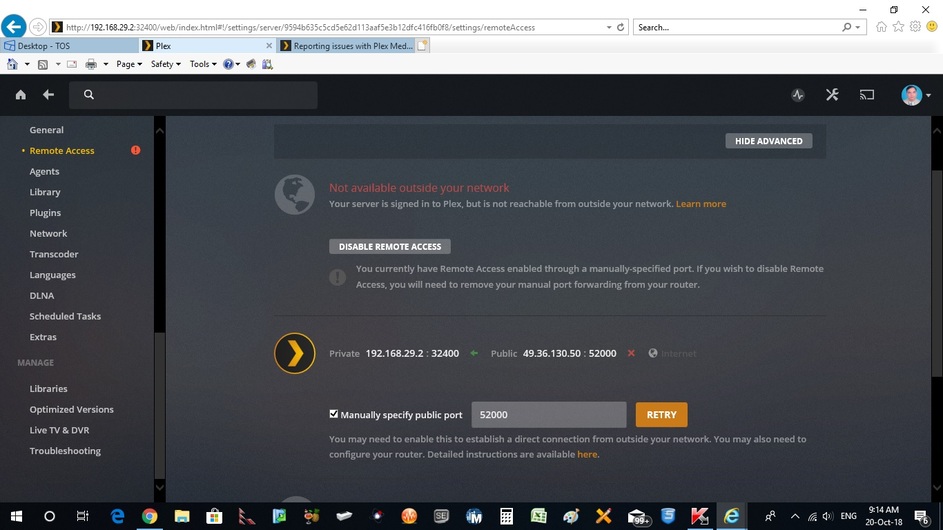
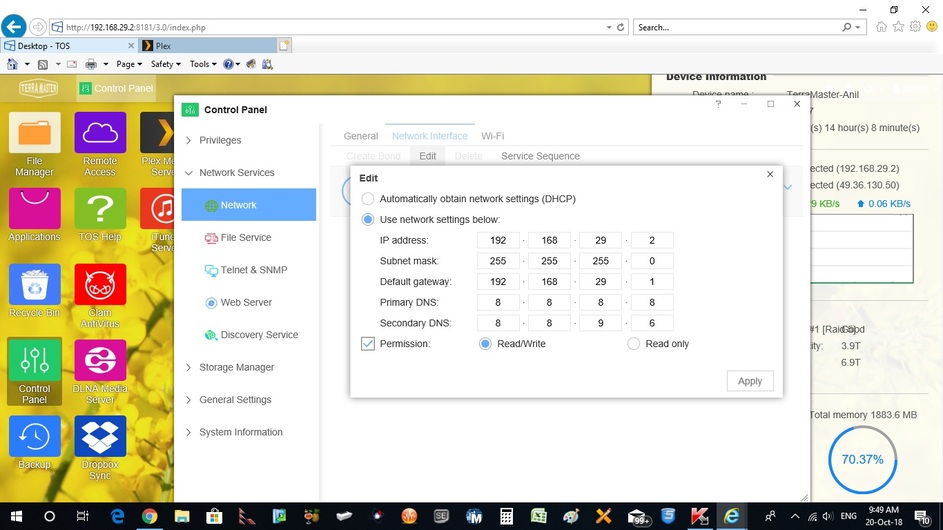
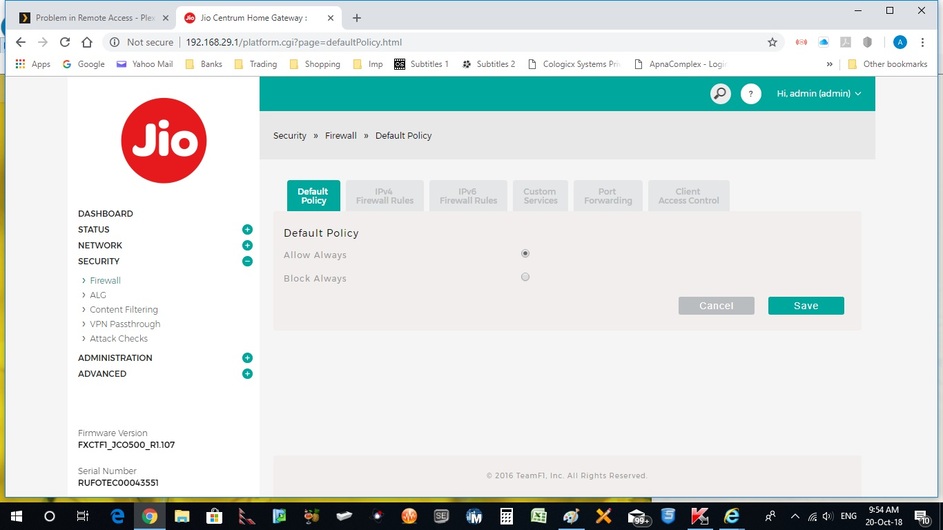
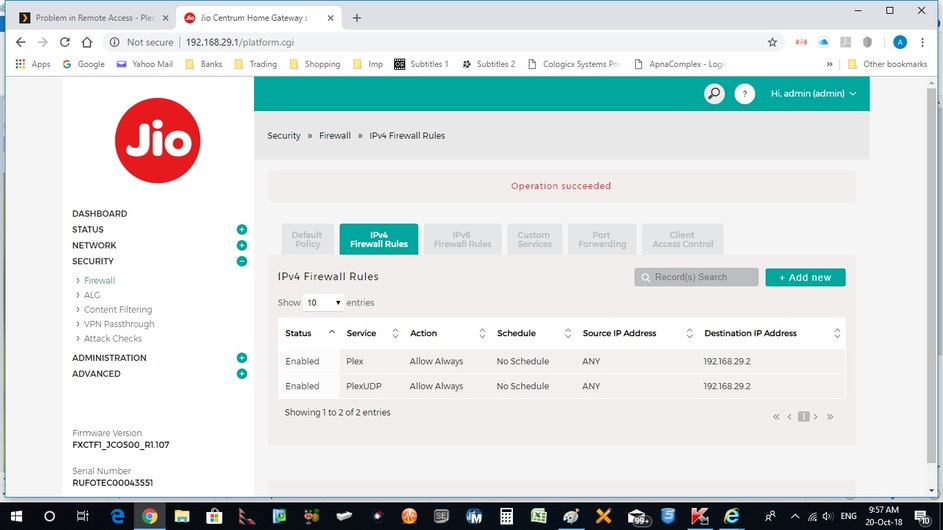
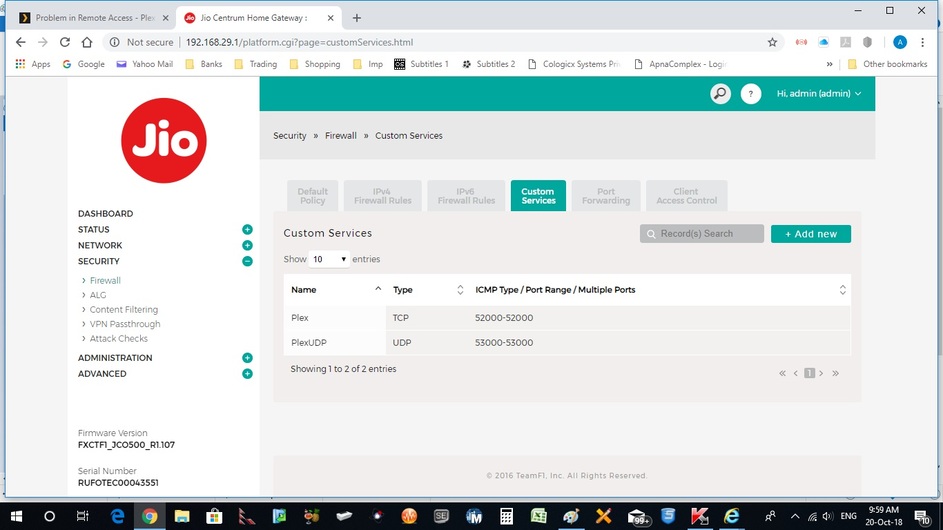
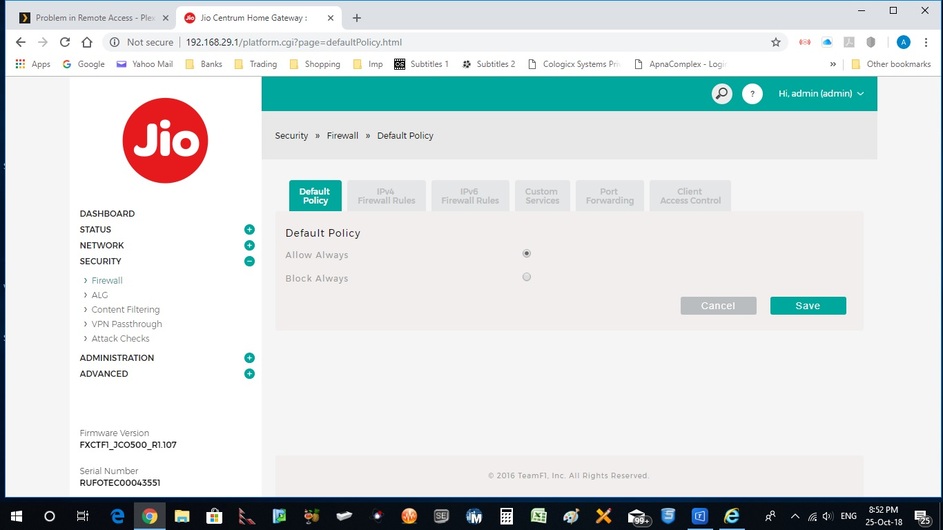
I have reserved IP address of my NAS to 192.168.X.Y in both Control Panel of TOS of Terramaster NAS as well as in router in LAN Reserved IP. Added Plex TCP and UDP as Custom Services in router with external port reserved 52000 and 53000 respectively. UPnp configuration permitted/ ON. Reserved Port forwarding Internal 32400 for Plex and 32410 for PlexUDP services. In firewall section of router “Default Policy” given “Always allow”. The button of Remote access becomes green for a second and then goes off. In manual Public Port given as 52000 against Public IP 49.36.A,B and tried repeatedly with same result.Plex Media (3.2 MB)



A few things:
- Your IPv4 Firewall Rule seems incorrect. The Destination IP-Address should be your router’s public IP address, not your server’s private one.
- Plex only uses TCP as far as I’m aware. So no need to open another port for UDP.
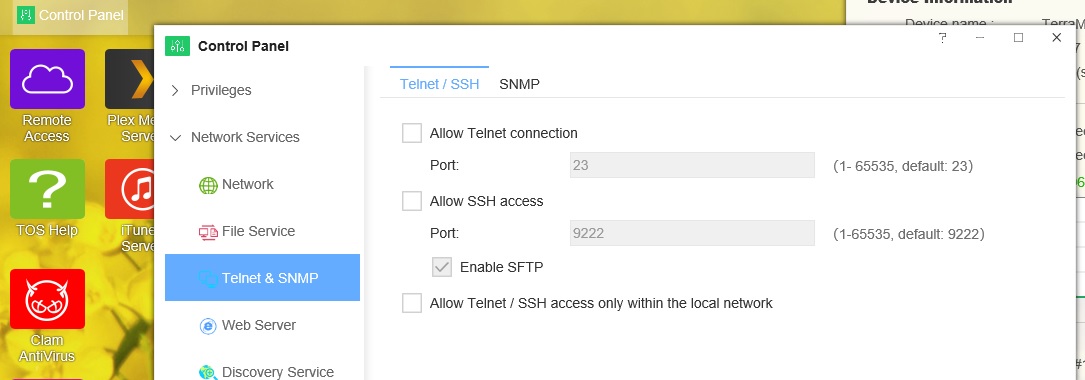
- Your server has opened some quite sensitive ports to the world. 22 (SSH) and 23 (Telnet) both allow anyone who manages to log in to do as they please with both your system and your data. You might intend this, but it’s worth pointing out since it’s a HUGE risk if set up incorrectly.
- You might want to blur your public IP address in any further screenshots posted to the internet. Check out Greenshot (a screenshot tool that makes blurring screenshots super easy).
Kind of you for prompt reply. Changed IP 4 Firewall Rule in Security of router to IP address of router. Have deleted UDP services from Port forwarding as well as from Custom Services. Still the problem persists.
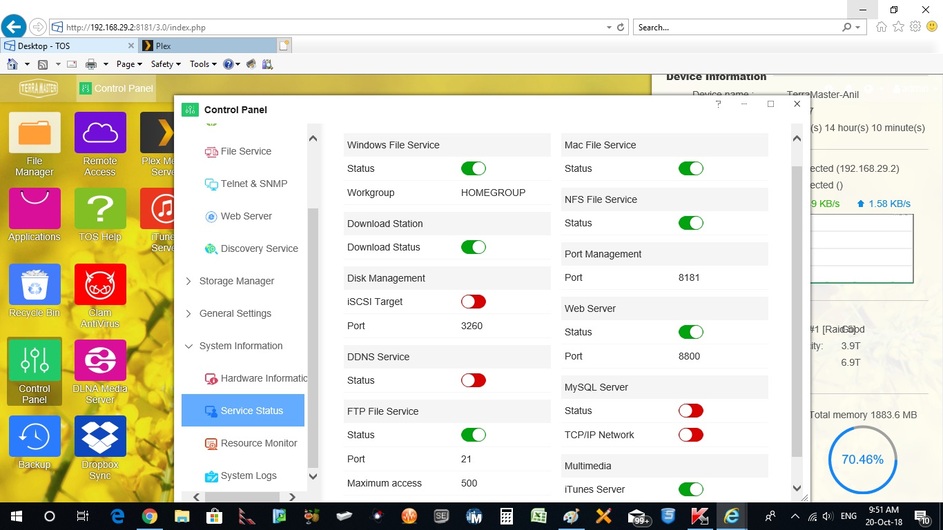
Secondly I could not see SSH and Telnet enabled in Server’s configuration. Attaching screen shot of said configuration, which is disabled.
Kindly help. I seem to missing some little configuration somewhere.
Hi,
Regarding the firewall rule.
What Cetteup said about the destination IP-address should be your router’s public IP address is not correct.
For you to get it working you should just go into your router open the TCP port “52000” to the ip “192.168.29.2” save the settings wait for a couple of minutes or restart your router up to you.
and it should be running.
If that is not the case then i would recommend trying to uncheck the “Manually specify public port” in Plex and then opening the TCP port “32400” to the ip “192.168.29.2” if that does not solve it either try restarting either the plex service or your NAS and see if it is working after that.
Unless there is something very! different about this firewall, it’s not wrong. No remote client will never send a packet to 192.168.29.2:52000. Instead, they will send it to [public_ip_address]:52000, since this is the address they know. Your router (listening on [public_ip_address]:52000) will then forward the packet to 192.168.29.2:32400 due to the port forwarding you set up. Note that this is referring to the firewall rule - not the port forwarding setup!
Which IP address did you enter, exactly? You should not need to specific one. Instead, there should be a dropdown allowing you to select something like “WAN IP” (since your public IP address changes quite frequently). If you’re unsure, post a screenshot of the interface where you set up the firewall rule (not the overview, the view where you enter the settings).
It might not be turned on, but the ports are all open to the public according to the screenshot of your UPnP config.
What Cetteup said about the destination IP-address should be your router’s public IP address is not correct.
Unless there is something very! different about this firewall, it’s not wrong. No remote client will never send a packet to 192.168.29.2:52000 . Instead, they will send it to [public_ip_address]:52000 , since this is the address they know. Your router (listening on [public_ip_address]:52000 ) will then forward the packet to 192.168.29.2:32400 due to the port forwarding you set up. Note that this is referring to the firewall rule - not the port forwarding setup!
I am pretty sure we are talking about the same thing here  i might have misunderstood what you wrote in the first message.
I agree that if pepole try to access it the would access “[public_ip_address]:52000” and then the router would translate it to a LAN ip in his case it would be “192.168.29.2:32400” for the plex server.
BTW ak_bajaj2003_yahoo_com i just noticed an error on the picture of your router “security-firewall-port forwarding” i can see you typed “32400” in internal port. that should be “52000” instead because that is what you stated in your plex setup.
Incorrect. The internal port (the port Plex actually listens on) is and will always remain 32400 – you can not change that. You can change the remote port, but not the local one.
Ok mate.
Good luck helping him fix it 
Thanks. I have changed Port number both sides to 32400 now, WAN side and LAN side. Still remote access becomes green for a fraction of time and then goes off. I was going through some of the articles and these say explicitly that IP address duly linked to MAC has to be LAN IP, which has to be static. WAN IP naturally is dynamic.
Could you please post updated screenshots of your remote access settings in PMS, your firewall settings and your port forwarding settings?
Also, check whether the IP address you see when googling “what is my IP address” is the same address as the one Plex shows in the settings.
Thnx. Please find att screenshot of remote access settings. Also screen shots of firewall settings and Port forwarding settings are att. I have also drawn connections diagram which will surely help you in diagnosis of the problem.


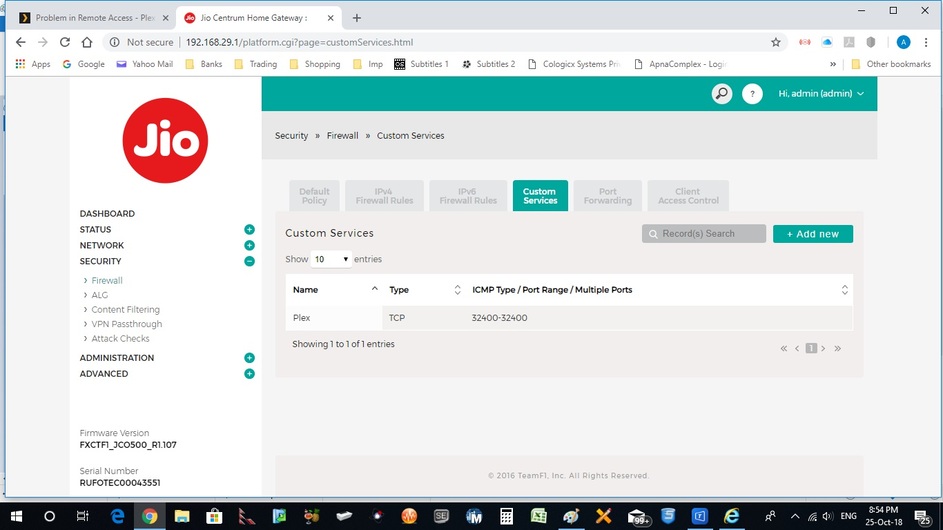
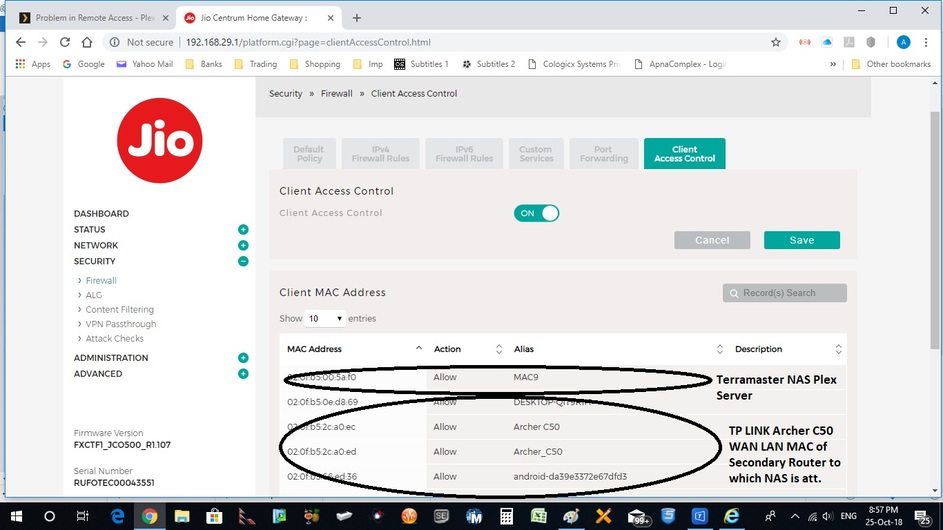
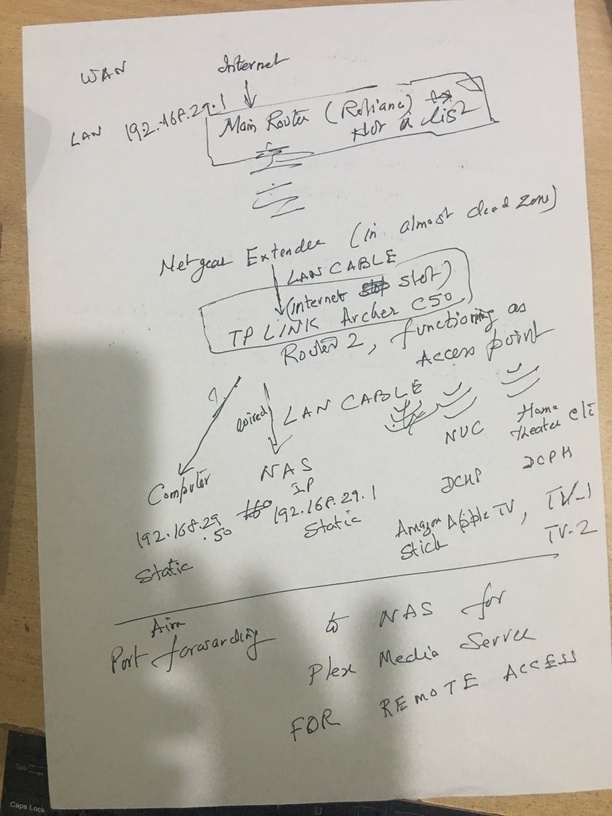
I missed out forwarding Remote Access screen shot. It is att now. In my hand drawn NAS local address be read as 192.168.29.84.Thanks again.
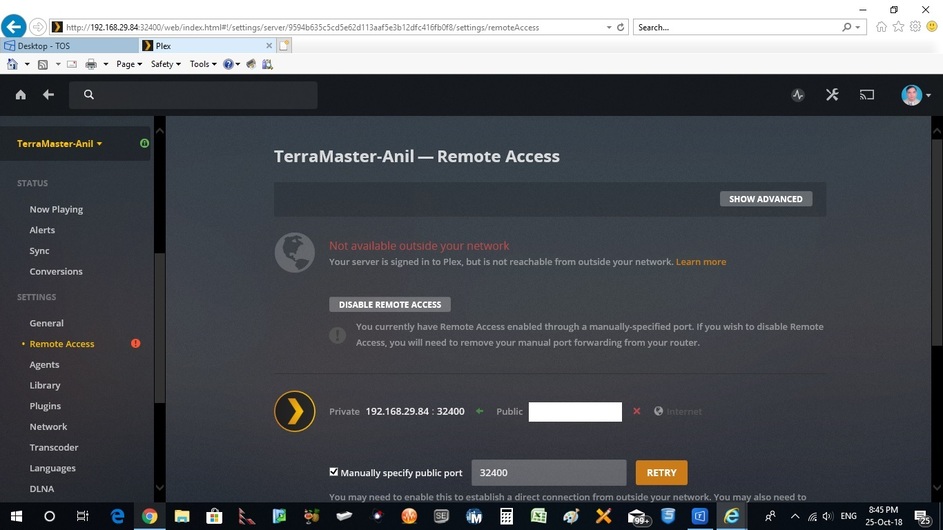
Just now I connected my NAS directly to LAN Port of main router to avoid double NAT problem, if it existed with second router functioning as access point… Now access (Green) stays for 15-20 minutes and then goes off. Of course manual setting only connects it. It gets connected again through activation of manual settings when again done.
I do not wish to connect my NAS to main router as there is no power back up there. This was only to trace out the problem.
It is evident that there is a bug somewhere at Plex end only. The users are pointing about repeatedly disappearance of full access on forum with new Plex Server installed. And they may be right in complaining. Please look into it. If required I can send log file for new connection.
Did you actually test the remote access with a remote client while the PMS was wired into your router? The indicator in the settings is pretty unreliable.
Also, where did your IPv4 firewall rule go? There should be one allowing remote clients to connect to port 32400.
Sorry I could not do it as time for doing it is too short. Today again I checked remote access. Green stays for a second now and goes off, unlike yesterday when it was staying for 15 minutes or so.
I was told by one of my tech friends that as in General Policy we had given access (as Plex also was there in Service now), a rule in IPv4 was not required again and that rule was to be used for blocking rather. Again done as per your advice. Screen shot is att. Also fresh debug log and database are att. My NAS Server is still attached with main router directly through LAN, avoiding double NAT. Kindly see the debug file. You are trying to do your best to help and I highly appreciate.
Plex Media (1.4 MB)
Plex Media Server Databases_2018-10-27_07-48-01.zip (8.5 MB)
Routers will usually block any incoming connections unless your specifically allow connections on a certain port. So, if your router applies the defined rules to incoming connections as well, you will need the firewall rule. The “Service” you set up is most likely just an alias that makes it easier to manage access to that “Service”, since you just have to set the port range once.
Have you checked your router’s manual regarding port forwarding?
This topic was automatically closed 90 days after the last reply. New replies are no longer allowed.
