Server Version#: 1.23.3.4707
Player Version#: 4.57.4
Hi there. I’m having problems accessing my plex server from outside.
First of all: My server is running on a VM (ubuntu-xenial) managed by vagrant on Windows. It all was working fine until I had to setup my host system from scratch. The VM is running on a different drive as the OS, so everything there stayed the same.
I launched my VM on the new host and everything was as it was before, except the remote access does not work. It says the server is accessible fully remotely and seemed to work in the beginning (saw one user streaming) but now nothing is available.
What I’ve done so far:
Checked my port forwarding (pointing directly to the VM and MAC address is identical)
Disabled then enabled remote access → Fully accessible outside your network
The odd thing is: In the settings I told Plex to use the local IP address I gave it, but strangely it still shows a 10.x.x.x range address (which VirtualBox allegedly needs) in remote access. So I put in a port forward in VirtualBox from the local IP to that 10.x.x.x IP but to no avail.
I also had to set the external port manually because it would say :0 otherwise.

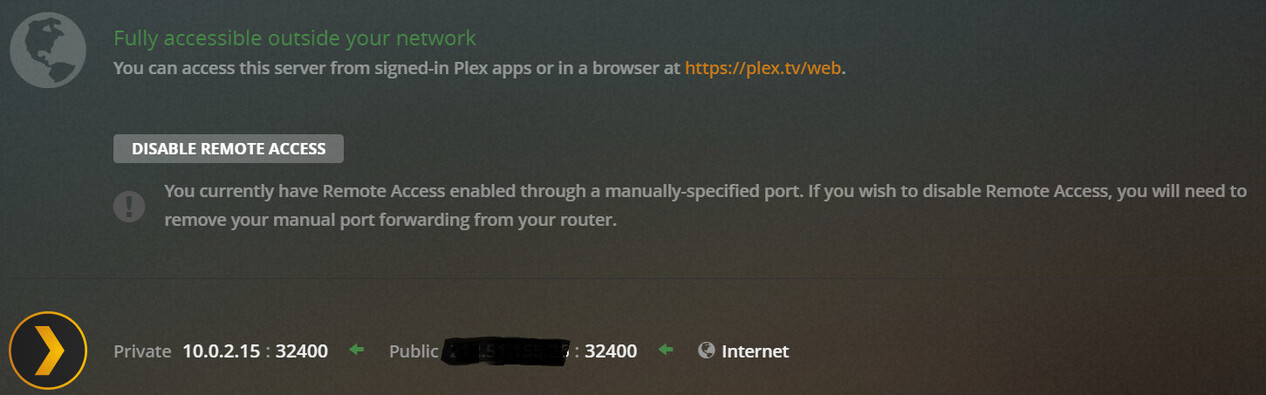

I don’t know what to do anymore. It worked just fine before “switching” the host system. Does anyone have an idea?
Thanks in advance
Edit:
Got it running somehow. I restarted the VM and it seems to be running now, only that it says the server is not remotely accessible 
Well, as long as it’s working. I don’t care what it shows there 
But does anyone know why Plex won’t take the local IP I tell it to use for the remote access?? That would still interest me.
