Yes. Exactly the same thing happened to me me this morning. I’m on a DS918+ also. Installed Plex update version 1.15.4.994. Now all my content is visible but unavailable. Unable to add new content & my music videos are still not visible since the last update
None of the above solutions have worked for me. I’ve had roll my version of Plex back to an earlier version to get content back
Please show me what you see in;
Control Panel - Shared Folders - (pick a share) - EDIT - Permissions tab.
During development, I discovered I had a DSM installation which was too old. (DSM 5.2 rooted). I needed a complete, fresh, installation to repair the problem.
It took only 20 minutes to do so.
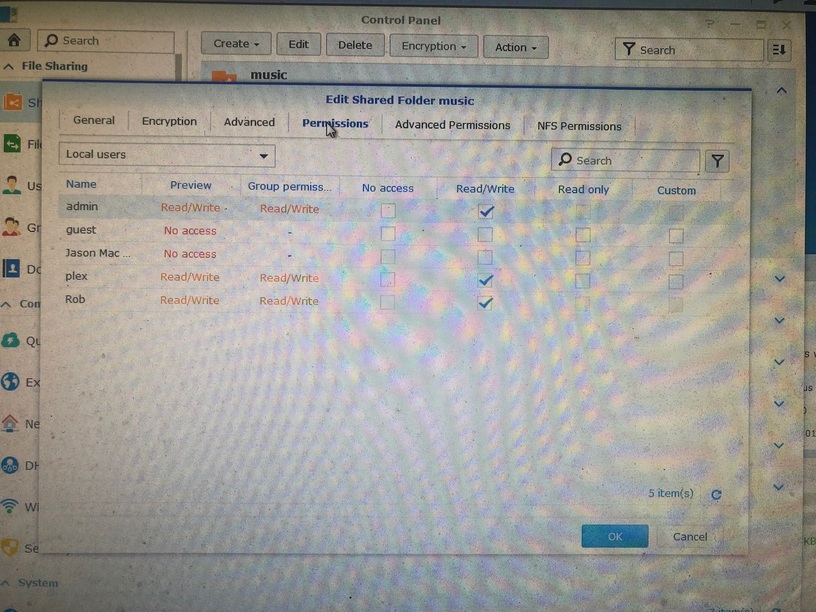
Read/Write option for Plex was originally unchecked.
I checked the box, restarted the Diskstation, then put Plex update in, then restarted the diskstation again.
Current version I have is DSM 6.2.1-23824 on a DS918+
Mine wasn’t. Using PuTTY to try & modify the root directory, I was continually denied access. Spent over 2 hours working with the 1st solution without a positive result.

Hello,
I post here to avoid duplicate TOPIC.
I’ve updated Plex, change my share folder permission for plex to R/W, restart my NAS : doesn’t work, still unavailable. I’ve restarted Plex : still unavailable. I’ve set permission to R/O, restarted Plex : still unavailable.
What to do now, please ?
Hello @trumpy81,
Thanks for your answer.
All my files are unavailable now, while they were available and playable just before the update. So it’s not a file problem.
I’m not sure to understand, sorry :/.
I’ve make all the change recommended in thae TOPIC you linked me.
I constat the problem from every interfaces I can use including the web one. And I don’t use the “plex” share folder. I’m using the “download” one and the “video” one.
What’s now, please ?
@Kabeyun I had the same issue on my nas where the read only (and custom) options were greyed out.
(I have no idea if sometime in the dim and distant past I might have changed something, it is quite possible.)
I solved it by doing this:
I went to Control Panel > Groups
Selected the administrators group, then edit members.
I found Plex was (still) in this group, so I removed it from the group.
I could then set the permissions for plex on my shared folders to read only
1 Like
Thanks blim. Worked as you said. Appreciate the help! ChuckPA might want to add that step to the directions.
Thanks the the input guys. I’m seem to be getting mixed results currently. Tried some of your tips (folder permissions & updating DSM to latest version). Re-installed latest Plex update.
I have succeeded to having my music & movies available again, but bizarrely TV shows are still unavailable & music videos still not visible. TV shows folder is in the same shared folder as the Movie folder
Plex permissions for this result is for read/write. When I set to read only, Plex seems unable to run.
Hello,
All seems to be OK for me now ! Thanks @trumpy81 for your precious help.
I solve it following this TOPIC : Restructuring a Plex library without full reinstall, questions (and I’ve lost absolutely nothing about my data).
In case it hasn’t been mentioned, if you are using custom certs and they are located on a share that Plex doesn’t have access to, it will default to the Plex cert instead of custom and you will get an SSL error when trying to hit it via your domain. I couldn’t figure out why I was getting the mismatch error after update. Didn’t have any issue accessing files but turned out Plex didn’t have access to my shared cert directory.
Sorry but this is the absolute worst. I get the security concerns but literally NONE of the steps mentioned here or anywhere worked.
I ended up downgrading to 1.13 again to be able to use PMS again.
Why would you release and update that breaks everything for everyone without properly testing it? Or at at least giving us a warning before we download something that breaks everything. My NAS is local I don’t care which permissions my plex user has. It will NEVER be used from the outside.
I deleted the whole library, did all the steps, restarted the NAS like 5 times, set all the permissions. Save the time guys, just downgrade to whatever version came before this one. Seriously, thanks for nothing.
Blank Memo.rar (1.3 KB)
With the latest Plex update (1.15.6), I’m seeing music video again, but TV shows are still unavailabe. Movies & Music work fine
Exactly as I said. TV Shows display unavailable & won’t play. Plex says it cant find the file. Movies are available & play fine. Music is available & plays fine. You go to select a tv episode, says its unavailable & wont play
Considering the movies folder & TV folder are in same same shared video folder on the server, this is quite confusing & frustrating.
Again I’ve had to roll back my version of Plex to 1.13.4 to get everything visible to my devices. All permissions have been set, as mentioned previously, over the past couple of weeks
Ultimately I’d like to fix the permissions issue, as I know I won’t be able to remain with this older version forever.
Logs are attached a couple of comments up.
In the end, most Plex users are just families with very little experience with under the hood changes (such as root directories) & most users don’t really get any benefit by applying these permissions. They just want a reliable media player that works. I’ve had a very good run with Plex for the past 12 months, but yeah, this issue is just really frustrating for me.
Thank you for your time with this
