Server Version#: 1.43.0.10492
Player Version#: 5.93.2 (PS5 Slim 12.70)
It all used to work. Everything is on the same network and the same subnet.
Apps on IOS devices work just fine. Web access works fine. Only the PS5 app won’t connect to the server.
Upgraded the server, logged out and in. Removed connected devices and tried again. Reinstalled plex app on PS5, reset plex app on PS5. Rebooted PS5 multiple times. Nothing works.
Removed server from my account and claimed again.
Log in the screen does not give enough information to determine potential issue?
Network encryption is not required server side.
Why can there be no more information on why the connection fails on the screen?
I’m out of options on what to try from here.
Maybe this will help you:
I had some issues with the GDM ports of Plex wit my PS4 and Samsung TV. I do not know your setup but maybe this is it.
Thanks for the reply and willingness to support. This is greatly appreciated.
Given the nature of what is happening, what is discussed in the linked article does not seem applicable here.
I only use Plex within my local network environment. I do not care, nor want it to be accessible from the internet.
All other clients on my local network can connect just fine, it is only the client on the PS5 that fails. This makes it unlikely that a firewall on my Synology NAS that has the Plex server on it would be the culprit, as other clients should then fail as well.
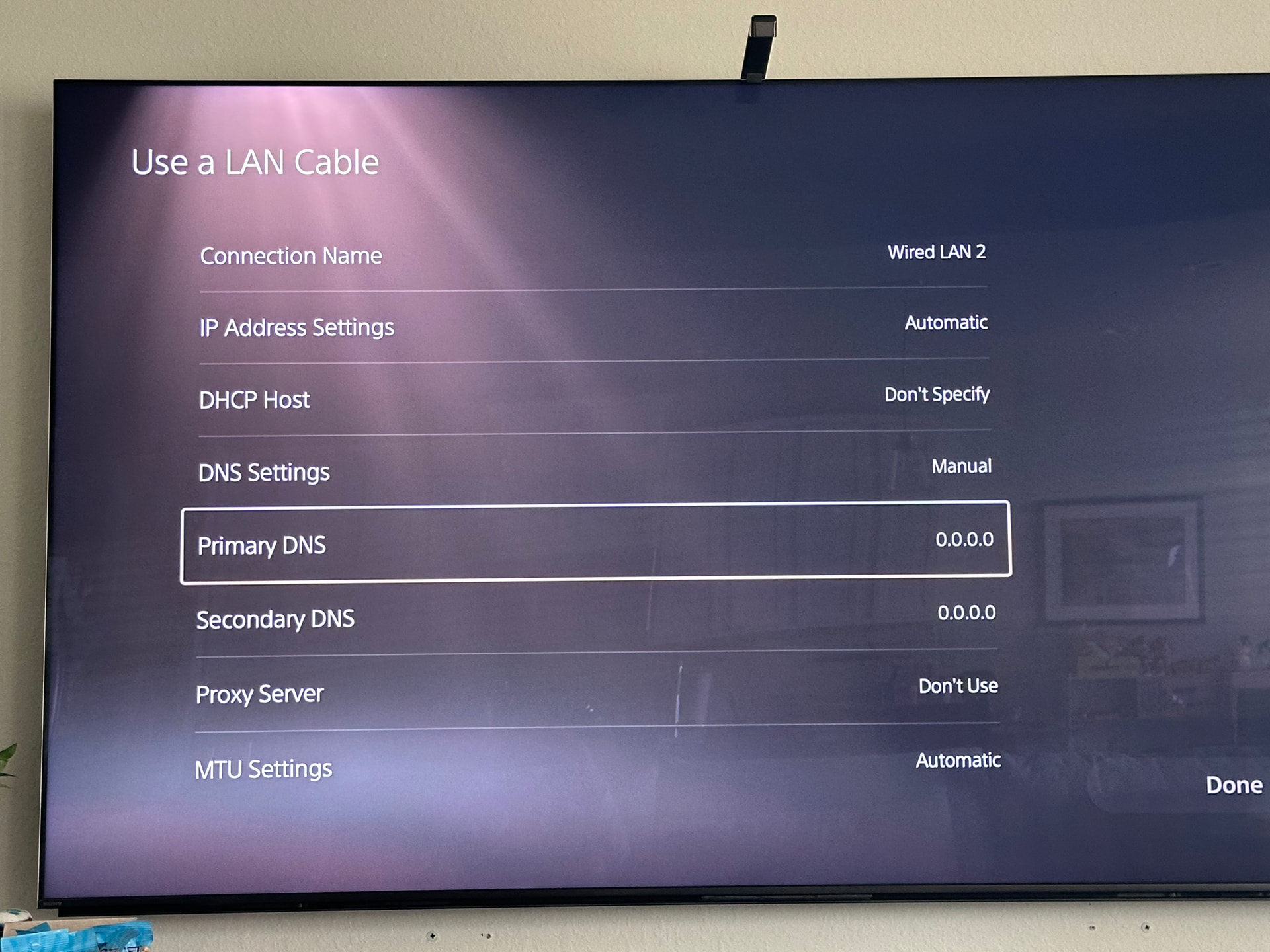
Try changing the DNS servers on the PS5 to 8.8.8.8/8.8.4.4 or 1.1.1.1/1.0.0.1
Thanks for the idea, I looked into that as well. However:
- I don’t know how. DNS is set through DHCP and points to my router which forwards. I could not find where to override the PS5 DNS server settings. (Also, we all go back to our Google overlord?)
- Why would that matter?
Please note: the PS5 has no issue reaching my account on plex.tv. It shows my library links as set up on my other devices. It just cannot connect to show the server content.
Plex uses a url, plex.direct, to make connections in the background. Some DNS servers, especially ISP ones, will block it thinking it’s malicious (DNS Rebind). It doesn’t always affect all clients the same.
On the PS5…. Network > Settings > Setup Internet Connection > Setup Manually > “Select type” > DNS Settings > Manually
Thanks for the guidance and explanation.
Unfortunately, this does not make a difference.
I did observe a detail to my above mention of what i see. I see the server name, but do not see the libraries, which is logical as that is part of the content.
I turned on console log messages but all it says is notConnected. Not very helpful in diagnosing why it might not connect.
(Log level is DEBUG)
These were my thoughts too. But the GDM ports work in your internal network as well. I run Plex in a Docker and a subnet. As soon as I allowed these ports my PS4 and Samsung TV worked again.
Another idea: In PS4 setup you can give an explicit IP and port. I do not know if this can be done at PS5 as well but should be checked.
Small remark: GDM is/was solely intended for the local network. Just like DLNA, it relies on broadcast packets for server discovery. And these are not routed across network boundaries. Which means you should only open the associated ports in the local firewall of the server machine, but not in the firewall of your router.
GDM however is getting more and more useless nowadays, because many clients will use secure connections exclusively. And for these to work, your server needs a working FQDN. Because the server’s security certificate is “pinned” to that domain name.
And in turn for the FQDN to be available for a local server, your local DNS resolver must not suppress the resolution of host names on the plex.direct domain. (Which is the security feature called “DNS rebinding protection”.)
https://support.plex.tv/articles/206225077-how-to-use-secure-server-connections/
Both, thanks for the responses.
As to GDM ports being blocked, I don’t think that applies as I’m not aware of a firewall on my Synology NAS being active, but can check. For the rest it is all on the same network and subnet, wired together through a couple dumb switches, nothing complicated.
Now as to secure connections and FQDNs needed. I hope that is not the case here, but the PS5 might require that. This would be a real pain though as it would mean that I have to create both a valid FQDN for my NAS as well as a related certified CA Certificate, ugh. A lot of hassle for something within a local home environment.
Maybe a question to get answered here might be, is the anyone that currently has PLEX client working on a PS5 at all, and secondary in combination with a Synology NAS hosting the plex server? And if the answer is yes, what was required to make this work?
With Plex that is not the case. It’s all handled by plex for you. The only thing you need to do is to ensure that your local DNS resolver doesn’t apply DNS rebinding protection
for the *.plex.direct domain. See the link I’ve left above for an explanation how this is working.
I fixed that on the PS5. I can try to hard code that on the NAS as well to see if that helps.
Nope, no game.
Both the PS5 and the Synology are hardcoded to use 8.8.8.8 as DNS with 8.8.4.4 as backup. I actually rebooted the NAS to ensure all is clean. However, the problem persists.
Maybe it is good to ask the question again if there is anyone that currently has a working setup with the Plex app on the PS5.
i have the same exact issue.
i just upgraded from ps4 to ps5 and my server is found but showing “Remote”.
i had claude sonnet diagnose the issue & prepare a report.
[mod edit: AI slop removed because it contained factual errors and hallucinations]
Fixed it!
I had actually contacted Verizon Fios in meantime also and this is what worked:
In PS5:
Set DNS to Manual
Set Primary DNS: 8.8.8.8
Set Primary DNS: 1.1.1.1
In mac mini:
Go to System Settings –> Network –> open the Wi-FI Network –> Details –> change DNS: 8.8.8.8
On Verizon Fios Router page: https://192.168.1.1/:
Go to Advanced –> Network Settings –> DNS Server –> uncheck “Enable DNS Rebind Protection”
Now PS5 Plex app shows the server as “Nearby” & media plays fine + shows up on Plex Dashboard on the mac mini.
thanks! This worked for me