I have just come back to Plex after a 2 year gap. Before in the PVR there used to be a Channels / Category / List for TV series / shows etc - where I could simply look maybe for Home Improvement and then it would show all shows related to home improvement.
Or maybe I chose reality shows, or murder mysteries - it then shows any related content to those.
I can’t seem to locate that option now. I have looked on iPad/iPhone and web portal and in recommended there are no drop down options like before.
I know I can use the search field - but that only finds content with the particular word in it you wrote, not related content to the category I want.
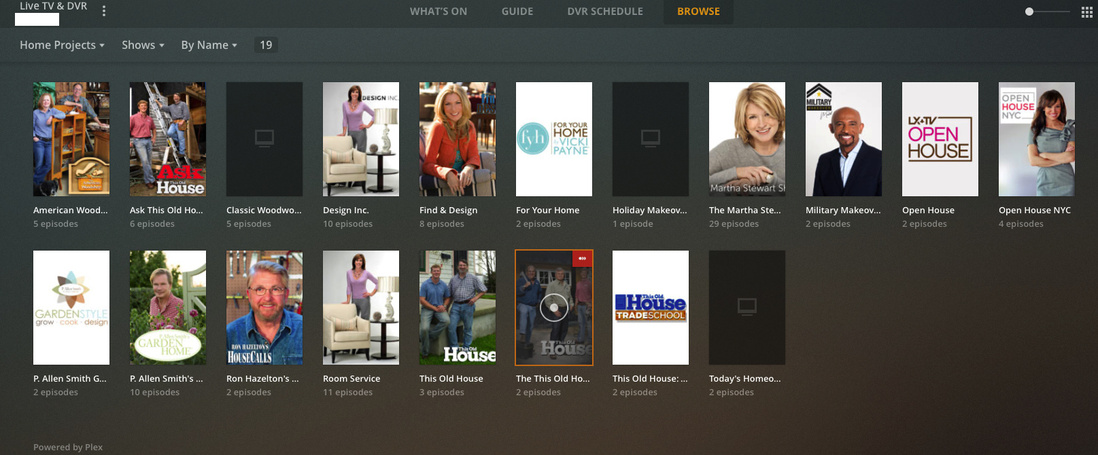
You can still do this, at least on the web client and desktop apps (it doesn’t appear to be supported on the iOS clients yet). Navigate to the Live TV & DVR section and select the Browse tab. Then, change the first filter to Genre and select the one in which you’re interested:
1 Like
Thanks - I found it… as I had just set the server up for some reason the BROWSE option had nothing showing in it till the next day - so now it has the menu to choose genre… we much prefer this to a normal guide (although normal guide is good to have too) as I don’t have to trawl the channels looking for stuff I am interested in… all I do is go to the Genre - find Real Estate for instance… and it brings up all the shows to do with house improvements etc… so good! That is the major reason why I came back to Plex!
Another question… do you still have the option to have a Plex server running from your end - rather than us having to use our own PCs? I know you had this in beta before but I can’t see it now. saves me have to buy a dedicated PC to run this…
Unfortunately no, Plex no longer offers that service. You could create your own hosted instance using a cloud compute provider (Amazon, Google, Digital Ocean, et al…), but I’m not sure that’s a worthwhile endeavor for the average user. Though plenty of folks do it. If you want to discuss it further, you may want to create a new thread with a suitable title to attract folks interested in that area. You’ll surely get some suggestions.
Ok thanks. Going back to the guide, I am trying to work out how you are supposed to know
what channel the episode was recorded on. It doesn’t seem to tell you anywhere. Some of the recordings are showing a title that when playing is a different show, but i don’t know what channel it is to make sure the guide listing is correct in the dar epg settings.
As far as I know, channel information is not maintained after the recording has completed and it has been moved into your library. I checked a few of mine (and the XML data associated with them) and didn’t see the channel information. However, you can likely infer it from the logo in the video, if one is present. Many (most?) stations place one in one of the corners (bottom-right, usually) of the video.
If you do find that there are EPG data inaccuracies, you can report them here:
And perhaps mention it here, as well:
It would be a lot easier if the recorded listing showed which channel it was recorded on. I’ve been getting recordings with audio description for those with problems with sight, and there seems to be no way to turn it off, so not sure if it’s the type of audio it is recording or if it’s specific to a channel. Any ideas?
This topic was automatically closed 90 days after the last reply. New replies are no longer allowed.
