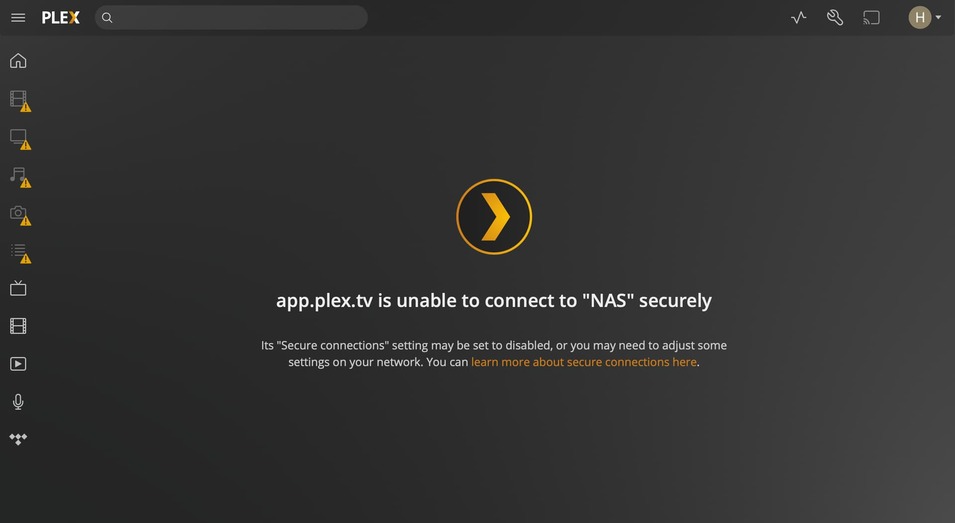
Hi, I wonder if anyone has a fix for this problem:
Plex Media Server 1.25.6 installed on NAS QNAP TS-251+ with up to date firmware.
Every time I reboot NAS, Plex Media Server does not connect although open unless I deliberately “Stop” and restart Plex Media Server app again on NAS. It then connects straight away. It seems to have nothing to do with being signed in to my Plex account.
Any suggested fix would be appreciated as it is a nuisance having to stop and restart Plex Media Server every morning.
Feb 28, 2022 11:36:34.122 [0x7f2b5d03db38] ERROR - MyPlex: mapping failed due to potential double NAT configuration
Feb 28, 2022 11:36:34.122 [0x7f2b5d03db38] DEBUG - MyPlex: mapping state set to ‘Mapped - Not Published (Double NAT)’.
So please describe your setup in more details here
Also, the logs indicate, that you have two interfaces connected to the same IP Net?
Hi Dane, thanks for looking at the logs and for spotting that. You are right. One of the ethernet cables got plugged in to the wrong device. I have unplugged the second ethernet and have rebooted the NAS. Perhaps that will solve the problem. If it persists I will upload a new log. Thanks again, Hugh
Hi Dane, the problem persists with Plex Media Server not connecting after a reboot of the NAS. I signed out and back into Plex again after the first stop and restart of PMS but this did not solve the problem. Please see attached a copy of a log after I had to stop and restart PMS a second time before it finally connected.
My set up is that the NAS QNAP TS-251+ with Plex Media Server 1.25.6 installed is connected to the home wifi network via ethernet to a Netgear GSE108E router, which is in turn hard wired to an Asus RT-AC68U which is the wifi router. The Asus is hard wired to a Huawei mobile broadband modem with 100+ mbps download speed.
Hi Dane, still no solution to the problem of Plex not connecting after NAS reboot. The only way round it at the moment would be to keep the NAS running 24/7 which I do not want to do. I’d be grateful for a fix. Thanks, Hugh
Hi Dane, see the attached screenshots of what I get after stopping and restarting the Plex app on the NAS and signing back in to my Plex account. Does this have something to do with the ongoing problem?
I have installed the recent PMS update 1.25.6.5577 which refers to NAS stop/start issues in the release notes, so I guess I am not the only person experiencing these problems. Having installed it, Plex now appears to be connected BUT when I try and use it I get a message “Check the file exists and the necessary drive is mounted.” Yes, it is mounted and the files exists. Makes me wonder why is Plex such a pain to use with an NAS system when it should be seamless?
Now I am completely unable to use Plex at all, with the same Playback Error displayed above every time I try to listen to a sound file or watch a video. I have used Plex for many years without these problems until recently. What is going on? Here’s another PMS system log. Dane2.zip (3.0 MB)
Regarding your music, you are using a wrong path to your library!
From your log:
Error opening file '"/share/CACHEDEV1_DATA/.qpkg/MediaSignPlayer/CodexPackExt/share/Multimedia/Music/Funny/Weird Al Yankovic/Weird Al Yankovic - Amish Paradise.mpg"' - No such file or directory (2)
Above indicates, that you specified a library path for your music as:
Hi Dane, thanks for your explanation. It does seem odd that I was able to use Plex trouble free for a couple of years until recently with Plex media stored in the NAS Multimedia folder. While I don’t understand the technical details of why my Plex media should not be stored in the Multimedia folder as you say, please can you confirm what I need to do to sort the problem out.
I assume I need to move my Plex media to a new dedicated folder for Plex on the NAS and then point PMS at this new folder as the library source? So basically rebuild the library from scratch?