Hi all, I was wondering if you could help me with an issue I have been having over the past few weeks, please.
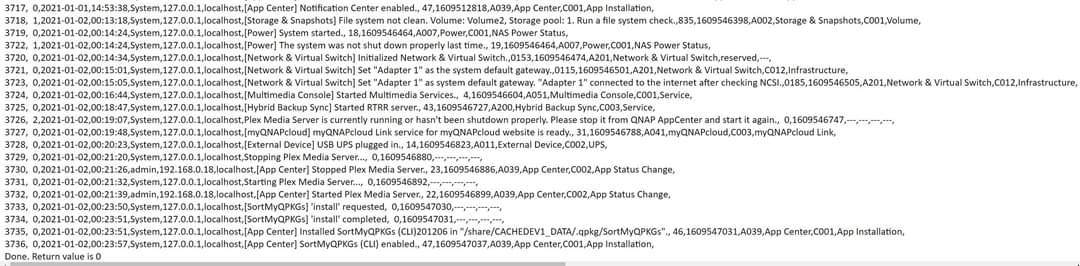
Around once or twice a day/every few days, my QNAP NAS (TS-453B) randomly restarts. I have attached images of the notifications/log entries that I get.
I use my NAS purely as a Plex Media Server. I have tried downgrading to a previous firmware, but still the same issue.
I’m sorry for not responding sooner. Thanks for pinging.
Yes, I did get to the bottom of a few things.
I’ve updated firmware to 4.5.1.1495.
The QNAP is stable now. I’ve not had any issues with it. It’s been running for 11 days now without issue. In that time, my UPS has engaged a few times due to winter power fluctuations / interruptions.
My TS-128 (development system) is not connected to the UPS and did lose power. It did have a dirty file system when it restarted.
A dirty file system after a power loss is VERY expected and normal for any computer. Windows systems run CHKDSK, Mac’s have their utility, Linux has fsck. QNAP doesn’t automatically clean filesystems. I wish they would change that behavior but so far no. I will continue to nudge them as best I can.
If your AC power is fluctuating enough to trigger a power-fail event every few days, I urge you to get a UPS.
I don’t know which model QNAP you have but you only need enough VA (VoltAmps) to keep it running for about a minute (short power interruption) plus have enough time to perform a controlled shutdown.
If you’d like some help selecting the right one, I’d be happy to help.
The UPS management is automatic with QNAP. You only need have a UPS with a USB port on it to connect to the QNAP. The QNAP will detect it and then manage it from there.
To ease the search, here’s the QNAP - UPS compatibility page.
For this link, I preselected the TS-453B
I personally use APC UPS units. They’ve served me well for the past 20+ years.
Thank you for the detailed response. This issue has occurred both before and after installing a UPS (I use an APC UPS which the QNAP recognised and provides about 35 minutes of uptime). I last updated the firmware about a week ago, this issue has occurred across 3 different firmwares, as I downgraded to see if it was a firmware issue.
I wouldn’t say the unit is in a dusty area and doesn’t look dusty on inspection.
Had a quick read over the QNAP ticket again, and the agent said: “For some reason, it looks like it happens because of the GPU in Plex.”
Sorry to the late reply my side too, I’m in the UK so I think we’re in different timezones!
Thanks for supplying the log but we don’t know how to read their logs.
If there is a problem with the GPU then every TS-453B in existence would have the same problem – which isn’t the case.
Everything you’re describing sounds like the first TVS-1282 I had.
There was nothing wrong with Plex and everything wrong with that unit.
They eventually shipped me a new NAS and there hasn’t been a problem since.
Manufacturing defects happen. It might indeed be the CPU or might be as simple as the CPU isn’t seated in the socket or heat sink compound problem. Those things happen.
Please do press on them to replace the unit while still under warranty.
Unfortunately it’s out of warranty. It has been running completely fine for ages, and then suddenly, just starts to crash/restart almost daily. It wasn’t after any updates to PMS or the QNAP either.
I guess I’ll just have to keep trying different things and see where I get to. I’ll start with trying the stock QNAP RAM, as officially, these are made to take 2x4GB RAM sticks rather than 1x8GB.
Linux kernels are like that. A small change in the MMU can cause a lot of strange behavior.
As I think through this now, you’re probably seeing hard “kernel panic” because of memory addressing faults. What you describe is, in retrospect, consistent with it.
Bring it down to 8 , obey the CPU spec, observe the results.
There were similar discussions early on about why the C2538’s can have 16 GB but the newer J-series could only have 8 GB. Those discussions are here in the forum somewhere.
ChuckPa of you recall there was A LOT on the QNAP forums over this. After the 4.3.1 upgrades may people had random reboots and we found several Panic Errors in the logs specific to memory.
I had to change from 1 single 8 GB stick of ram to 2 - 4 GB sticks which is specifically what QNAP calls for. After I switched it has worked like a champ.
Did and tried, problem was i was a year into owning it when the issues with reboots started happening and I discovered that the actual specs called for 2 - 4 gb sticks.
I did make known to them my displeasure with their inability to sell units as a direct vendor and NOT align with the actual manufactures specifications
I would still buy from them, just would make sure all the specs match myself now. Live and learn.
This started happening to me in January and I’m still trying to debug it. Also with a 453Be. Running QTS 4.5.1.1540 and PMS 1.21.2.3939. Seems to trigger by running multiple transcodes. Already did a full 1 pass Memtest86 and drive diagnostics seem fine.
Yes Crucial 8GB DDR3L 1600 MHz SODIMM Memory Module Kit (2 x 4GB). I could find this in the QNAP Log below but doesnt appear to give any more info when checking mcelog. I’m not sure what this is pointing to as previously stated the Memtest passed. I do have the original 4gb stick somewhere.