QNAP has not told me of their release date for QTS 4.4.2. I truly don’t expect them to either (that’s company confidential info).
As for TVDB, it’s going to be problematic for anyone on older PMS versions which only use TVDB v2.
QNAP has not told me of their release date for QTS 4.4.2. I truly don’t expect them to either (that’s company confidential info).
As for TVDB, it’s going to be problematic for anyone on older PMS versions which only use TVDB v2.
This explains the weird transcoding issues I am seeing. I had just updated to a TS-453Be and when it’s not direct playing it seemed to struggle on tasks that it shouldn’t be.
Gonna try downgrading to 1.16 and see how things go.
I have been running a TS-453Be updated to the most recent QTS and Plex running most recent version.
I have not seen any issues transcoding to Roku’s , IPADs, Android phones, Samsung TVs or Vision TVs. I know this is not helpful in your situation, just adding this as a data point to help Plex people possibly
All my media is MP4 H264 1080p AC3 5.1
Have you monitored you CPU? Transcoding works for me but will drive my CPU way up, which means it is software transcoding. This is when transcoding 1080p. However it is struggling to do anything with 4K to 1080p or even 720p which the 453Be should be able to handle via hardware transcoding(Direct play on my Shield/Rokus work fine).
Lemme see what 1.16 can do tonight.
My usage on the CPU for 1080p to 720p is very low, under 10% I just do not recall the exact number. Plex also matches stated it is hw encoding
My sons Roku was transcoding 1080p to 720p from Maryland to St Loius and transcoding audio from AC3 5.1 to AAC 5.1 for what I saw above.
UPDATE. I just ran Aladdin 1080p on my sever to my phone (android) via remote, transcoded from 1080p to SD and AC 5.1 to AAC my TS-453Be started at 28-33% CPU then dropped down to 6% after about 2 minutes, not sure if that is high or not but those are the numbers.

So it was interesting. I initially played a 4K movie on my iPhone and forced it to down convert to 1080p. It played but pegged my cpu at 77%. I then loaded 16.6(latest from QNAP store) and it then did you hw.
However, I then loaded version 18 again and now it too is handling hardware transcoding. Not sure why the reload fixed it or now why ChuckPA says this is an issue.
I am going by what QNAP has told me. If that information is incorrect… GREAT! I am glad to be corrected here. I also know from my work on the QNAP’s making PMS able to use the Nvidia hardware. If it really is doing more than I initially thought, outstanding! Thank you.
It is interesting that you’re not getting HW decode. You should be. must be a plex/web display problem.
It should look like this:
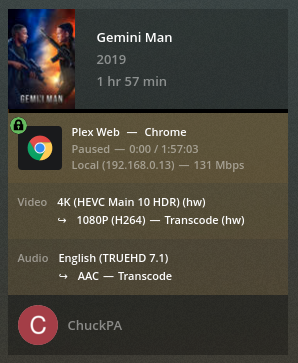
I have the TS-453be as well and it doesn’t have Nvidia hardware. Is the Nvidia driver stuff related in that case?
I read through this thread and I’m struggling to understand if there are some crossed wires here.
In other words, if you’re also using a TS-453be, which has an Intel J3455 and HD Graphics 500, I don’t think any updates (or lack thereof) with the Nvidia GPU drivers are related. So it would kind of make sense if what you’re experiencing conflicts with what ChuckPA said because it would just be a similar problem with a different (unknown) cause.
Are the Nvidia drivers, QTS, and Plex inter-dependent in some way that would still have an effect?
The pcie slot on the 453be can’t accomodate a GPU, either, so it seems unlikely you’re using any sort of Nvidia ahrdware. Am I missing something related to the specs?
TS-453Be uses Intel QSV for transcoding (of supported formats) which is completely unaffected by what Chuck mentioned related to the NVidia driver updates.
This topic was automatically closed 90 days after the last reply. New replies are no longer allowed.

